Your AI resources in one place
Prompts, agents, flows, apps, reports and files brought together; everyone sees only what is relevant to their profile.


Digital & AI Hub gathers the prompts, Copilot agents, flows and reports your teams need in a single application. Everyone finds the resources for their role in a few clicks, creates their own prompts and shares them with colleagues. The app installs in your Microsoft 365 and stores everything in SharePoint.
In production in a large organisation
# why
# benefits
Prompts, agents, flows, apps, reports and files brought together; everyone sees only what is relevant to their profile.
Open the card, adjust the parameters, and one button copies the prompt and opens the target tool.
Everyone creates their prompts in a personal space, then shares them selectively.
Content is stored in your SharePoint lists. No publisher server or service is involved.
Each department manages its own catalogue: contexts, profiles, destinations, title, logo and links.
# features
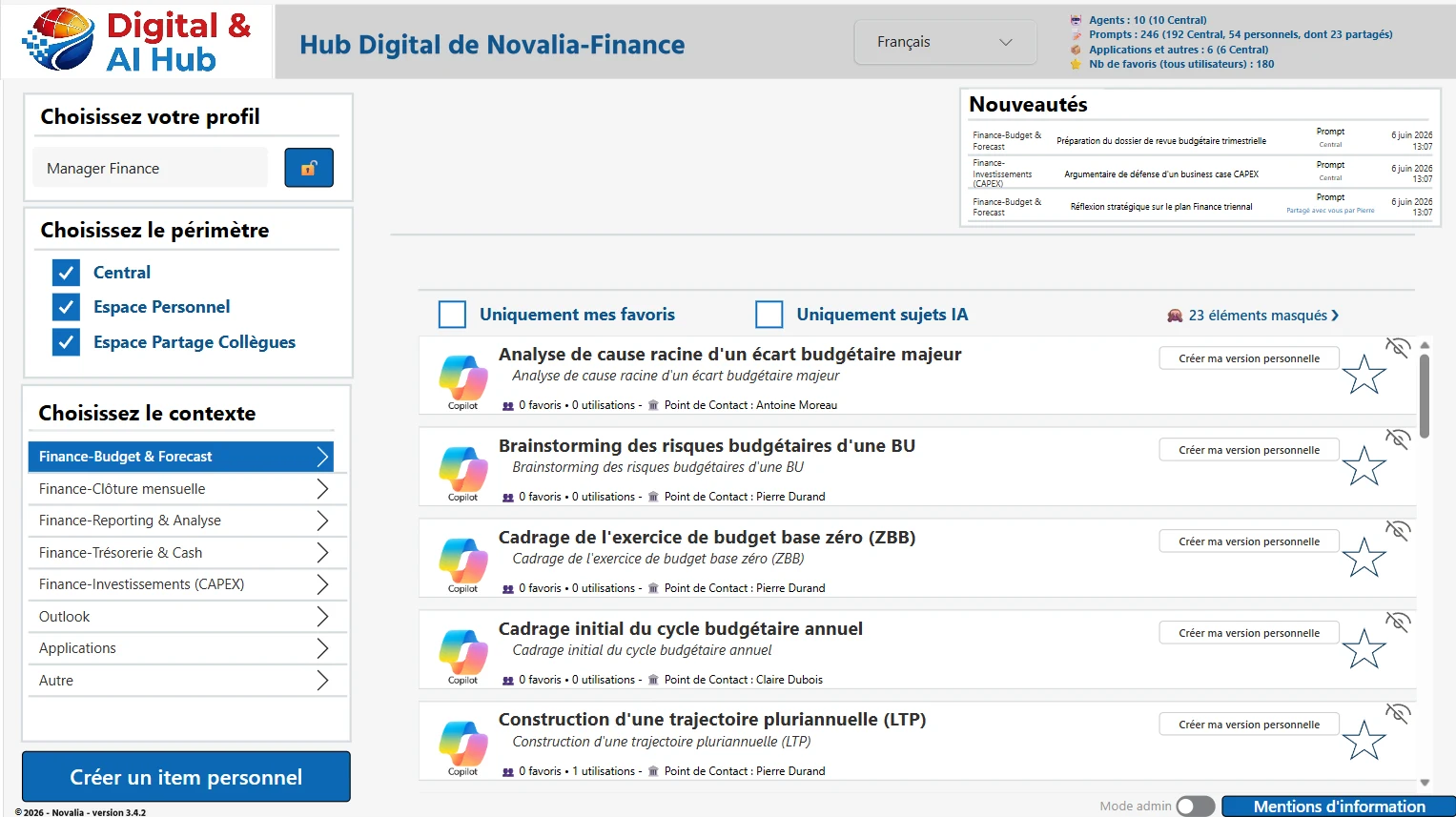
Three scopes brought together in a single view: the resources published by administrators, each user's personal space and the items shared by colleagues.
The home screen shows a catalogue filtered by the user's profile and organised by business context. The latest additions, published or shared, appear at the top.
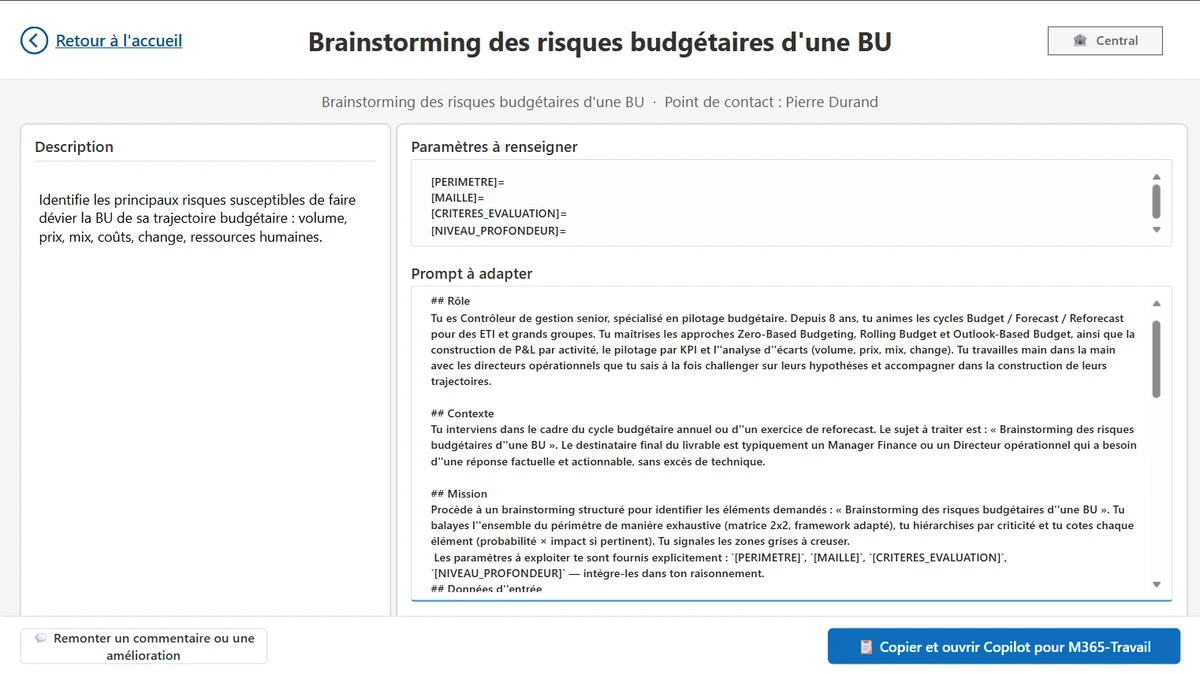
One click opens the card: description, prompt text, parameters to adjust. A second click copies the prompt and opens the target tool, for example Copilot. Agents, flows and reports open directly.
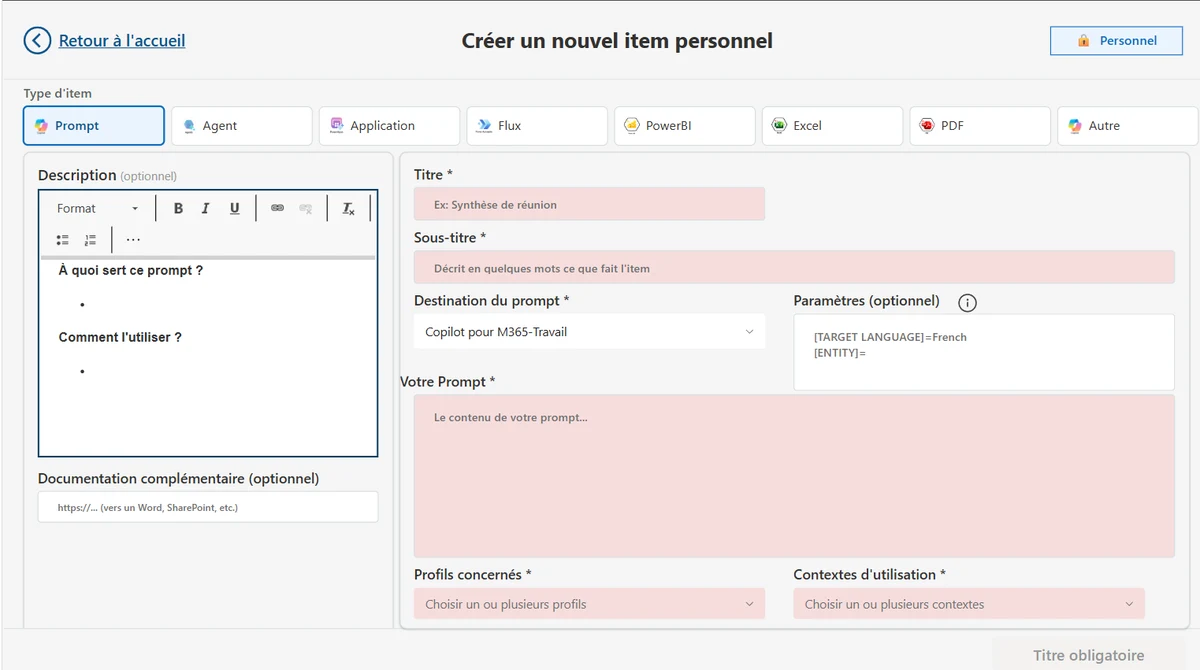
Each user creates items in a personal space, choosing from 8 types, with a destination suggested by default. An item published for the organisation can also be copied as a personal version, then adapted.
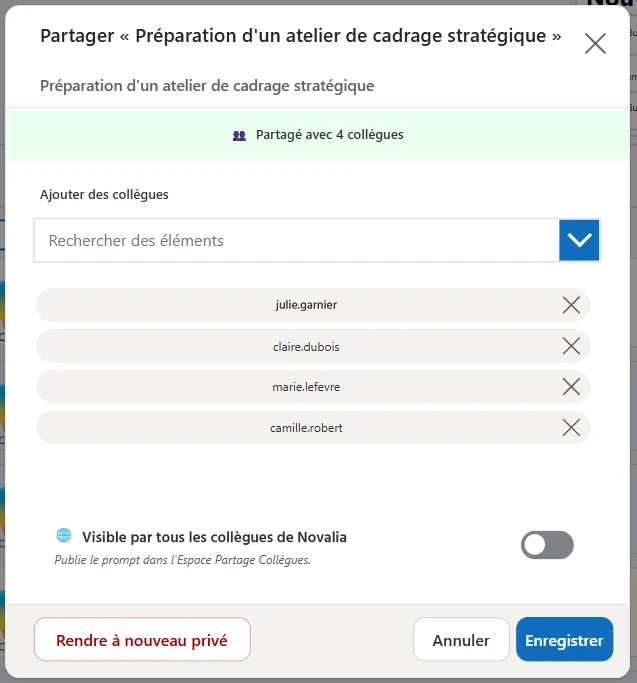
A personal item can be shared with one or more people, with a profile or with the whole organisation. Named recipients receive a Teams notification.
Its own business administrators, contexts, profiles and resources. Several departments can each have their own catalogue in the same tenant. Demo environments are ready for five functions.
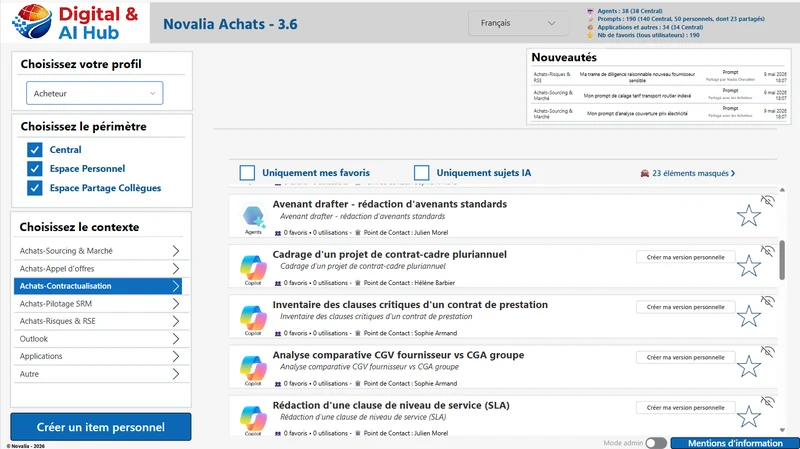
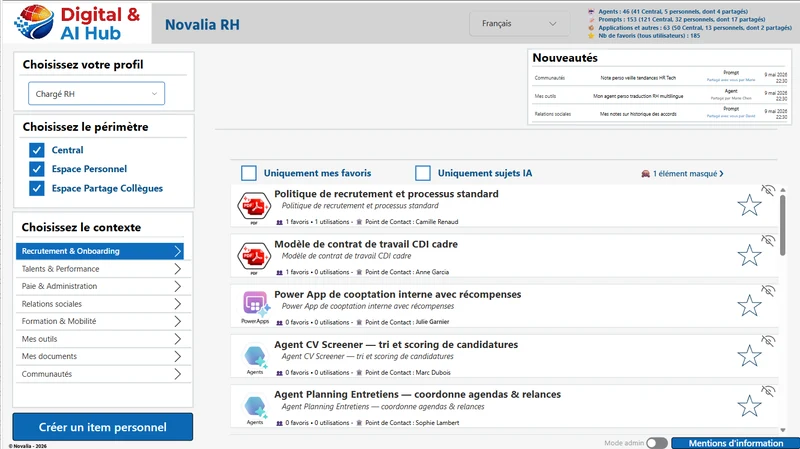
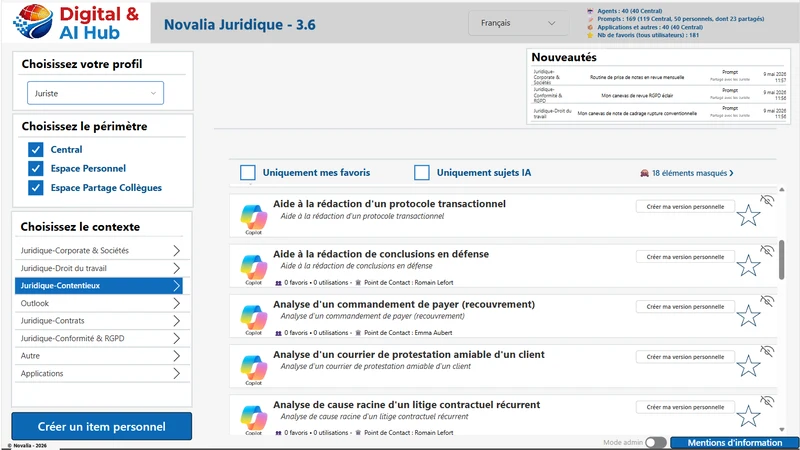
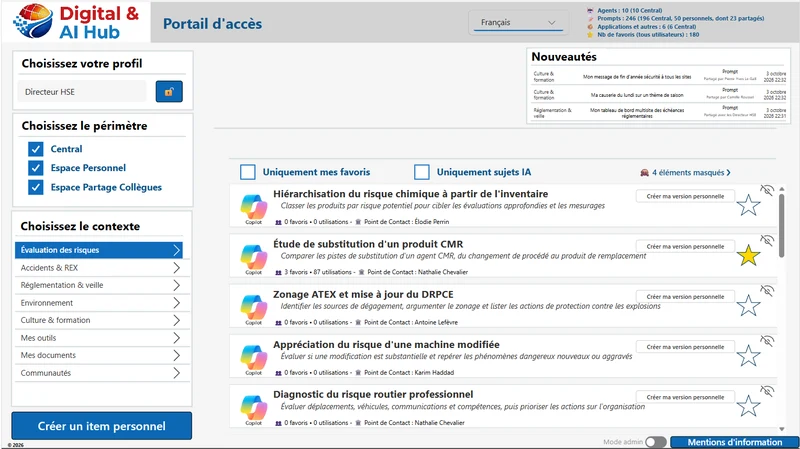
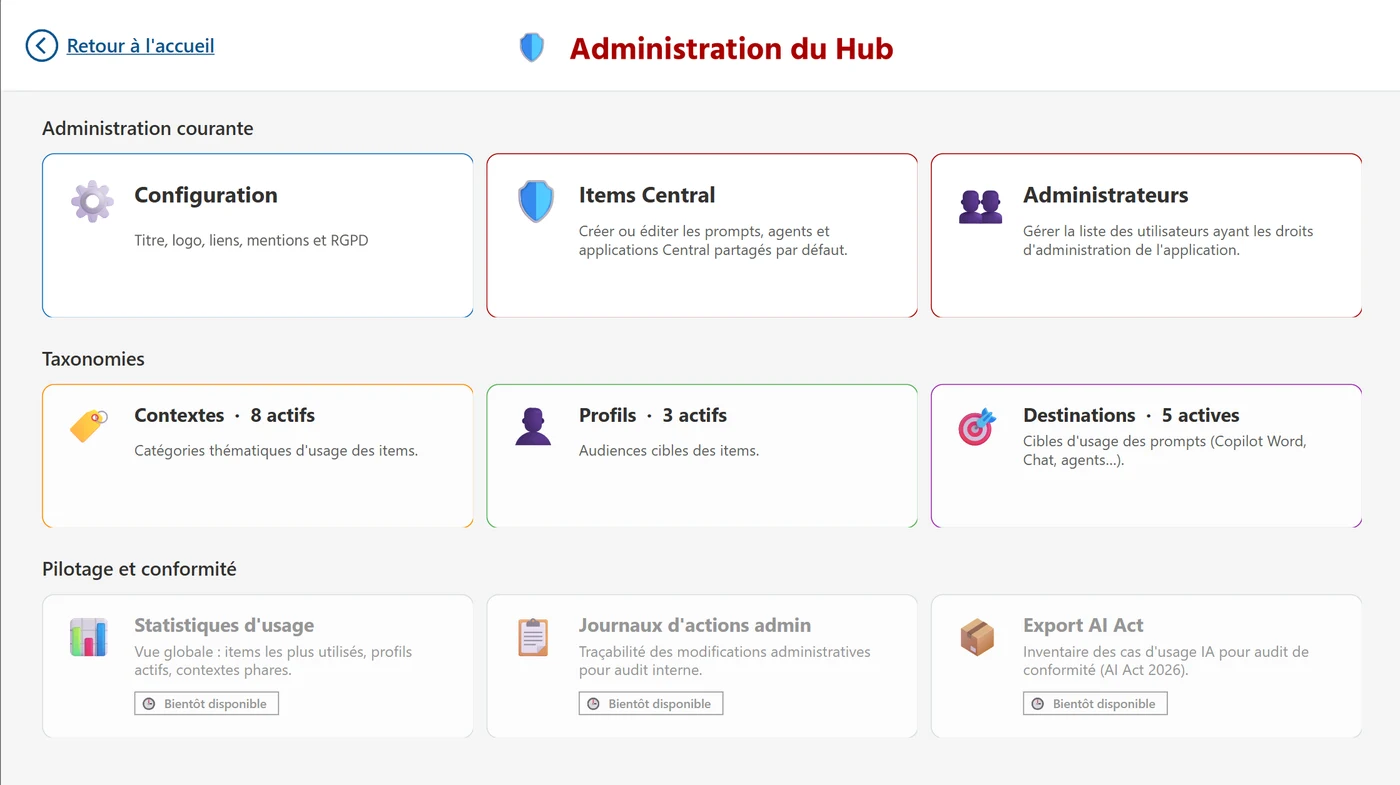
Administrators control everything from a dashboard: publishing official items, contexts, profiles and destinations, title, logo, links and GDPR text. No code changes and no republishing of the app.
# positioning
The native catalogues work at two levels: the individual or the team in Teams on one side, the whole tenant on the other, with publishing reserved for central administration. In between, a department has no tool of its own. Digital & AI Hub fills that level, without replacing the native catalogues: an item can open Copilot or an agent published for the organisation.
Run by its own business leads, with no tenant administration role.
Contexts and profiles specific to the department, with visibility targeted by profile.
Agents, flows, apps, Power BI reports, Excel and PDF files, with usage counters for each item.
# who it is for
For IT departments, transformation departments and business departments that want to scale up the use of AI in their teams.
# use cases
Teams spread across several countries use Copilot and dedicated agents. The catalogue is organised by work stage and by profile, and everyone browses it in their own language. The app is in production, with administration restricted to a dedicated group.
The administrator publishes structured prompts, half of them with parameters (period, scope, amount), and links them to the relevant profiles. A controller fills in the period, clicks “Copy and open” and pastes the prompt into Copilot.
A buyer shares her prompt for comparing offers with the “Buyers” profile. Her colleagues add it to their favourites and adapt it. The AI lead then publishes an official version for the whole organisation.
# data and security
The app runs on Power Apps and SharePoint Online, with no external database and no premium connector.
# installation and support
In a ready-to-use environment: procurement, finance, legal, human resources or HSE.
A dedicated SharePoint site, the permissions the installer needs and the list of your future administrators.
Installation in your tenant, basic configuration and testing with you.
One month of hypercare by email, then application maintenance on quotation for fixes, new versions and enhancements.
# frequently asked questions
No. The app only uses standard Microsoft connectors: SharePoint, Teams, Power Automate and, with the multilingual option, Microsoft Translator. The Power Apps usage rights included in Microsoft 365 licences are enough. Automatic translation is free within the limit set by Microsoft; an Azure key lets you go beyond it.
In SharePoint Online lists in your tenant: catalogue, translations, users, shares, favourites, log and configuration. There is no publisher server, no external database and no Dataverse. The only exception, with the multilingual option: automatic translation sends the texts to be translated to the Microsoft Translator service. Your SharePoint retention and backup policies apply to the content.
One day. Bret Software installs the app in your tenant, sets up the permissions and the basic configuration, then tests it with you. On your side, you need to provide a dedicated SharePoint site, the permissions the installer needs and the list of your future administrators. One month of hypercare follows go-live.
Yes. Administrators manage three reference lists from within the app: contexts (themed tabs), profiles (who sees what) and destinations (where each item opens). They can add, rename, reorder, deactivate and translate each entry, with no code changes and no republishing of the app.
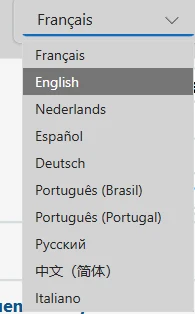
The base offer is delivered in the language of your choice. The multilingual option unlocks up to 10 languages: French, English, Dutch, Spanish, German, Italian, Russian, Portuguese (Portugal), Portuguese (Brazil) and Simplified Chinese. The app then detects the browser language, each user can switch language at any time, and items are translated with an automatic suggestion to review.
The app's administrators, that is, the members of a dedicated SharePoint group managed by the site owners. They publish official items and choose which profiles will see them. A user designated as the point of contact for an official item can also edit it. Other users create personal items and share them.
The Copilot prompt gallery offers prompts saved by each user, prompts shared with a team in Teams and prompts published for the whole tenant by central administration. Digital & AI Hub creates a local catalogue specific to a department: its own business administrators, its categories, its profiles, and resources beyond prompts. The two are complementary.
Yes. For a prompt, a button copies the text and opens the intended destination, for example Copilot in Microsoft 365. Listed Copilot agents open directly from their card. The app itself is used in the browser or in Microsoft Teams. It is not designed for use on smartphones.
Microsoft updates the platform at no cost. After installation, Bret Software provides one month of hypercare. Beyond that, maintenance and enhancements of the app are covered by an application maintenance contract, on quotation. A new version can be reinstalled without touching your data.
Pricing is on quotation. The licence is per tenant, per department or per person. The quotation includes installation by Bret Software, carried out in one day, and the multilingual option if you need it. One month of hypercare follows go-live, after which an application maintenance contract can be offered on quotation.
A demo in the environment for the function of your choice: procurement, finance, legal, human resources or HSE.


