Self-service answers
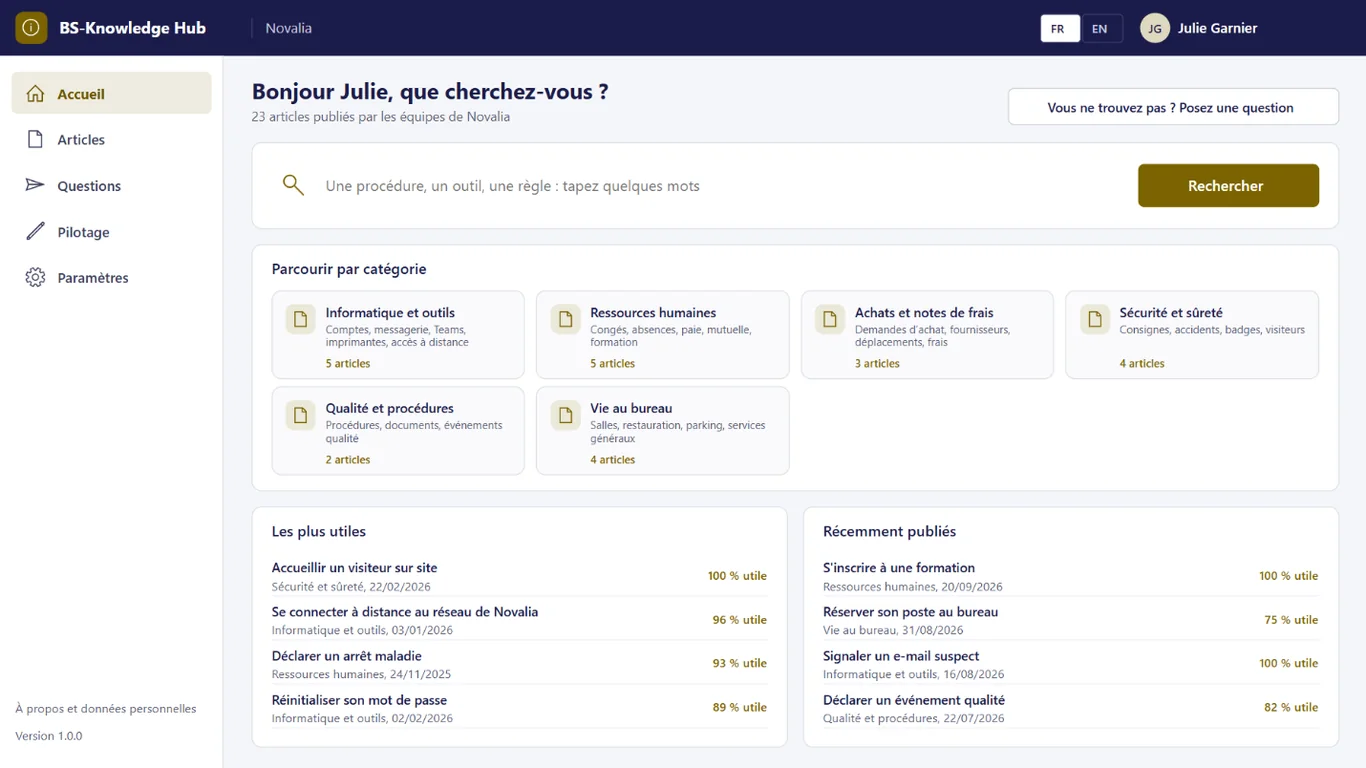
Search, categories, most useful and latest articles right from the home screen.


Answers to your internal questions, in one place.
BS-Knowledge Hub brings together the knowledge employees need: procedures, guides and answers to frequent questions, sorted by category. Readers search, give feedback and ask their questions; writers answer, often with an article, and every article is reviewed by its owner on a set date, with a reminder.
# why
# benefits
Search, categories, most useful and latest articles right from the home screen.
Employees ask, a writer answers and the requester gets the answer by e-mail.
Each article has an owner and a review date, with a reminder before it is due.
Useful or not enough, with a comment: writers know what to improve.
# features
Employees' questions feed the base: a writer answers, often by linking or writing an article, and readers' feedback shows what to improve.
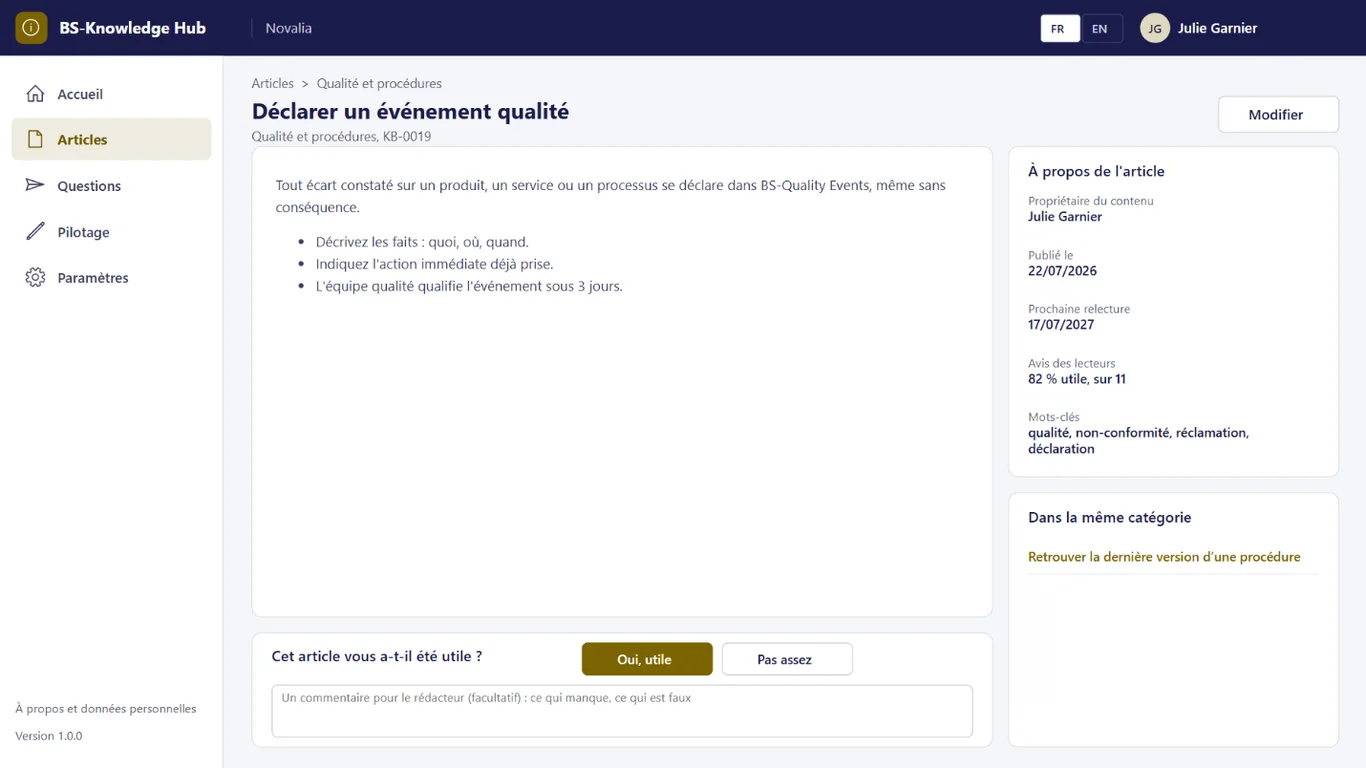
Each article is formatted, with its owner, publication date, next review and keywords. At the bottom of the page, readers say whether it was useful and can leave a comment.
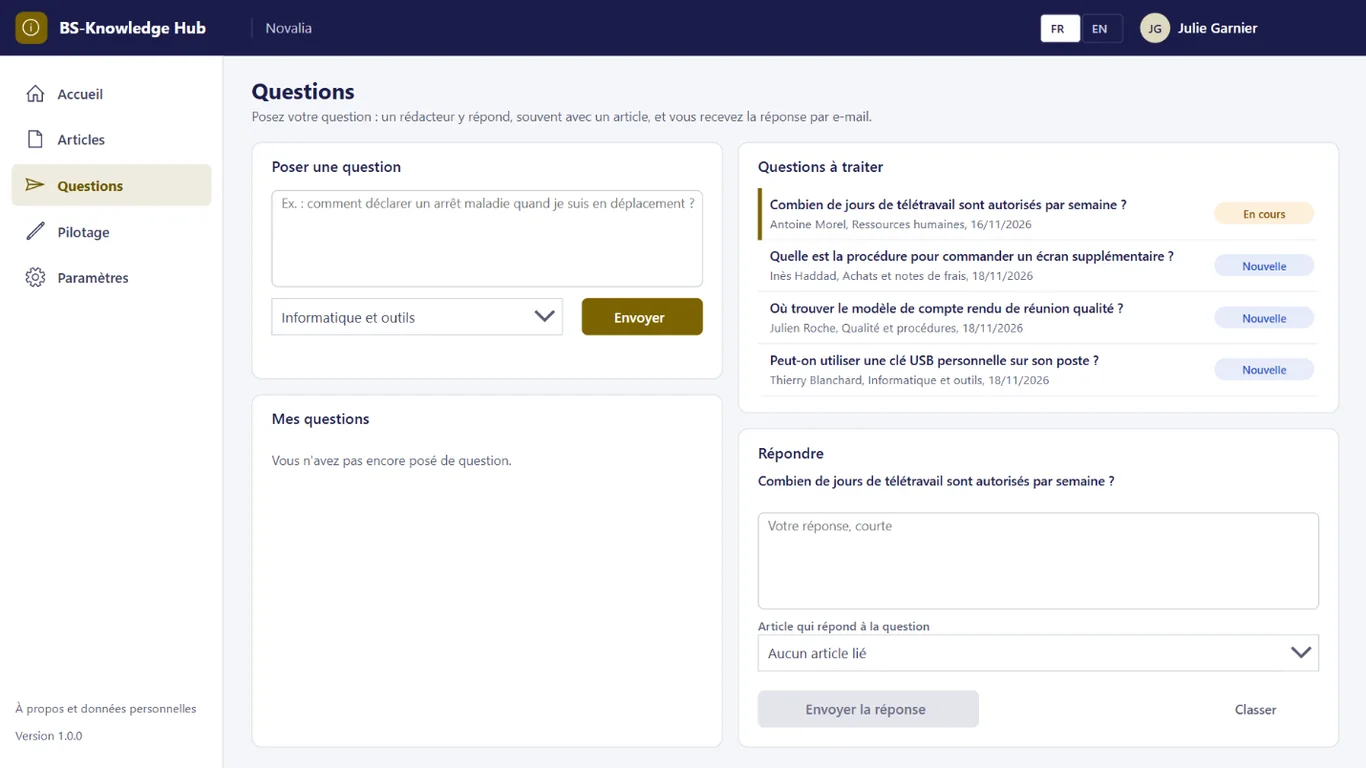
Employees ask their question and choose a category. A writer takes it on, answers and, where possible, links the article that answers it; the requester gets the answer by e-mail.
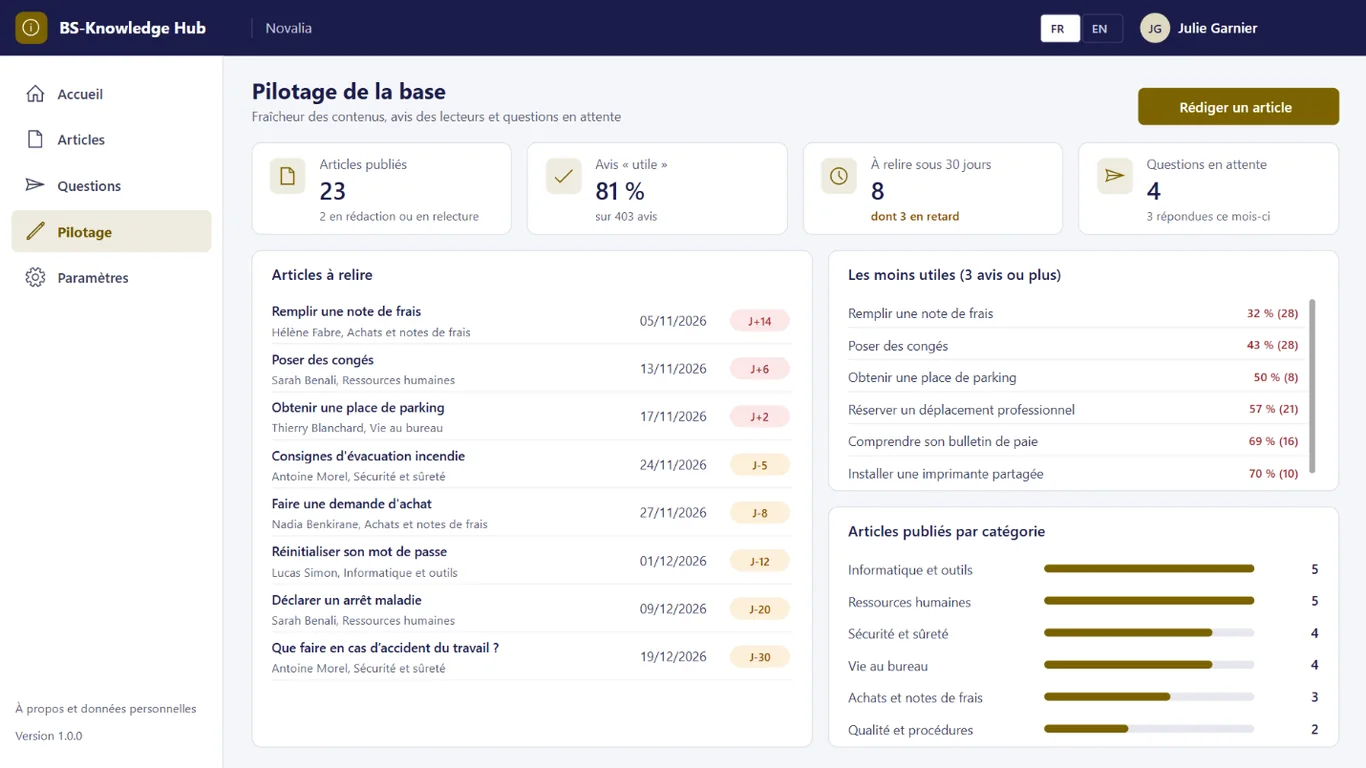
Published articles, share of useful feedback, articles to review within 30 days or overdue, least useful articles, pending questions and breakdown by category.
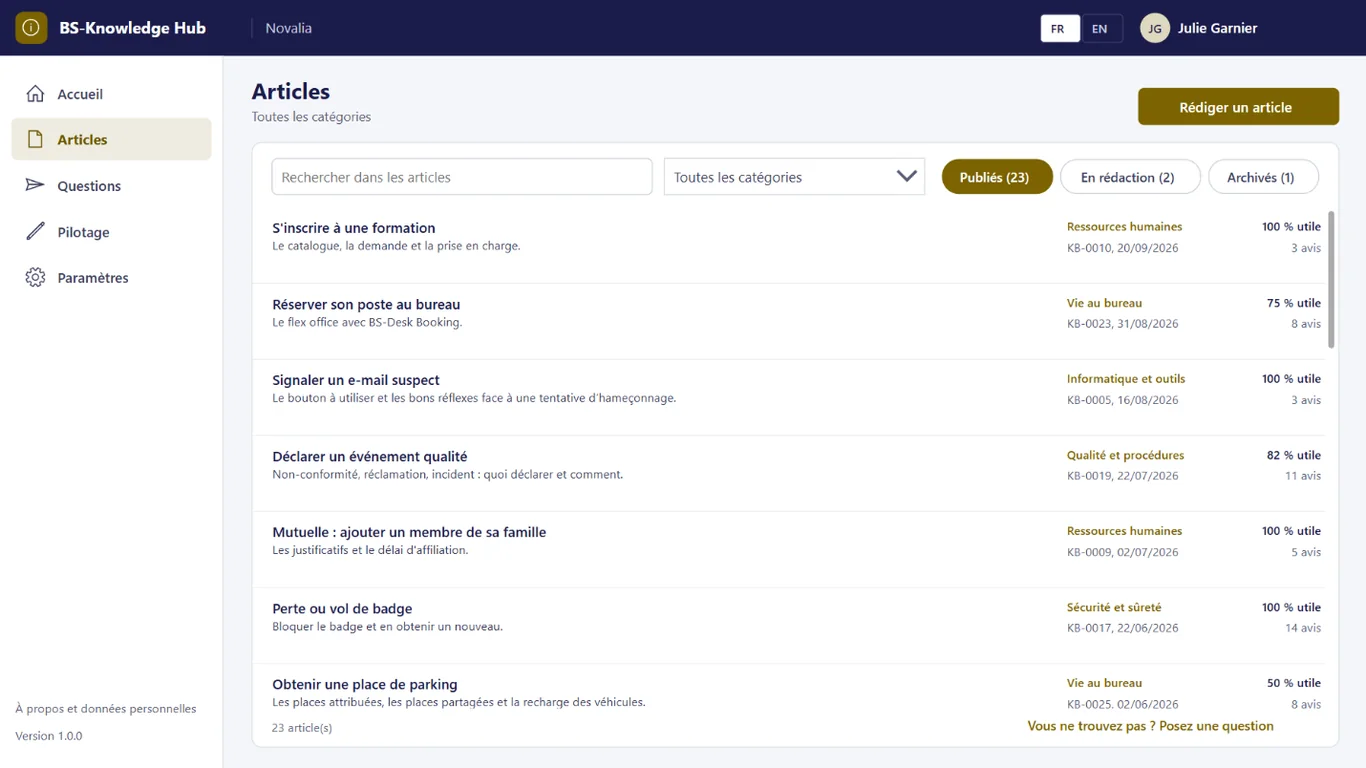
The list of articles can be filtered by category, status and search, with each article's publication date and share of useful feedback.
# who it's for
For support services, HR, quality or internal communication teams, who keep receiving the same questions.
# use cases
Facilities keep receiving questions about parking. They publish an article on assigned and shared spaces and vehicle charging, and answer questions by linking it. Employees find the answer in the base and repeated questions decrease.
An expense claim procedure has changed. The insights screen flags the article among the least useful and overdue for review; its owner receives a reminder. The article is updated and republished, with a new review date.
New employees need practical information. They browse the HR and office life categories and ask their questions in the app. They become autonomous faster and support services are asked less often.
# alternatives
| Alternative | Limitation | What BS-Knowledge Hub brings |
|---|---|---|
| Shared documents or intranet pages | No guided search, no owner or review date, no reader feedback, no questions | Categories and search, review on a set date, feedback and questions |
| Knowledge base SaaS | Content outside the tenant, subscription per user or per writer, Microsoft 365 integration to build | Content in your Microsoft 365, sign-in with the usual account |
| Custom development | Cost and lead time of a project, maintenance to plan | Ready-to-use app, delivered with its installation kit |
# data and security
Power Apps, Power Automate and SharePoint, with standard connectors only.
# installation
In the Bret Software demo environment, with fictitious data, on every screen.
A Power Platform environment with Dataverse, a SharePoint site, a service account with a Microsoft 365 licence and a mailbox, Microsoft Entra groups for the profiles (writers, readers), and the writers address.
By Bret Software, in your tenant, with the app's kit: lists, settings, audited permissions and Power Platform solution.
Setting categories, writers address and review period, acceptance in test mode, which sends every e-mail to a single address, then go-live for users.
# frequently asked questions
No. BS-Knowledge Hub only uses standard connectors: SharePoint and Office 365 Outlook. Users need a Microsoft 365 licence that includes Power Apps and Power Automate for Microsoft 365, with no Premium option. A service account, with a Microsoft 365 licence and a mailbox, runs the flows. Your administrator checks the plans available in your tenant.
In a SharePoint site of your Microsoft 365 tenant, dedicated to the app. No data is sent to Bret Software or to any third-party service: there is no external server. Any e-mails are sent through your organisation's Outlook connector. Permissions are set list by list for each group, and an append-only log records the actions.
Bret Software installs the app in your tenant in one day, with its kit: lists, settings, permissions and Power Platform solution. You provide a Power Platform environment with Dataverse, a service account with a Microsoft 365 licence and Microsoft Entra groups for the profiles. On request, we import your existing data and adapt the logo and colours.
Yes. The interface is available in French and English. The app opens in the browser language the first time, then remembers each user's choice. E-mails are sent in the recipient's language, or in French then English when it is not known or when the message goes to several people. Labels can be edited in a SharePoint list.
Yes. We give you access to the Bret Software demo environment: the app runs there with fictitious data, on every screen. You explore it with your teams before deciding. The price is set on quotation, according to your context and the adaptations you want, such as importing your existing data.
Writers, members of the app's administrators group: they write, review, publish and archive articles. An article goes through the statuses draft, in review, published and archived. Readers only see published articles. Each article has an author and an owner, responsible for keeping it up to date.
An employee who cannot find their answer asks their question in the app and chooses a category. Writers are told about new questions every morning. One of them takes it on, answers and, where possible, links the article that answers it. The requester receives the answer by e-mail and finds it in "My questions".
Each published article has a next review date, twelve months after publication by default. Its owner receives an e-mail reminder fifteen days before. The insights screen lists articles to review and those past their date, as well as the articles readers found least useful.
Yes, as part of the installation: we import your existing content as articles, with their category, owner and keywords. Article content is formatted, with headings, lists and links. Categories, their description and display order are set in the app, without changing its structure.
Demo with fictitious data: home, articles, questions, reader feedback and insights.


