Reliable voting
One vote per entry, a quota per category, no voting for yourself, and only during the voting period.


Photo contests, ideas and polls, with reliable voting.
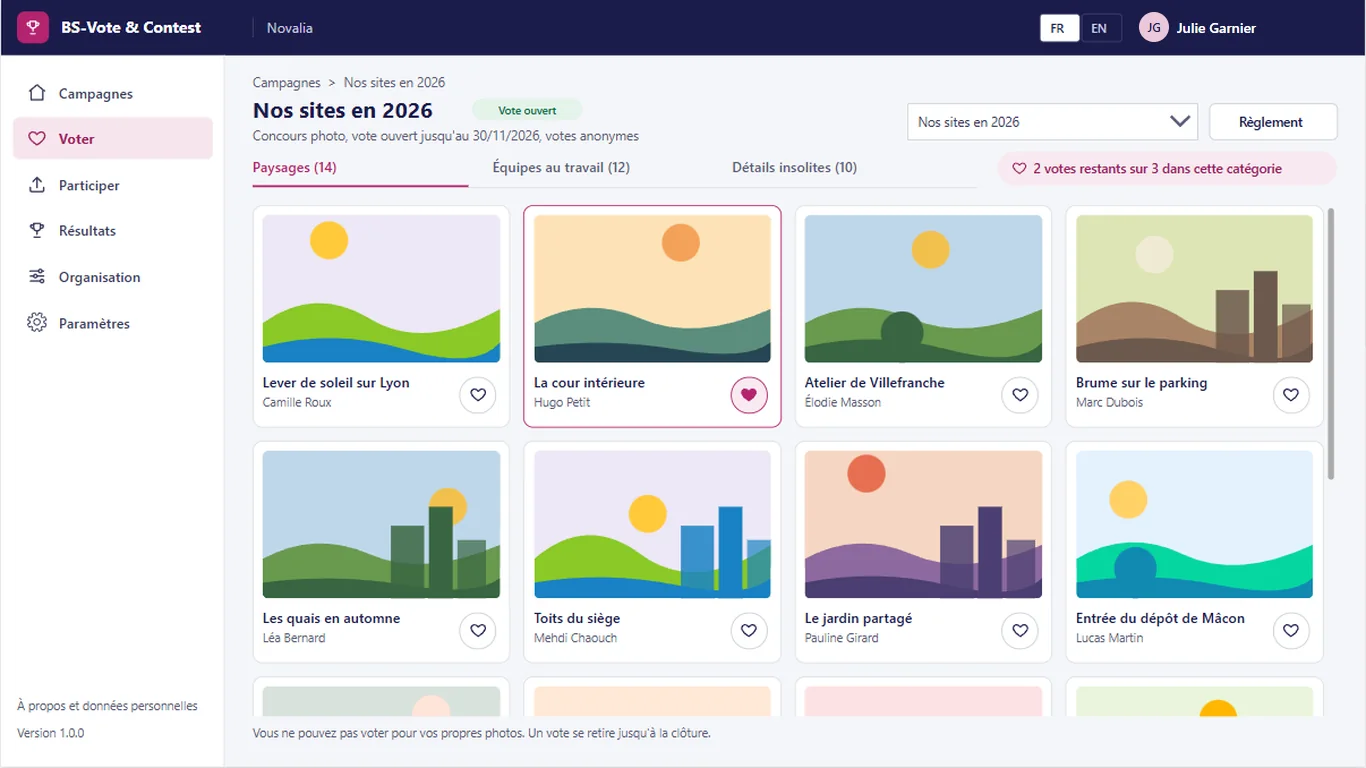
BS-Vote & Contest brings internal life together in one app: photo contest, call for ideas, poll. Participants submit their photo or idea, then vote in the gallery. A flow checks each vote: period, quota per category, no voting for yourself. Votes can stay anonymous and results are published by category.
# why
# benefits
One vote per entry, a quota per category, no voting for yourself, and only during the voting period.
Organisers see totals, not who voted for whom.
Entries open, voting opens and the campaign closes on the planned dates.
Photo contest, idea vote and poll, each with its own categories and rules.
Podium and ranking, shown during the vote or after closing.
# features
Three formats in one tool: photo contest, idea vote and poll, each with its own categories, rules and calendar.
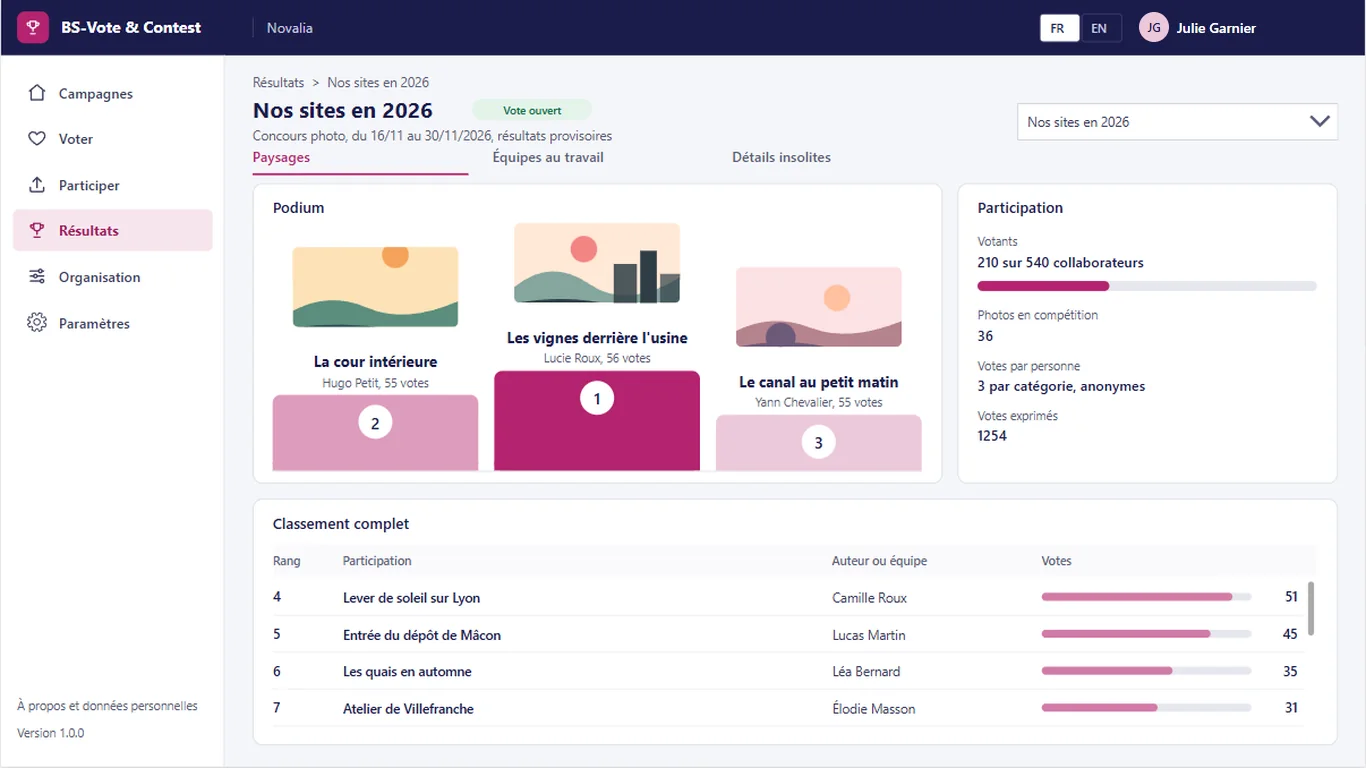
Podium and full ranking for each category, with the number of voters and the participation rate. The organiser chooses to show results during the vote or after closing.
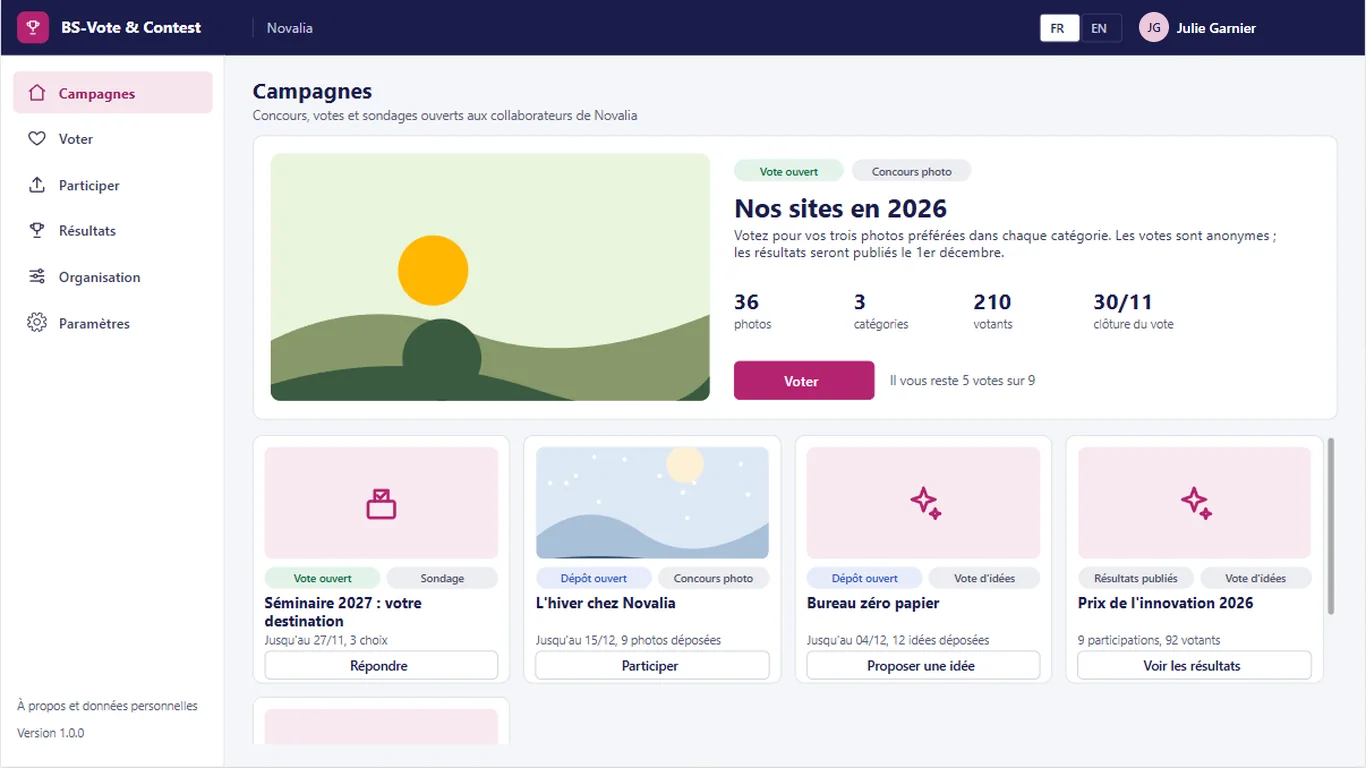
Open and upcoming campaigns, with their type, period and progress: photos submitted, categories, voters and closing date.
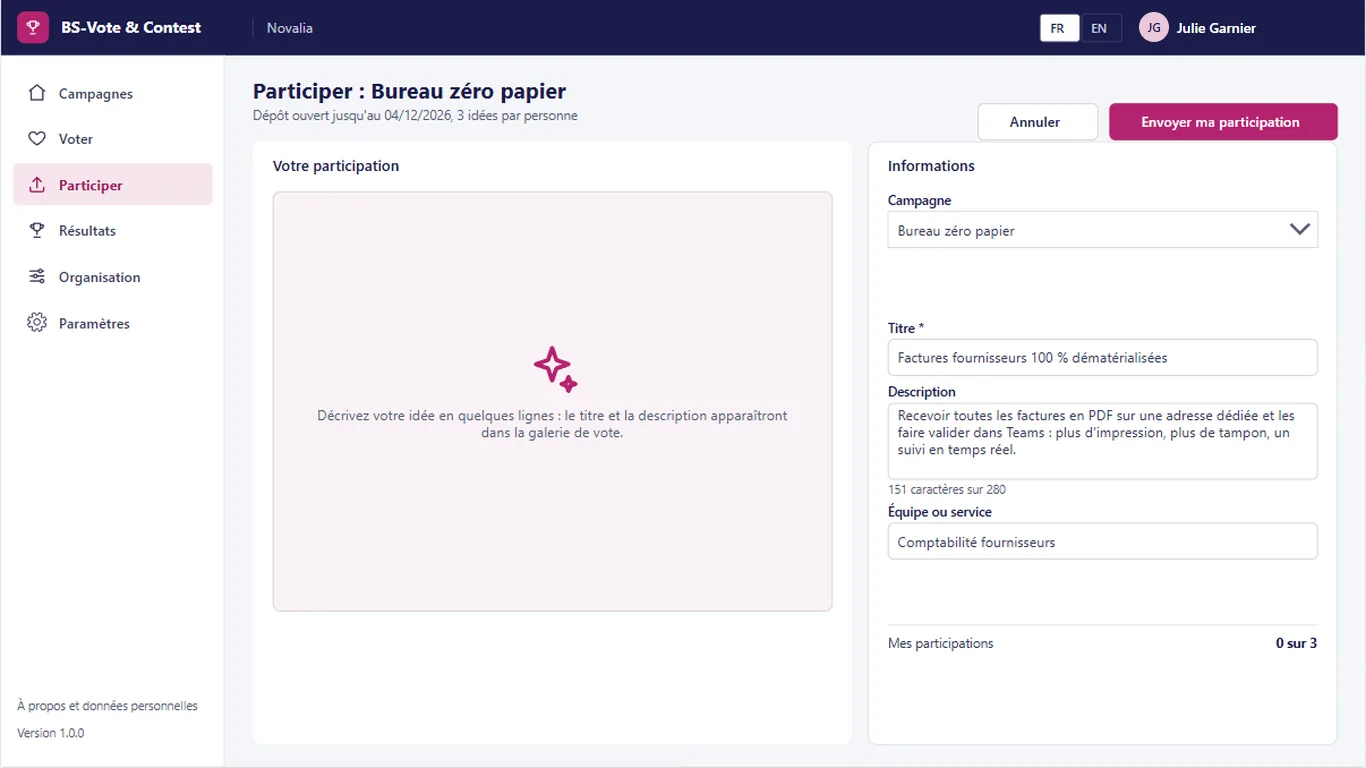
Participants upload their photo or describe their idea, with a title and caption, in the chosen category. The submission flow applies the limit of entries per person.
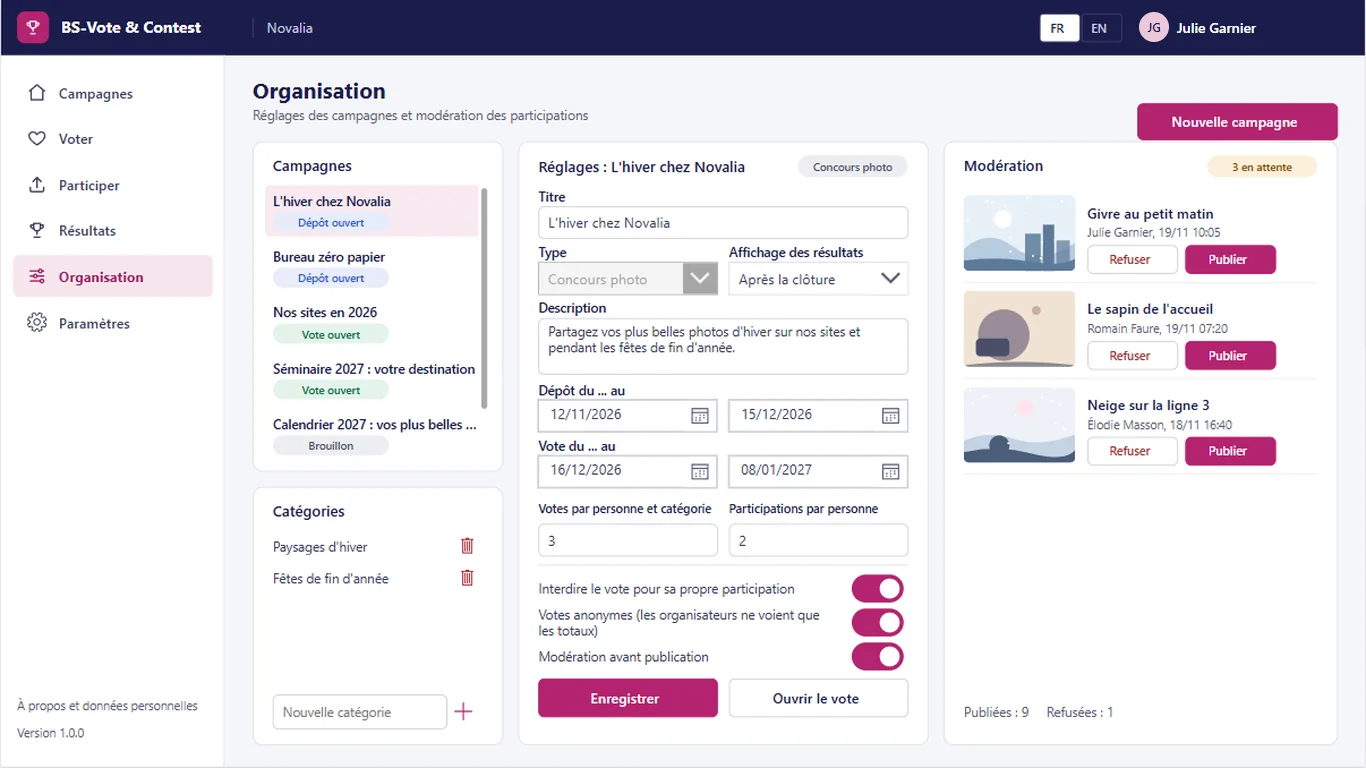
The organiser creates the campaign, its categories and calendar, sets the votes per category and entries per person, and moderates entries before the vote.
# who it's for
For internal communication, the works council, participative innovation or human resources. Each employee takes part with their Microsoft 365 account, with no separate sign-up.
# use cases
Internal communication launches a photo contest with three categories. Entries are open for three weeks with moderation, then voting runs for one week with three votes per category and no voting for your own photo. The podium of each category is published at closing, with no manual count.
A department wants to bring out improvement ideas. Employees submit their ideas, then vote for the ones they prefer. The ranking of ideas gives management a list prioritised by the teams.
The works council wants to consult employees on an event date. An anonymous poll, one vote per person, results shown after closing. The result is published with the participation rate, without anyone knowing who chose what.
# alternatives
| Alternative | Limitation | What BS-Vote & Contest brings |
|---|---|---|
| Microsoft Forms or reactions on an internal social network | No gallery of entries, no quota per category, limited control of duplicates and anonymity | Gallery by category, quotas, vote checked by a flow, real anonymity |
| Contest or voting SaaS platform | Participant data and photos outside the tenant, subscription, sometimes a separate sign-up | Photos, ideas and votes in your Microsoft 365, sign-in with the usual account |
| Custom development | Cost and lead time of a project, maintenance to plan | Ready-to-use app, delivered with its installation kit |
# data and security
Power Apps, Power Automate and SharePoint, with standard connectors only.
# installation
In the Bret Software demo environment, with fictitious data, on every screen.
A Power Platform environment with Dataverse, a SharePoint site, a service account with a Microsoft 365 licence and a mailbox, Microsoft Entra groups for the profiles (organisers, participants).
By Bret Software, in your tenant, with the app's kit: lists, settings, audited permissions and Power Platform solution.
Setting the number of people called to vote and the vote retention period, acceptance in test mode, which sends every e-mail to a single address, then go-live for users.
# frequently asked questions
No. BS-Vote & Contest only uses standard connectors: SharePoint and Office 365 Outlook. Users need a Microsoft 365 licence that includes Power Apps and Power Automate for Microsoft 365, with no Premium option. A service account, with a Microsoft 365 licence and a mailbox, runs the flows. Your administrator checks the plans available in your tenant.
In a SharePoint site of your Microsoft 365 tenant, dedicated to the app. No data is sent to Bret Software or to any third-party service: there is no external server. Any e-mails are sent through your organisation's Outlook connector. Permissions are set list by list for each group, and an append-only log records the actions.
Bret Software installs the app in your tenant in one day, with its kit: lists, settings, permissions and Power Platform solution. You provide a Power Platform environment with Dataverse, a service account with a Microsoft 365 licence and Microsoft Entra groups for the profiles. On request, we import your existing data and adapt the logo and colours.
Yes. The interface is available in French and English. The app opens in the browser language the first time, then remembers each user's choice. E-mails are sent in the recipient's language, or in French then English when it is not known or when the message goes to several people. Labels can be edited in a SharePoint list.
Yes. We give you access to the Bret Software demo environment: the app runs there with fictitious data, on every screen. You explore it with your teams before deciding. The price is set on quotation, according to your context and the adaptations you want, such as importing your existing data.
No. Votes are written by a flow, under a service account, in a list that no group of the app can access, not even the organisers. They see the number of votes for each entry and the participation rate, not the voters. Anonymity is set for each campaign: it is on by default.
Each vote goes through a flow that checks, before recording it, that voting is open, that the person has not reached their quota in the category, that they have not already voted for this entry and, if the rule is on, that they are not voting for their own entry. A refused vote shows the reason on screen.
Yes. For each campaign, the organiser sets the number of entries per person and the number of votes per category. They create as many categories as needed, with a display order. The campaign rules are shown to participants, and the submission flow applies the limit when the entry is sent.
No. BS-Vote & Contest is designed for photo contests, idea votes and internal polls. Staff representative elections by electronic voting follow their own rules, such as an independent assessment of the system, sealing of the ballot box or separation of voter lists and votes, which the app does not cover. For these elections, use a specialised electronic voting provider.
Moderation is optional and set for each campaign. When it is on, a submitted photo or idea stays pending and only appears in the vote after an organiser approves it. The organiser can also refuse it, giving a reason. Photos are stored in a SharePoint library of the app site.
Demo with fictitious data: campaigns, entries, voting gallery, moderation and results by category.


