The right workflow for each request
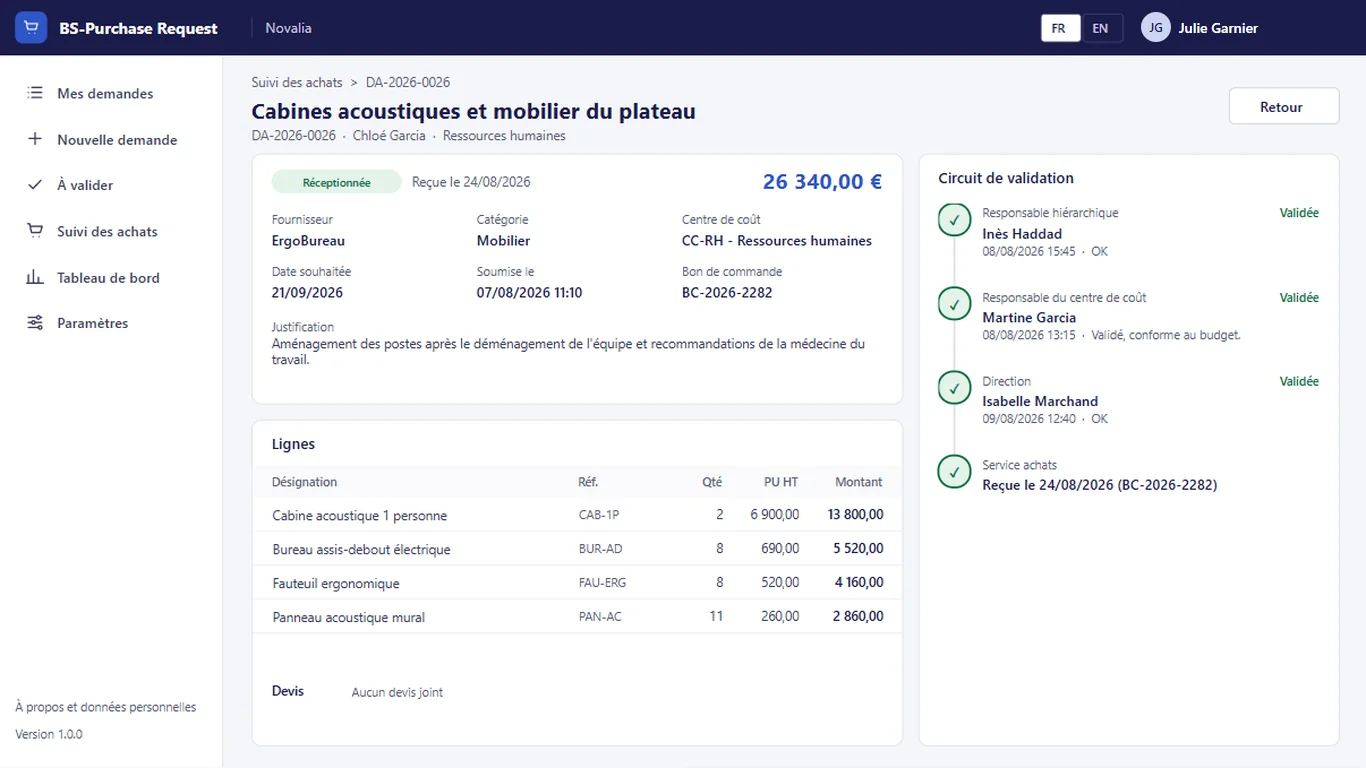
Line manager, cost centre and management depending on the amount, never twice the same person.

Purchase requests approved through the right workflow.
BS-Purchase Request replaces purchase requests by e-mail. Requesters enter their lines and attach quotes; the app works out the workflow: line manager, cost centre owner, then management depending on the amount. Each approver sees the committed budget, decides in one click, and purchasing places the order.
# why
# benefits
Line manager, cost centre and management depending on the amount, never twice the same person.
Requesters follow each step and see the current approver.
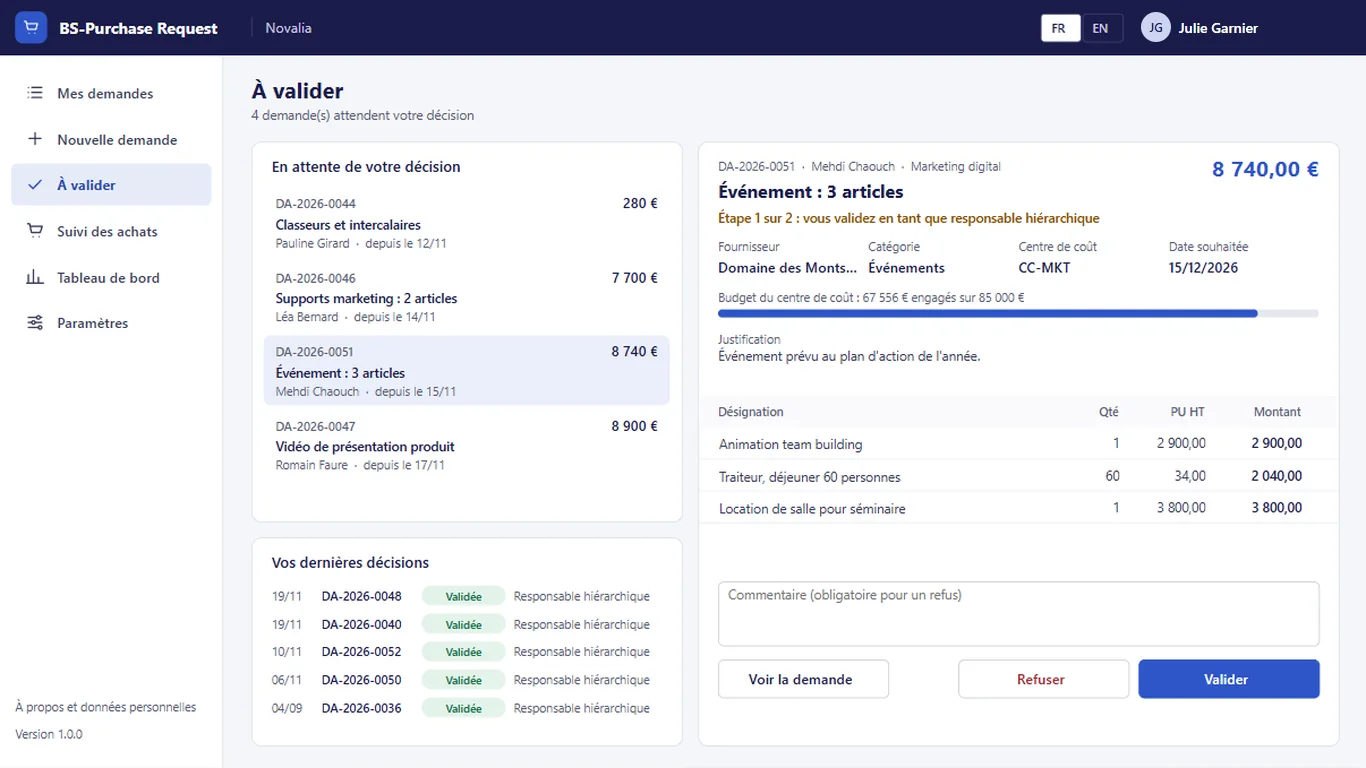
Lines, quotes and budget already committed on the cost centre are shown before the decision.
Each approval or refusal is recorded with its author, date and comment.
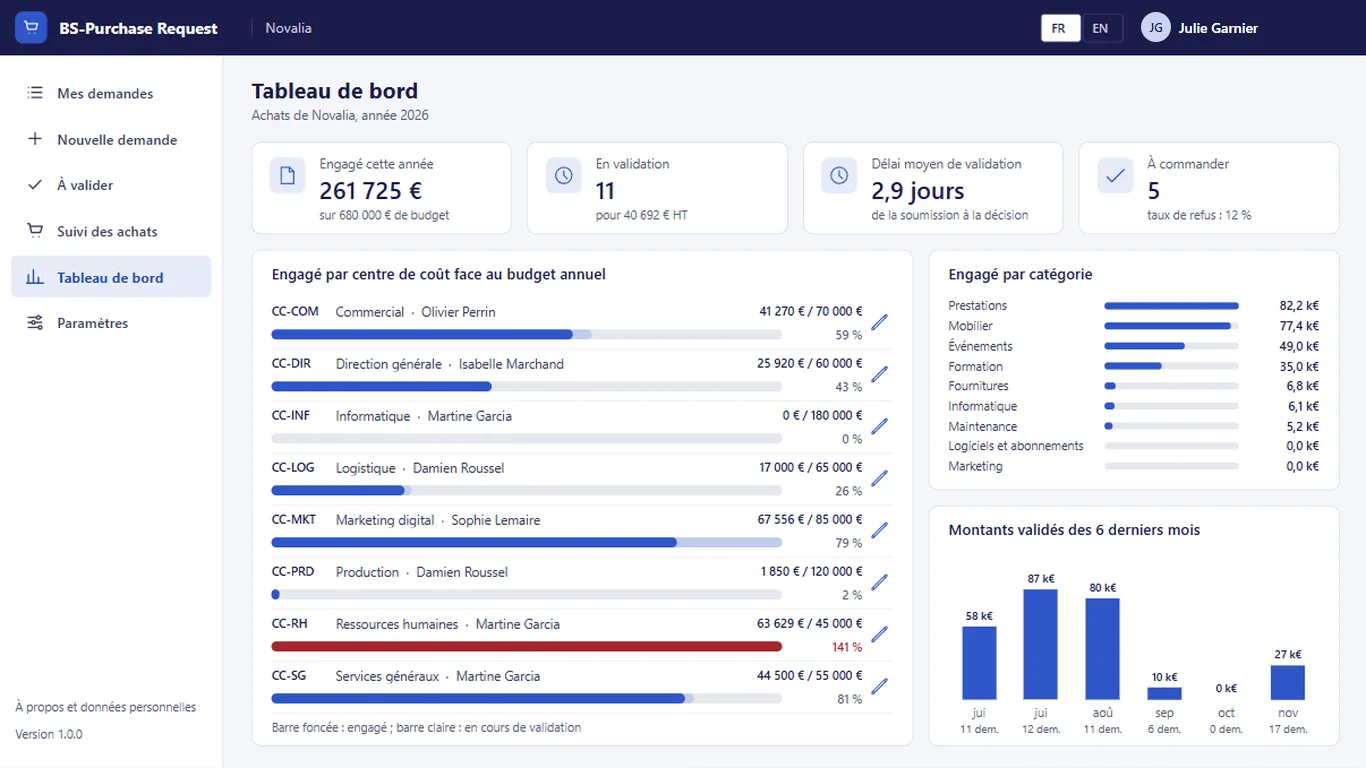
The amount committed by cost centre is compared with the budget, by category and by month.
# features
The app covers the purchase request and its approval, up to receipt, without replacing the company's management system.
Each approver receives an e-mail and finds the request in "To approve", with the lines, quotes and budget already committed on the cost centre. They approve or refuse with a reason.
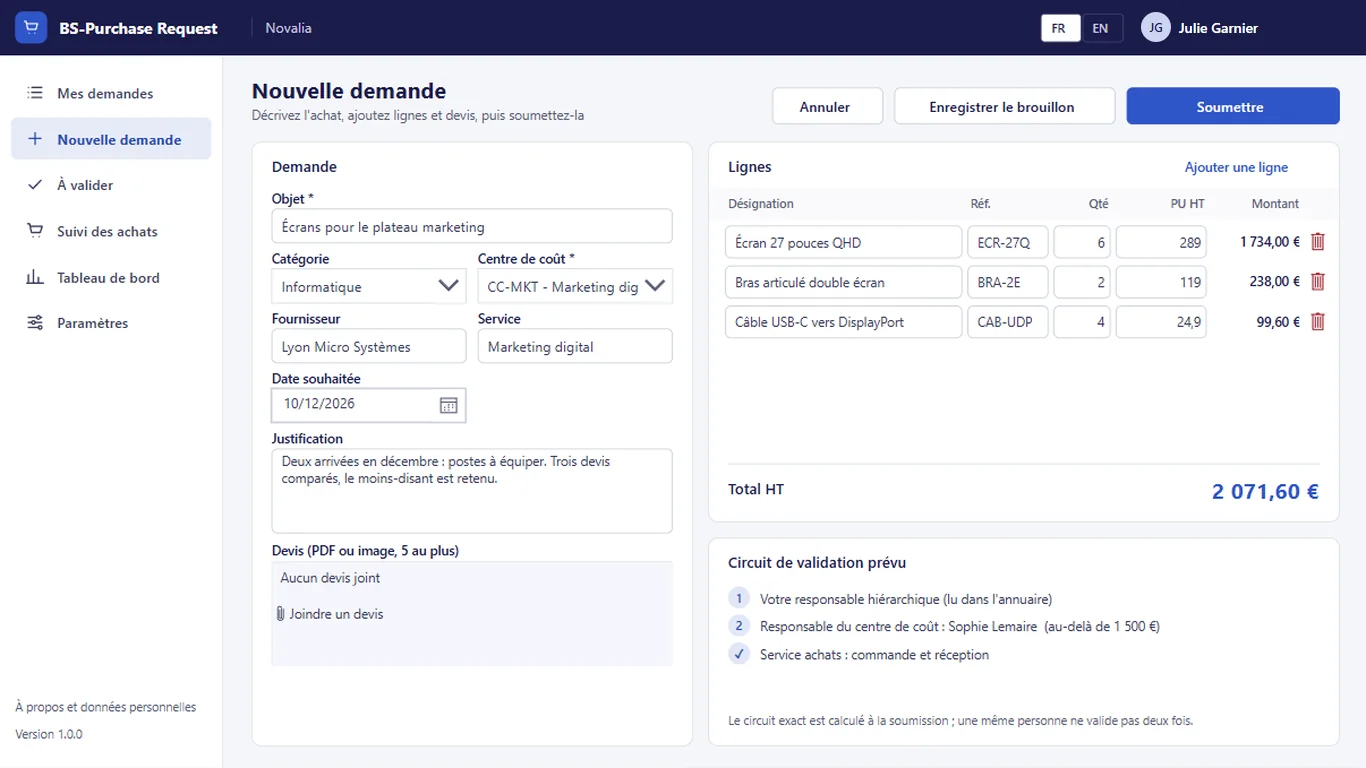
Subject, supplier, category, cost centre, lines, justification and attached quotes. The planned workflow is shown before submission, and the request can be saved as a draft.
The amount committed by each cost centre is compared with its annual budget, by category and by month. The average approval time and the requests to order complete the view.
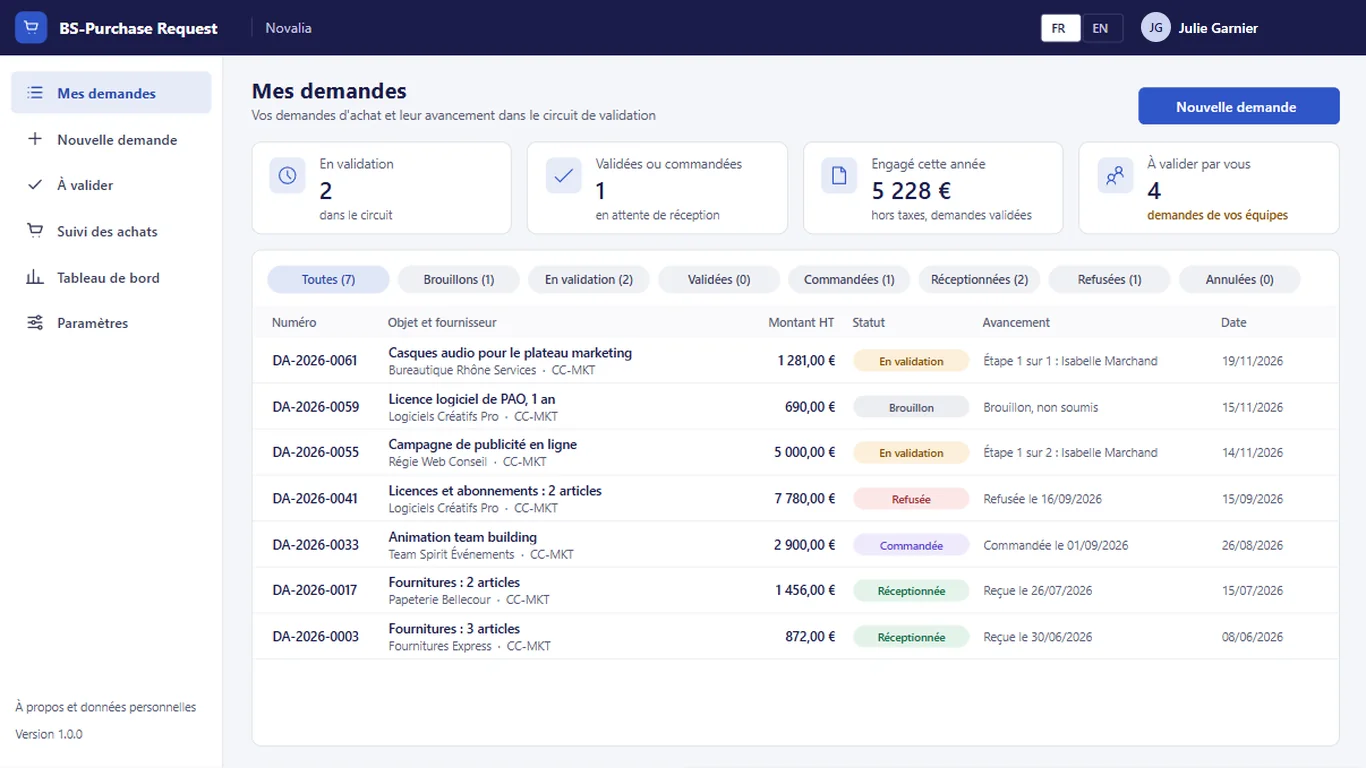
Requesters see their requests, their status and the current step, from draft to receipt. They can cancel a request as long as it has not been ordered.
# who it's for
For SMEs and mid-sized companies without a purchasing module in their management system, or departments of a large group. The workflow reads each person's line manager from the Microsoft 365 directory.
# use cases
A project manager requests two laptops for new joiners. He enters the request with the quote. The amount exceeds the first threshold: the workflow goes through his manager and then the cost centre owner, who sees the budget already committed. The request reaches purchasing approved; they note the purchase order and then the receipt. The requester followed each step.
A department orders a high-value consulting service. The workflow adds the approval of management; one approver is slow and is reminded automatically. The decision is taken on time, and the history shows who approved what and when.
Management control prepares the quarterly review. It looks at the amount committed by cost centre against the budget, by category and by month. Overruns show up before closing, not after.
# alternatives
| Alternative | Limitation | What BS-Purchase Request brings |
|---|---|---|
| E-mails and forms | Workflow applied by hand, no tracking, scattered quotes, no view of the committed budget | Calculated workflow, step-by-step tracking, budget visible at each approval |
| Purchasing module of a management system or purchasing SaaS | Integration project, per-user licences, data outside the tenant for a SaaS; often oversized for the purchase request alone | Focused on the request and its approval, installed in one day, data in your Microsoft 365 |
| Custom development | Cost and lead time of a project, maintenance to plan | Ready-to-use app, delivered with its installation kit |
# data and security
Power Apps, Power Automate and SharePoint, with standard connectors only.
# installation
In the Bret Software demo environment, with fictitious data, on every screen.
A Power Platform environment with Dataverse, a SharePoint site, a service account with a Microsoft 365 licence and a mailbox, Microsoft Entra groups for the profiles (buyers, requesters), and each person's line manager filled in in the Microsoft 365 directory.
By Bret Software, in your tenant, with the app's kit: lists, settings, audited permissions and Power Platform solution.
Setting the thresholds, management, default approver and cost centres, acceptance in test mode, which sends every e-mail to a single address, then go-live for users.
# frequently asked questions
No. BS-Purchase Request only uses standard connectors: SharePoint and Office 365 Outlook. Users need a Microsoft 365 licence that includes Power Apps and Power Automate for Microsoft 365, with no Premium option. A service account, with a Microsoft 365 licence and a mailbox, runs the flows. Your administrator checks the plans available in your tenant.
In a SharePoint site of your Microsoft 365 tenant, dedicated to the app. No data is sent to Bret Software or to any third-party service: there is no external server. Any e-mails are sent through your organisation's Outlook connector. Permissions are set list by list for each group, and an append-only log records the actions.
Bret Software installs the app in your tenant in one day, with its kit: lists, settings, permissions and Power Platform solution. You provide a Power Platform environment with Dataverse, a service account with a Microsoft 365 licence and Microsoft Entra groups for the profiles. On request, we import your existing data and adapt the logo and colours.
Yes. The interface is available in French and English. The app opens in the browser language the first time, then remembers each user's choice. E-mails are sent in the recipient's language, or in French then English when it is not known or when the message goes to several people. Labels can be edited in a SharePoint list.
Yes. We give you access to the Bret Software demo environment: the app runs there with fictitious data, on every screen. You explore it with your teams before deciding. The price is set on quotation, according to your context and the adaptations you want, such as importing your existing data.
It is read from the Microsoft 365 directory when the request is submitted. If the directory gives no manager for the requester, the request goes to a default approver named in the settings. The workflow is then fixed in the request: everyone sees the planned steps and the name of the current approver.
Yes. Two amounts excluding tax are set in the settings: above the first, the cost centre owner approves after the line manager; above the second, management approves in turn. The management approver and the reminder delay are set in the same place, without changing the app.
No. Only a draft request can be changed. Once submitted, it follows its workflow and the decisions are recorded. The requester can however cancel it as long as it has not been ordered. A refused request carries the reason for refusal: the requester enters a new one if they want to submit it again.
No. It covers the purchase request, its approval and its tracking up to receipt. Purchasing places the order in the company's management system, then simply notes the purchase order number in the request. The dashboard tracks the approved committed amount against each cost centre's budget.
Demo with fictitious data: entry, calculated workflow, approval, order and budget dashboard.


