No notice deadline forgotten
The owner and deputy are warned 90, 60, 30 and 7 days before the notice deadline.

Never miss a contract notice deadline again.
BS-Contracts brings contracts and subscriptions together in a shared register: dates, notice period, tacit renewal, annual amount, owner and deputy, signed documents. The app works out the notice deadline, warns the owner and deputy 90, 60, 30 and 7 days before it, and keeps track of each decision.
# why
# benefits
The owner and deputy are warned 90, 60, 30 and 7 days before the notice deadline.
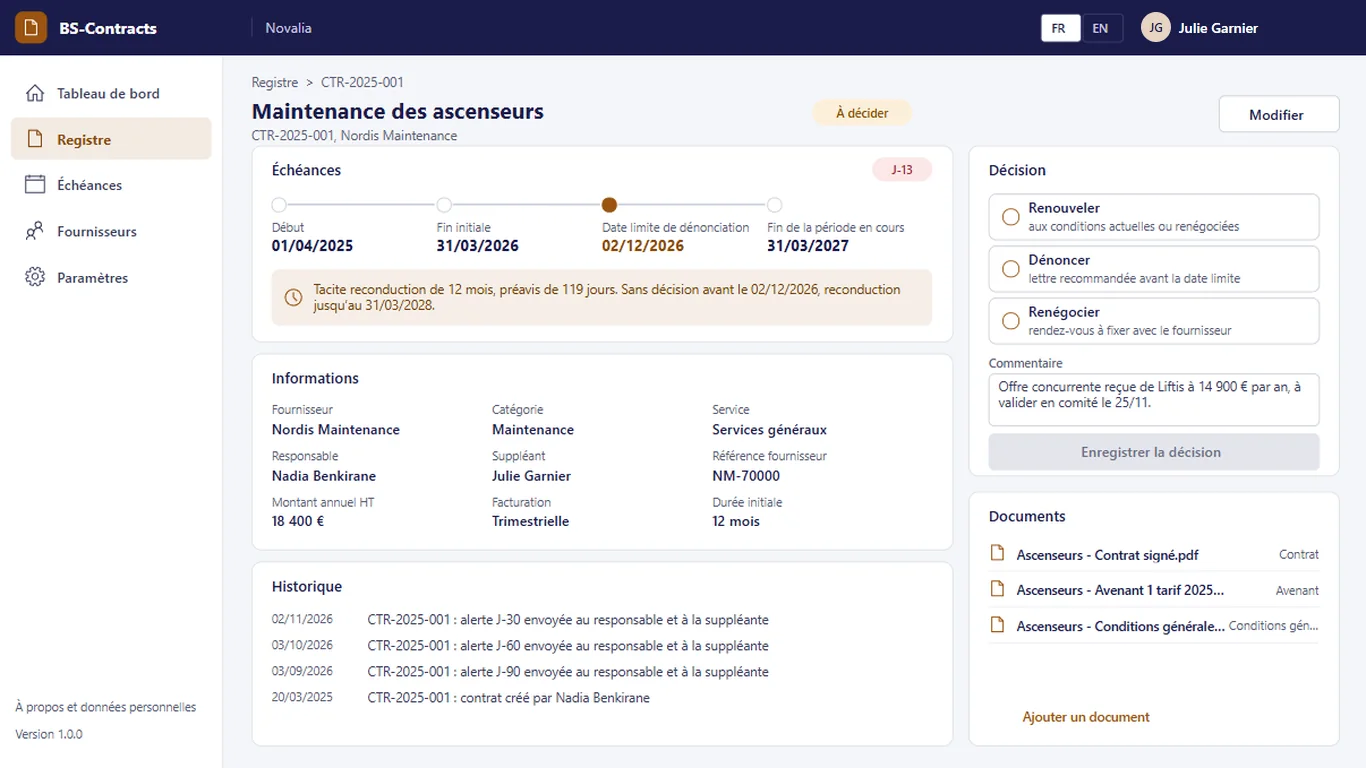
Renew, terminate or renegotiate: the decision and its comment are saved in the contract record.
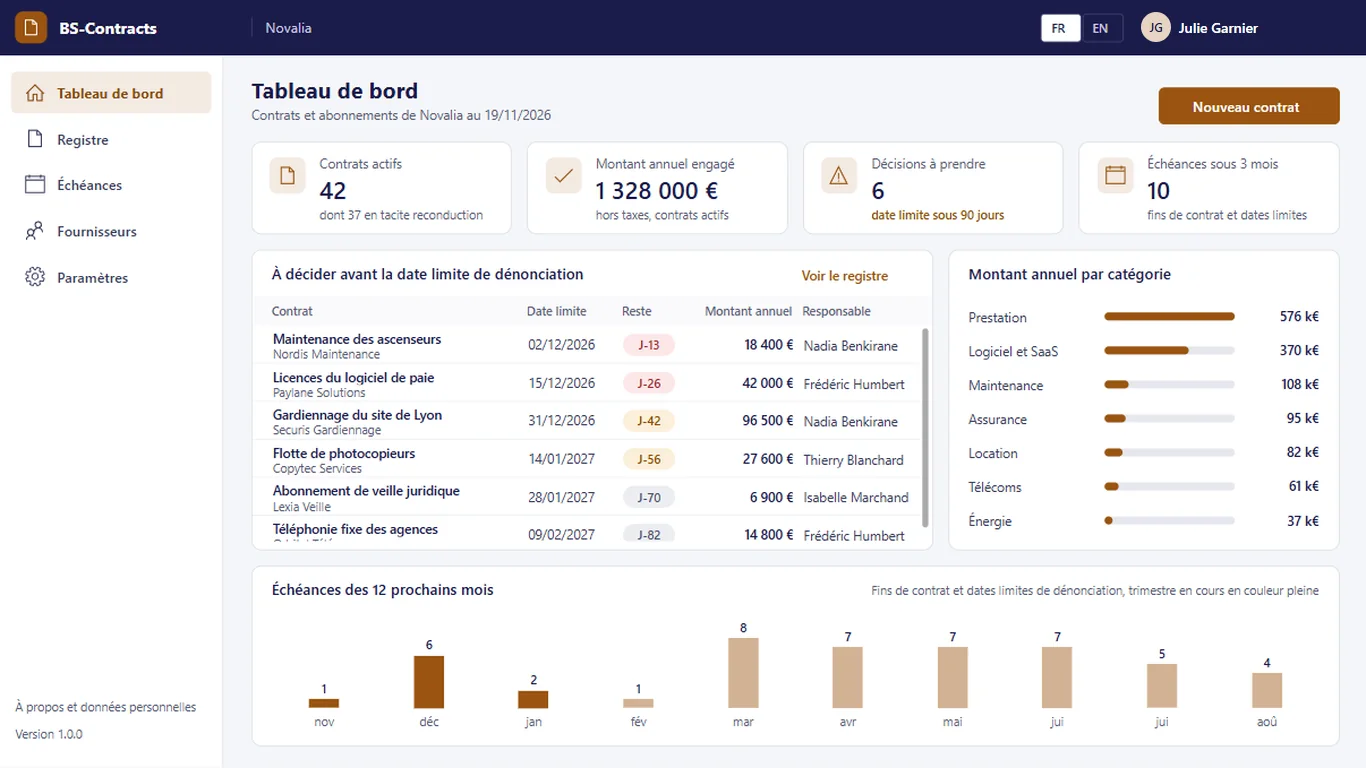
Annual committed amount, pending decisions and the next 12 months of deadlines on one screen.
Signed contract, amendments and terms and conditions open from the record.
Alerts also go to the deputy: an absence does not make you miss a deadline.
# features
Every morning, a flow checks the deadlines, warns the right people and moves the contracts concerned to "To decide".
The timeline shows the start, initial end, notice deadline and end of the current period. The "Decision" panel records the choice (renew, terminate or renegotiate) with a comment, and the history keeps track of the alerts.
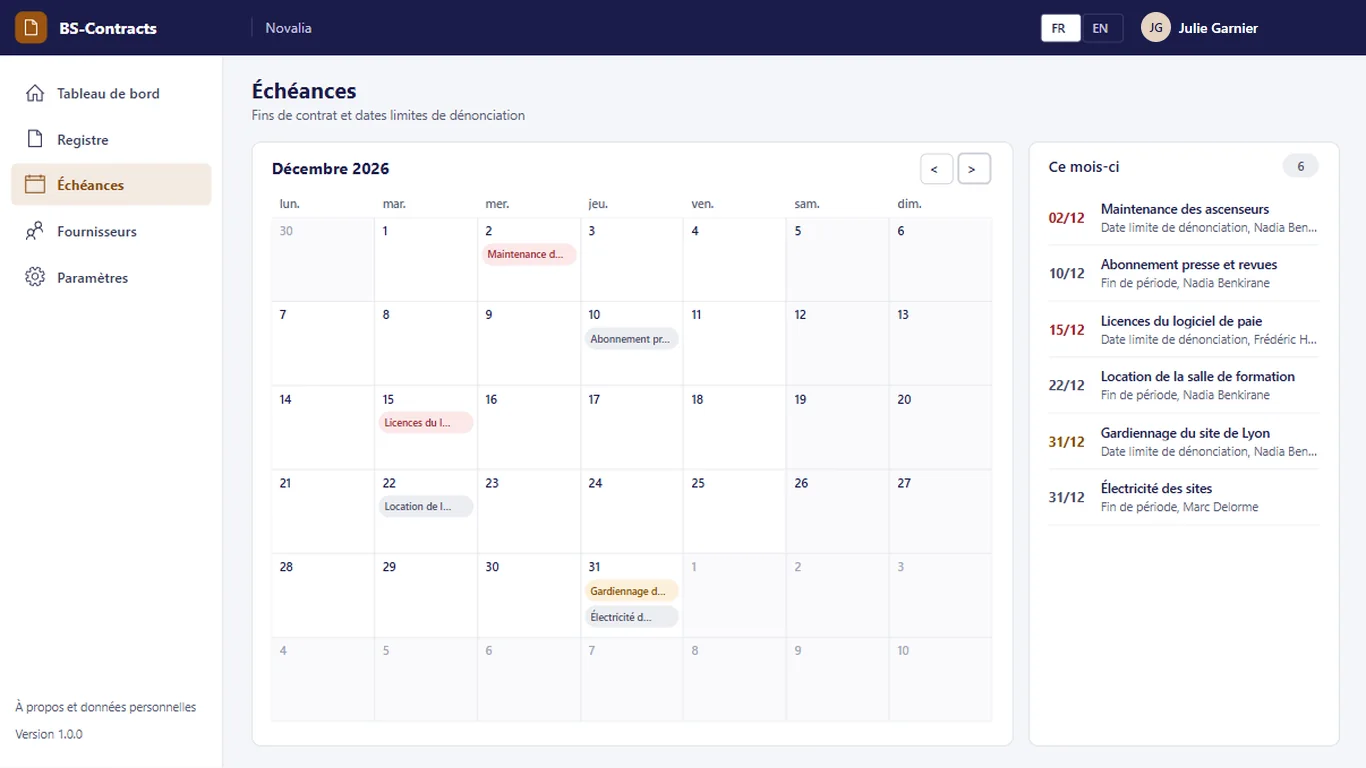
The monthly calendar shows contract ends and notice deadlines, with the list of deadlines to handle.
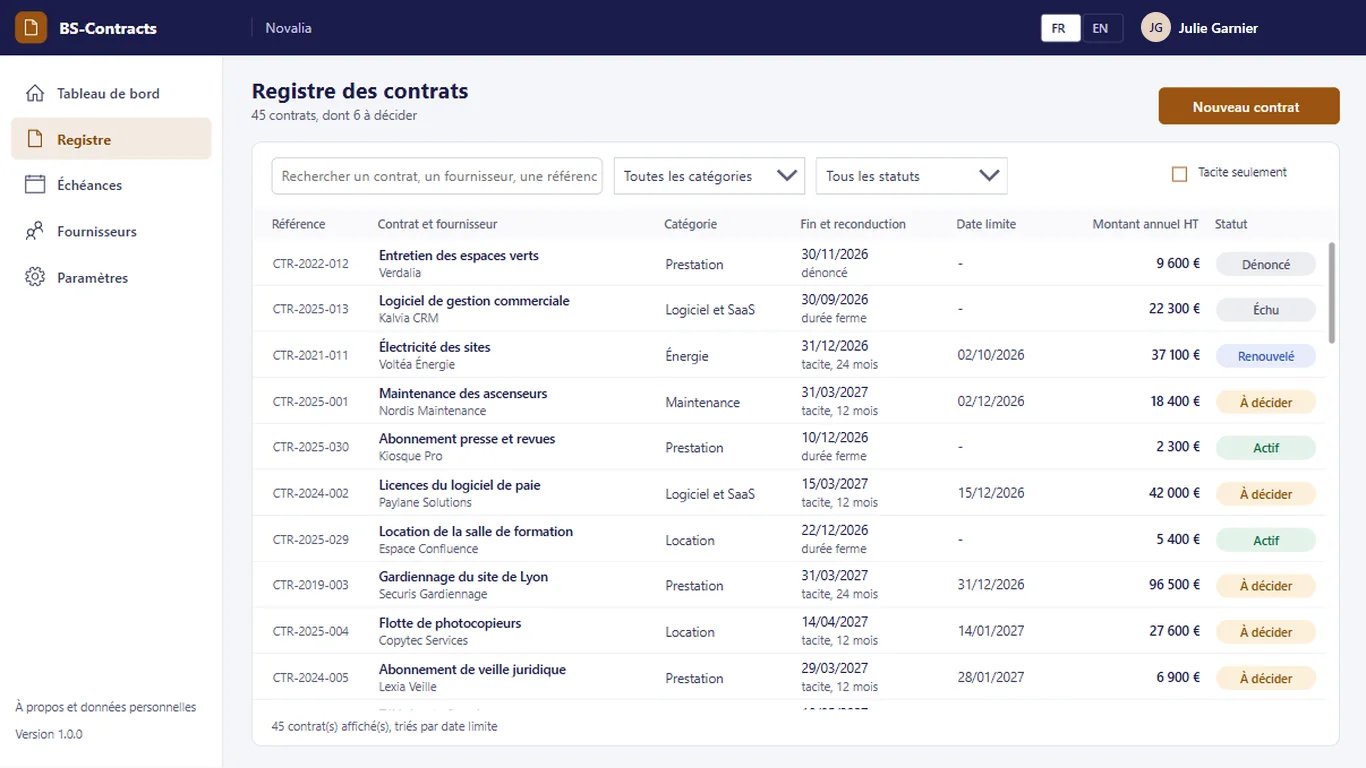
All contracts with their period end, renewal, notice deadline, amount and status. Search and filters by category and status, and a filter for tacit renewal contracts.
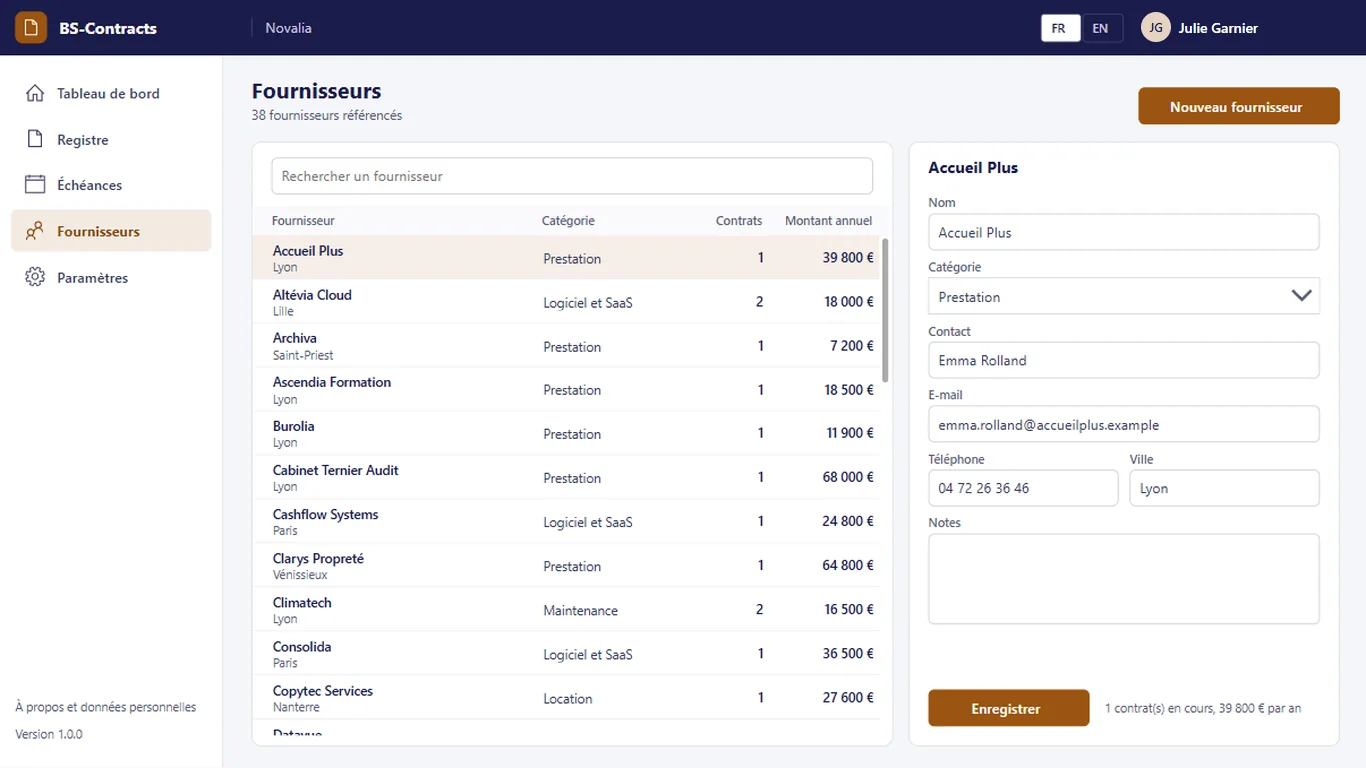
The directory gathers each supplier's category, contact, e-mail, phone and city, with its current contracts and committed annual amount.
# who it's for
For purchasing, facilities, legal or IT for its licences, in SMEs, mid-sized companies or departments of large groups. The owner and deputy of each contract receive the alerts.
# use cases
A company's facilities team has a one-year lift maintenance contract with tacit renewal. 90 days before the notice deadline, the owner and the deputy receive the alert; the contract moves to "To decide". A competing offer arrives, the owner chooses "Renegotiate" and notes it in the comment. The decision is taken before the deadline and stays recorded in the record, with the signed contract and the price amendment.
IT wants to keep its licences and online subscriptions under control. Each subscription is entered with its annual amount and invoicing frequency; the dashboard gives the amount by category. The budget review starts from an up-to-date amount, and subscriptions to stop are spotted before their deadline.
The owner of a security guard contract is away when the deadline comes. The deputy receives the same alerts and records the decision. The deadline is handled without depending on a single person.
# alternatives
| Alternative | Limitation | What BS-Contracts brings |
|---|---|---|
| Shared spreadsheet | No alert, no reliable deadline calculation, no record of decisions; depends on whoever keeps it | Deadline worked out, graduated alerts, recorded decisions |
| Contract management SaaS | Data outside the tenant, subscription often per user, drafting or signature features sometimes unnecessary for a register | A register focused on deadlines, data and documents in your Microsoft 365 |
| Custom development | Cost and lead time of a project, maintenance to plan | Ready-to-use app, delivered with its installation kit |
# data and security
Power Apps, Power Automate and SharePoint, with standard connectors only.
# installation
In the Bret Software demo environment, with fictitious data, on every screen.
A Power Platform environment with Dataverse, a SharePoint site, a service account with a Microsoft 365 licence and a mailbox, Microsoft Entra groups for the profiles (managers, readers).
By Bret Software, in your tenant, with the app's kit: lists, settings, audited permissions and Power Platform solution.
Setting the default notice period and alert thresholds, acceptance in test mode, which sends every e-mail to a single address, then go-live for users.
# frequently asked questions
No. BS-Contracts only uses standard connectors: SharePoint and Office 365 Outlook. Users need a Microsoft 365 licence that includes Power Apps and Power Automate for Microsoft 365, with no Premium option. A service account, with a Microsoft 365 licence and a mailbox, runs the flows. Your administrator checks the plans available in your tenant.
In a SharePoint site of your Microsoft 365 tenant, dedicated to the app. No data is sent to Bret Software or to any third-party service: there is no external server. Any e-mails are sent through your organisation's Outlook connector. Permissions are set list by list for each group, and an append-only log records the actions.
Bret Software installs the app in your tenant in one day, with its kit: lists, settings, permissions and Power Platform solution. You provide a Power Platform environment with Dataverse, a service account with a Microsoft 365 licence and Microsoft Entra groups for the profiles. On request, we import your existing data and adapt the logo and colours.
Yes. The interface is available in French and English. The app opens in the browser language the first time, then remembers each user's choice. E-mails are sent in the recipient's language, or in French then English when it is not known or when the message goes to several people. Labels can be edited in a SharePoint list.
Yes. We give you access to the Bret Software demo environment: the app runs there with fictitious data, on every screen. You explore it with your teams before deciding. The price is set on quotation, according to your context and the adaptations you want, such as importing your existing data.
The contract owner and their deputy, named in the record. A flow checks the deadlines every morning and writes to them 90, 60, 30 and 7 days before the notice deadline; the contract then moves to "To decide". The alert thresholds are set in the app settings, without changing the app.
From the end of the current period and the notice period entered in the record: the deadline is the period end minus the notice period. For a tacit renewal contract, the period end moves forward at each renewal, by the planned duration. A default notice period, set in the settings, applies to new contracts.
The contract stays "To decide" and the alerts continue until 7 days before. At the end of the period, a tacit renewal contract is renewed by the flow, as it would be with the supplier; a fixed-term contract moves to "Expired". The record history keeps track of the alerts sent.
Yes. Signed contracts, amendments and terms and conditions are kept in a SharePoint library of the app site, with the document type and the contract they belong to. They open from the contract record, and the library permissions follow those of the app.
Demo with fictitious data: dashboard, contract record, alerts, decision and calendar of deadlines.


