Proof of reading per version
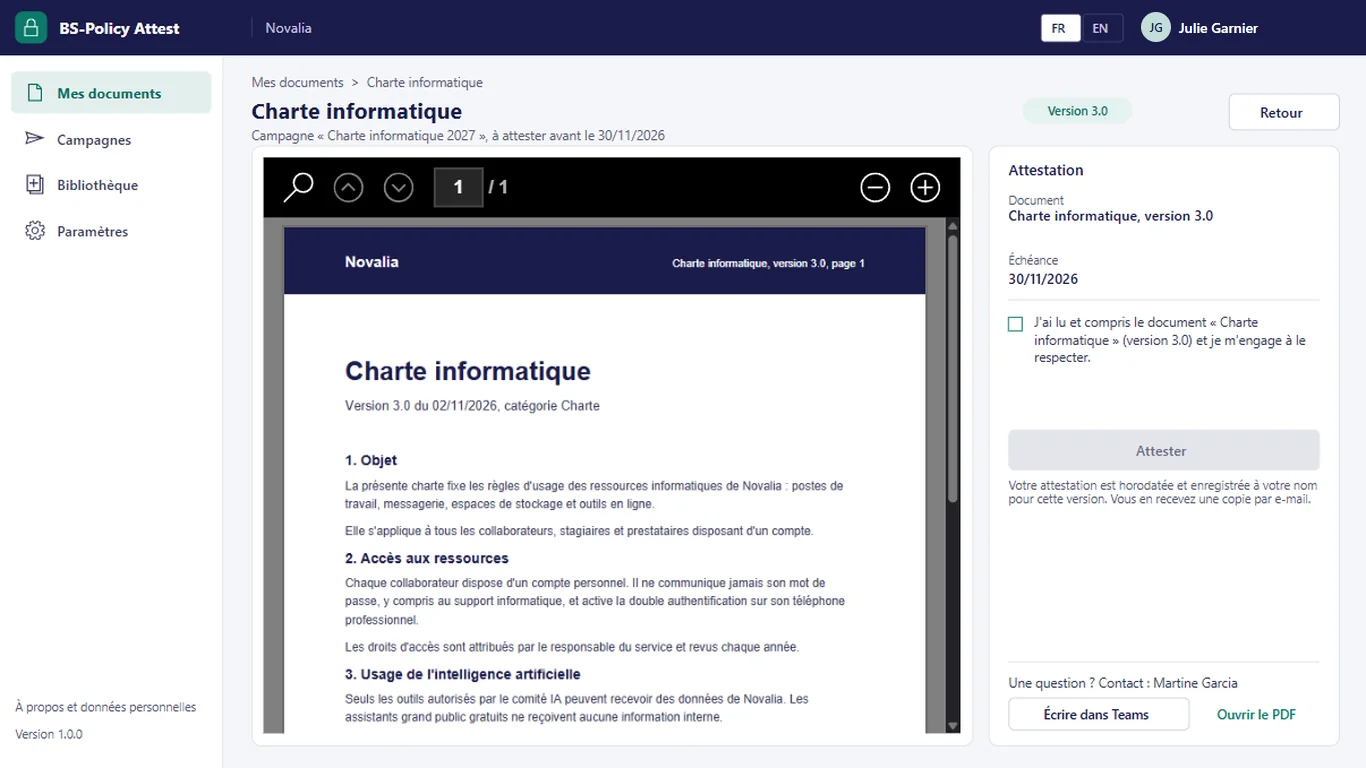
Each attestation records the date, time, document version and accepted commitment text. Users cannot change it.

Get internal policies read, and keep the proof.
BS-Policy Attest organises the reading of documents that bind employees: IT charter, code of conduct, security procedure. The manager starts a campaign aimed at Microsoft 365 groups, the app reminds late readers and records each attestation, time-stamped and linked to the version read. Data stays in your Microsoft 365.
# why
# benefits
Each attestation records the date, time, document version and accepted commitment text. Users cannot change it.
Late readers are reminded at the interval set for the campaign, until the deadline. The manager can also remind them in one click.
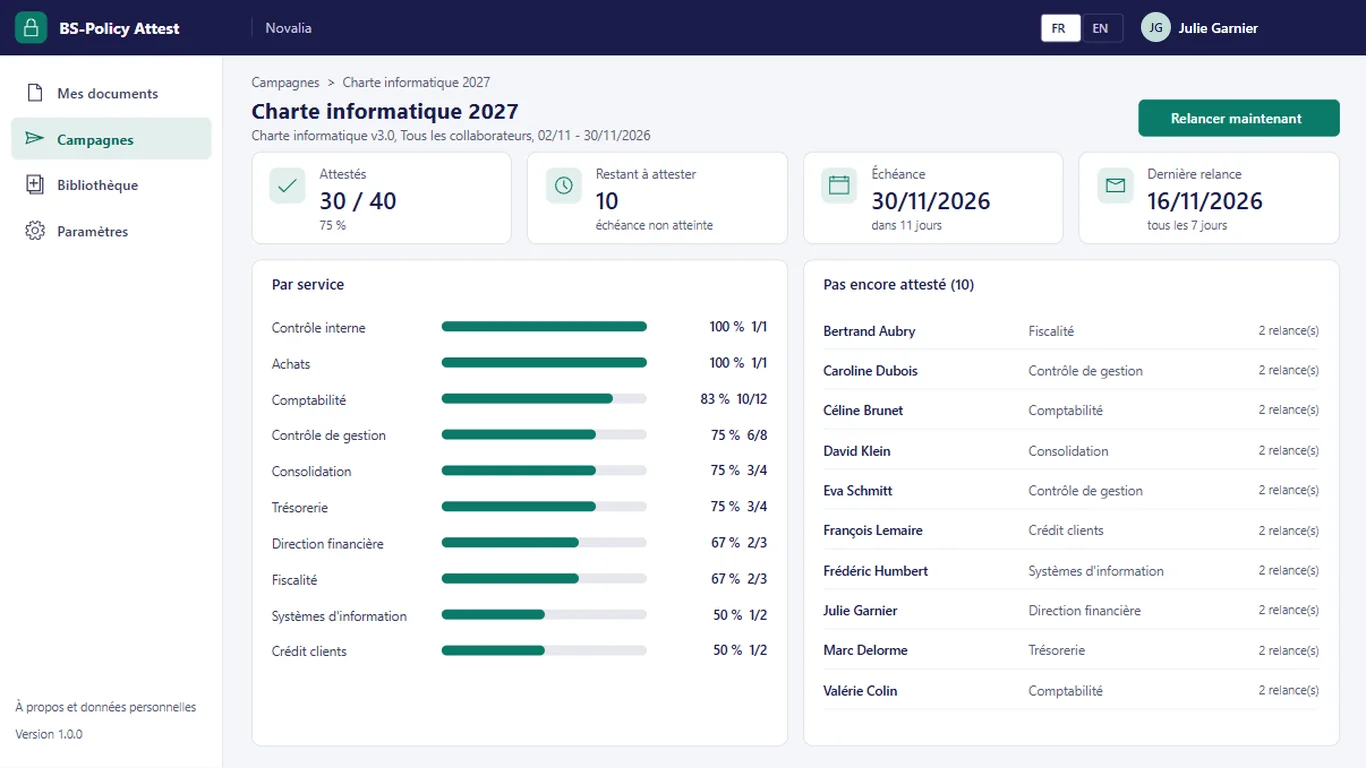
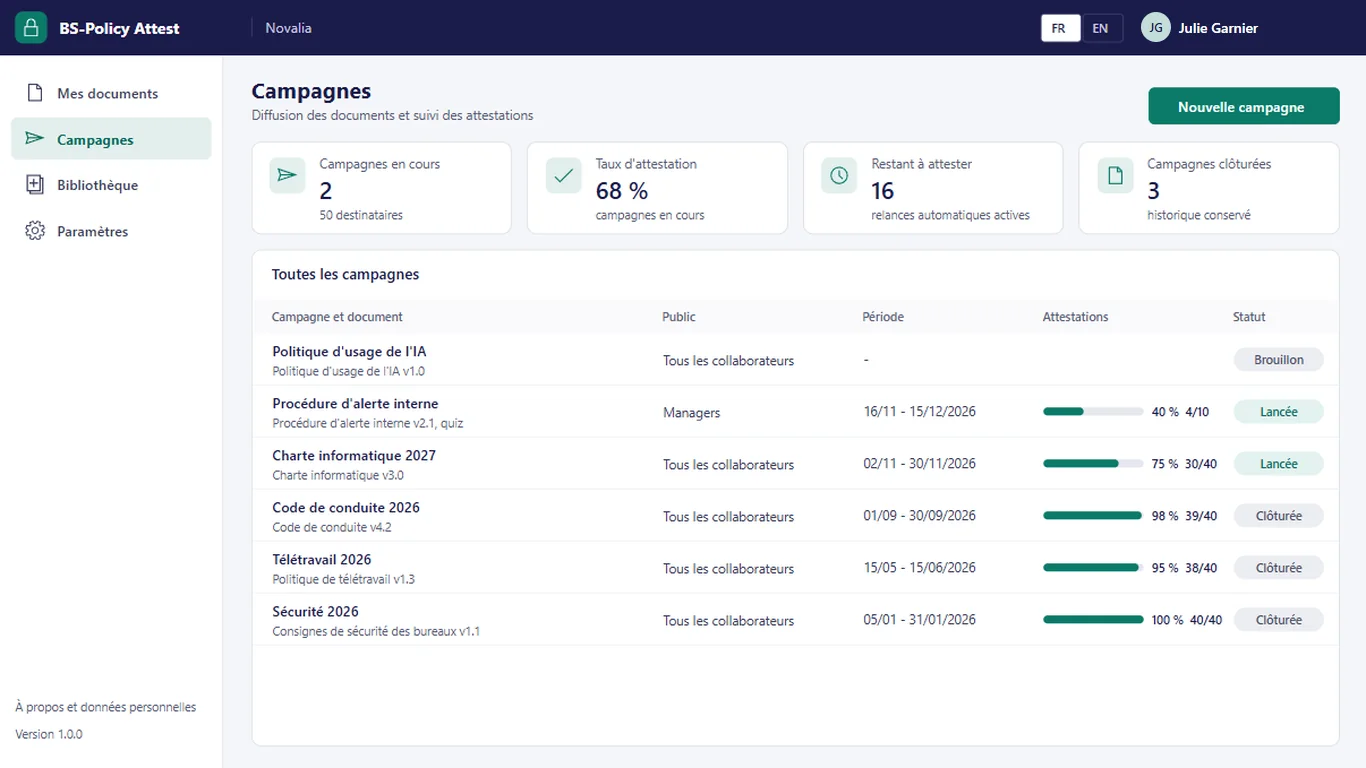
Each campaign shows attestations, readers still to go and progress by department.
An optional quiz makes the attestation depend on a minimum number of correct answers.
Documents, recipients and attestations are stored in a SharePoint site of your tenant.
# features
The manager prepares the campaign, the app distributes, reminds and records. Each employee only sees what they have to read.
For each campaign: attested, still to attest, deadline and last reminder. Progress by department shows where to follow up, and the list of late readers is always up to date.
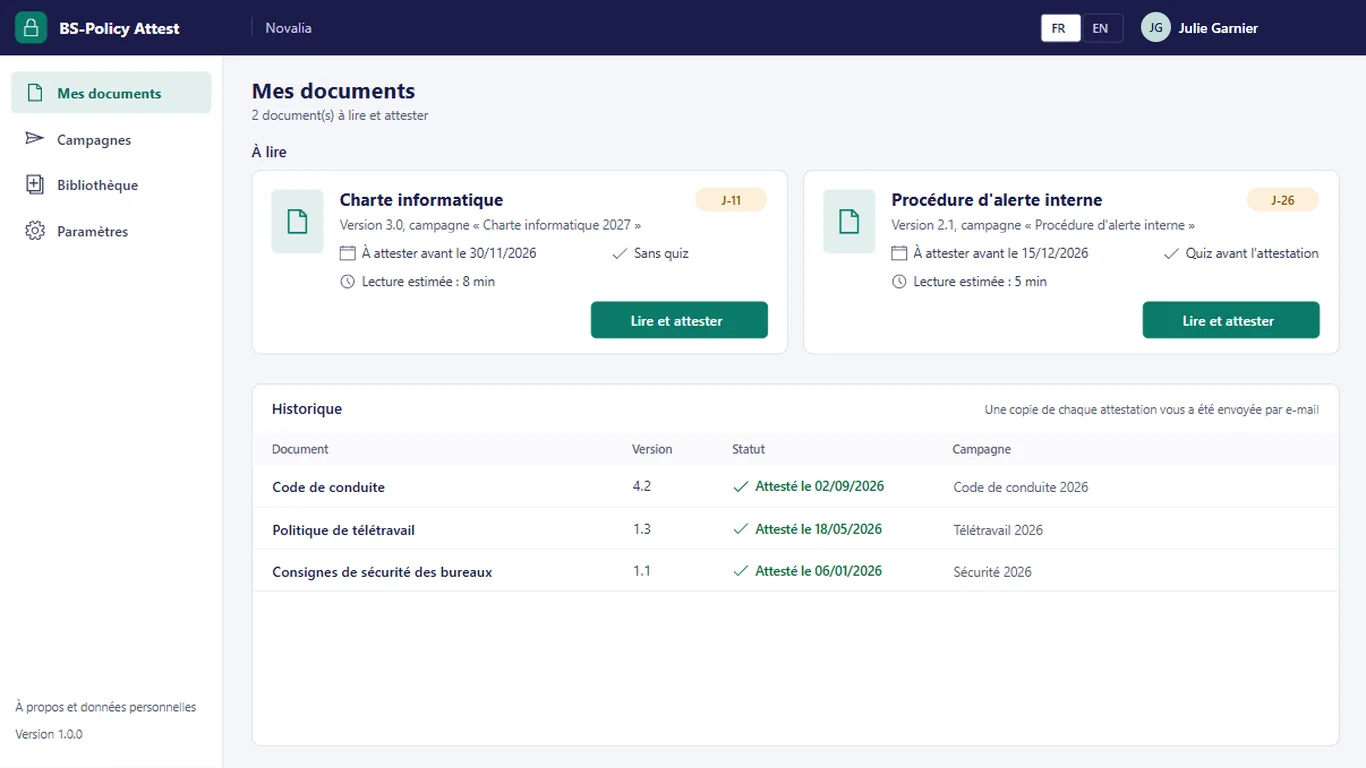
Employees find the documents addressed to them, with their deadline and estimated reading time, then the history of their attestations. A copy of each attestation is sent to them by e-mail.
Document, audience, dates, message, commitment text and reminder interval. At launch, the app creates the recipients from the members of the chosen groups and writes to them.
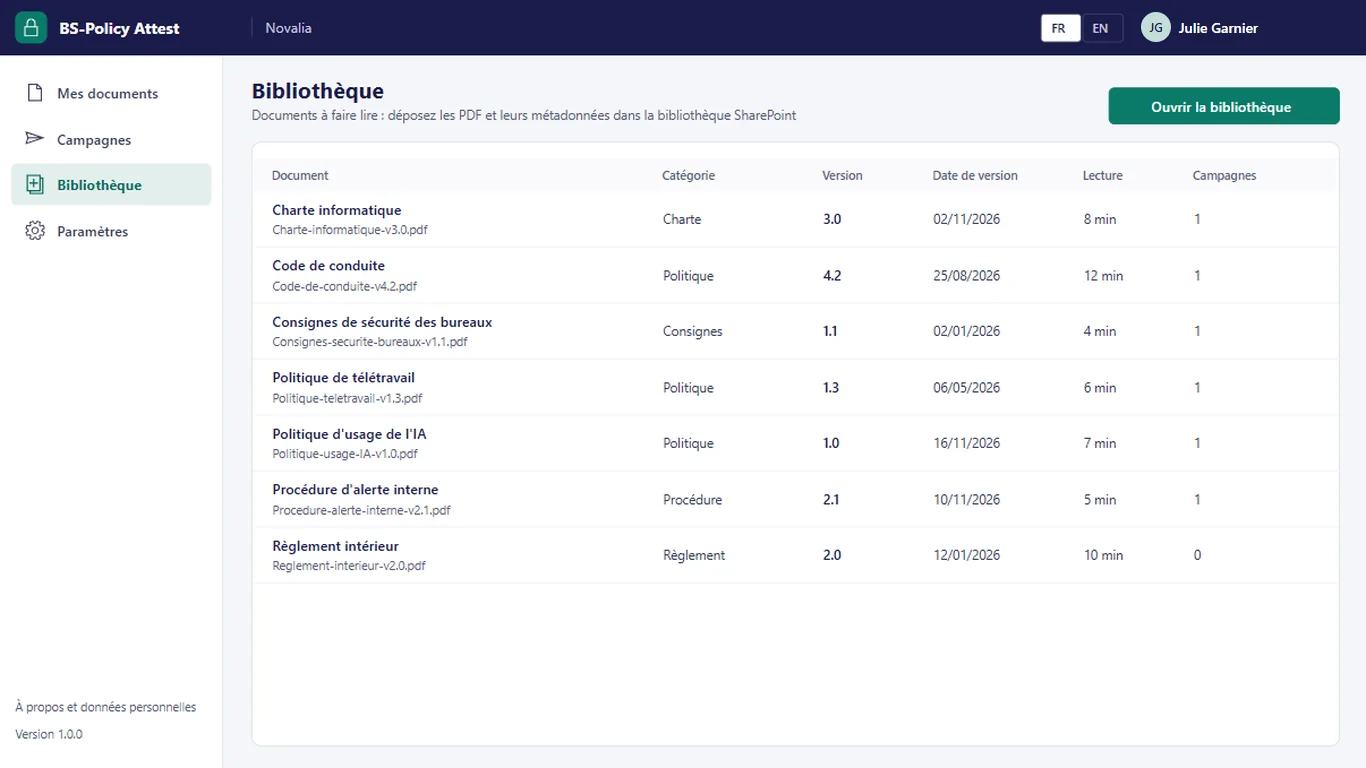
The PDFs to be read are kept in a SharePoint library, with their category, version, version date and estimated reading time. A new version leads to a new campaign; earlier attestations stay linked to their version.
# who it's for
For compliance, human resources, security or quality teams, in organisations equipped with Microsoft 365. Profiles are carried by Microsoft Entra groups.
# use cases
The IT department of a services company publishes the new version of its IT charter. The manager uploads version 3.0 and starts a campaign for all employees, with one month to attest and a weekly reminder. Everyone reads the charter in the app and attests. Progress by department shows where to follow up, the list of late readers stays current, the report arrives at closing and each attestation remains linked to version 3.0.
Compliance wants to make sure managers have understood the internal whistleblowing procedure. The campaign targets the managers group, with a short quiz and a pass mark. The attestation is only recorded after a passed quiz, and the score is kept with it.
The remote work policy moves to version 1.3. HR upload the new version and start a new campaign; employees see it in "My documents". Attestations of the previous version remain available with their version, until the end of the retention period set by the company.
# alternatives
| Alternative | Limitation | What BS-Policy Attest brings |
|---|---|---|
| E-mail with read receipt or Microsoft Forms | Nothing links the answer to the document version; manual reminders and tracking in a spreadsheet | Attestation linked to the version, automatic reminders, tracking by department |
| Training platform or compliance SaaS | Often billed per user and hosted outside the tenant; broader than the need | Focused on reading and attestation, data in your Microsoft 365 |
| Custom development | Cost and lead time of a project, maintenance to plan | Ready-to-use app, delivered with its installation kit |
# data and security
Power Apps, Power Automate and SharePoint, with standard connectors only.
# installation
In the Bret Software demo environment, with fictitious data, on every screen.
A Power Platform environment with Dataverse, a SharePoint site, a service account with a Microsoft 365 licence and a mailbox, Microsoft Entra groups for the profiles (managers, employees), and the groups that will be campaign audiences.
By Bret Software, in your tenant, with the app's kit: lists, settings, audited permissions and Power Platform solution.
Setting of audiences and reminder interval, acceptance in test mode, which sends every e-mail to a single address, then go-live for users.
# frequently asked questions
No. BS-Policy Attest only uses standard connectors: SharePoint, Office 365 Outlook, Office 365 Groups and Office 365 Users. Users need a Microsoft 365 licence that includes Power Apps and Power Automate for Microsoft 365, with no Premium option. A service account, with a Microsoft 365 licence and a mailbox, runs the flows. Your administrator checks the plans available in your tenant.
In a SharePoint site of your Microsoft 365 tenant, dedicated to the app. No data is sent to Bret Software or to any third-party service: there is no external server. Any e-mails are sent through your organisation's Outlook connector. Permissions are set list by list for each group, and an append-only log records the actions.
Bret Software installs the app in your tenant in one day, with its kit: lists, settings, permissions and Power Platform solution. You provide a Power Platform environment with Dataverse, a service account with a Microsoft 365 licence and Microsoft Entra groups for the profiles. On request, we import your existing data and adapt the logo and colours.
Yes. The interface is available in French and English. The app opens in the browser language the first time, then remembers each user's choice. E-mails are sent in the recipient's language, or in French then English when it is not known or when the message goes to several people. Labels can be edited in a SharePoint list.
Yes. We give you access to the Bret Software demo environment: the app runs there with fictitious data, on every screen. You explore it with your teams before deciding. The price is set on quotation, according to your context and the adaptations you want, such as importing your existing data.
Yes. Each campaign targets one or more audiences, that is Microsoft 365 or security groups from your Microsoft Entra directory. At launch, the app creates the list of recipients from the members of these groups and sends them an e-mail. Managers declare the audiences once in the settings, then reuse them from one campaign to the next.
No, not by users. The attestation is written by a flow running under a service account, in a list where employees have no write permission. It records the time stamp, document version, commitment text and quiz score. Only the scheduled purge deletes it, at the end of the retention period set by your organisation.
You upload the new version to the library and start a new campaign. Attestations already recorded stay linked to the version read: the history shows who attested which version, and when. Employees see the new campaign in "My documents", with its own deadline and reminders.
The quiz is optional and set for each campaign. The manager enters the questions and the minimum number of correct answers. The employee answers after reading; the attestation flow checks the answers and only records the attestation if the pass mark is reached. The score is kept with the attestation.
Demo with fictitious data: library, campaign, reading and attestation, tracking and reminders.


