Nothing forgotten on day one
All tasks of the path are created as soon as the arrival is recorded, with their due date.

Make every new hire's arrival a success.
BS-Onboarding organises the onboarding of new employees. HR records the arrival and picks a template path: tasks are created for the manager, IT, facilities and the buddy, with due dates calculated from the start date and e-mail reminders sent to each contributor before every task is due.
# why
# benefits
All tasks of the path are created as soon as the arrival is recorded, with their due date.
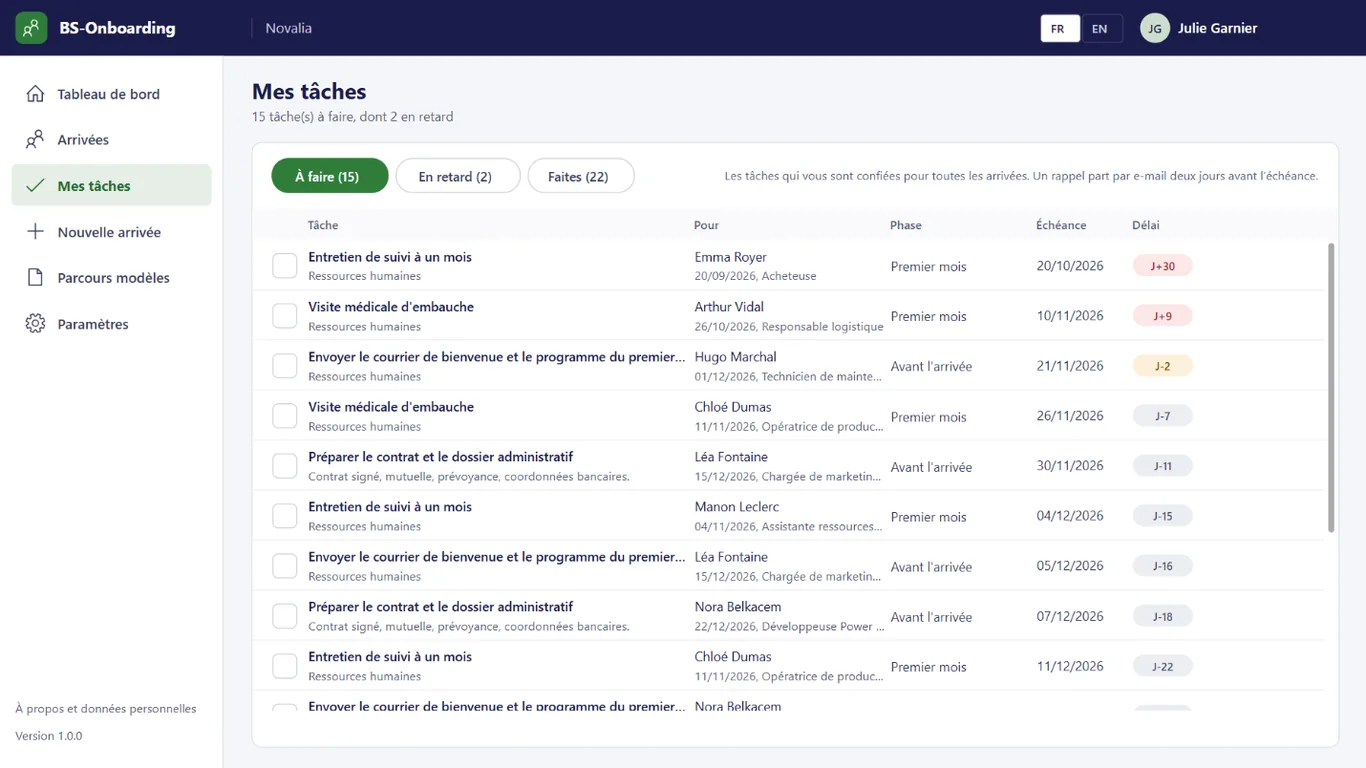
Each contributor sees their tasks in "My tasks" and gets a reminder before they are due.
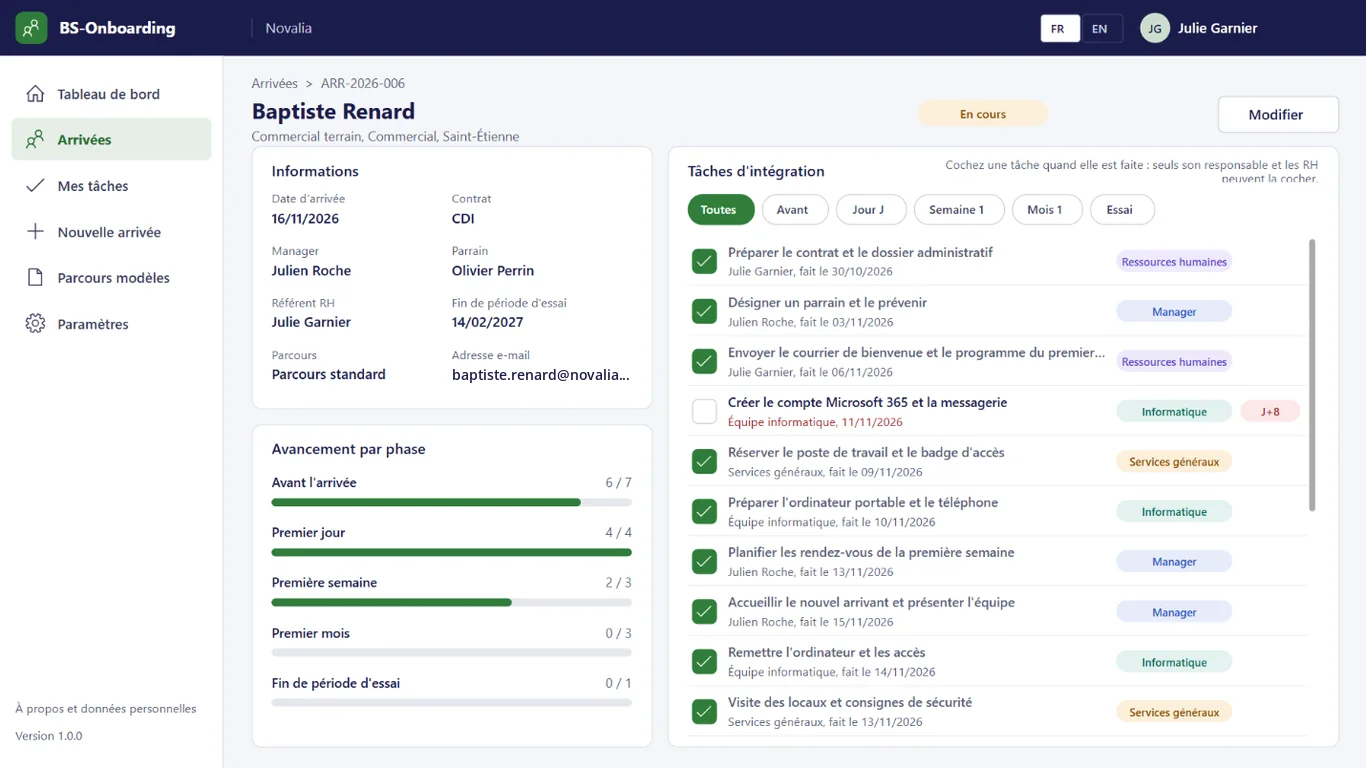
The arrival record shows what is done before arrival, on day one, in the first week and month.
One path per type of role or contract: standard, production, internship and work-study.
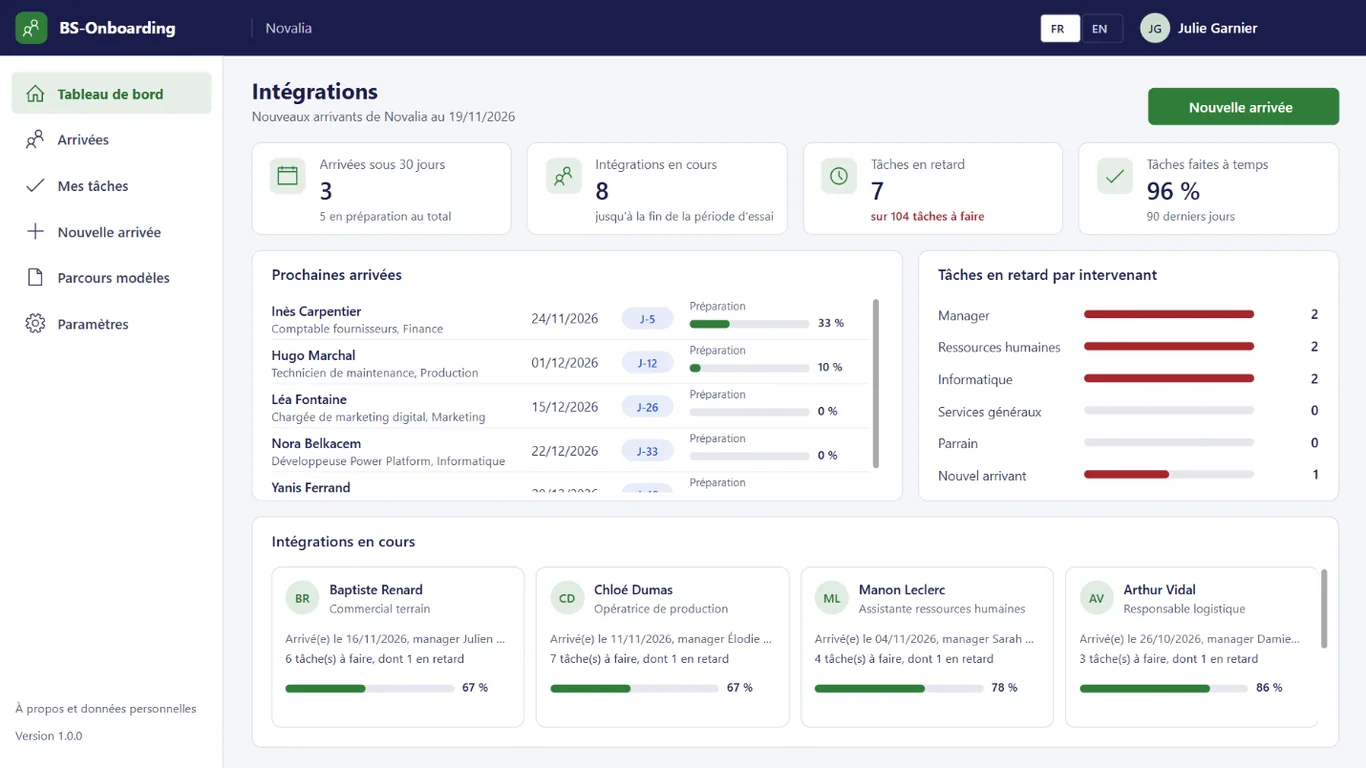
The dashboard shows overdue tasks by contributor and the share of tasks done on time.
# features
HR records the arrival: every department's tasks are created in one go, with due dates calculated from the start date.
The record brings together the arrival's details (role, contract, manager, buddy, HR contact, end of probation) and the onboarding tasks, with the progress of each phase.
Each contributor finds their tasks to do, overdue and done, for all arrivals, with the due date and phase. An e-mail reminder is sent two days before the due date.
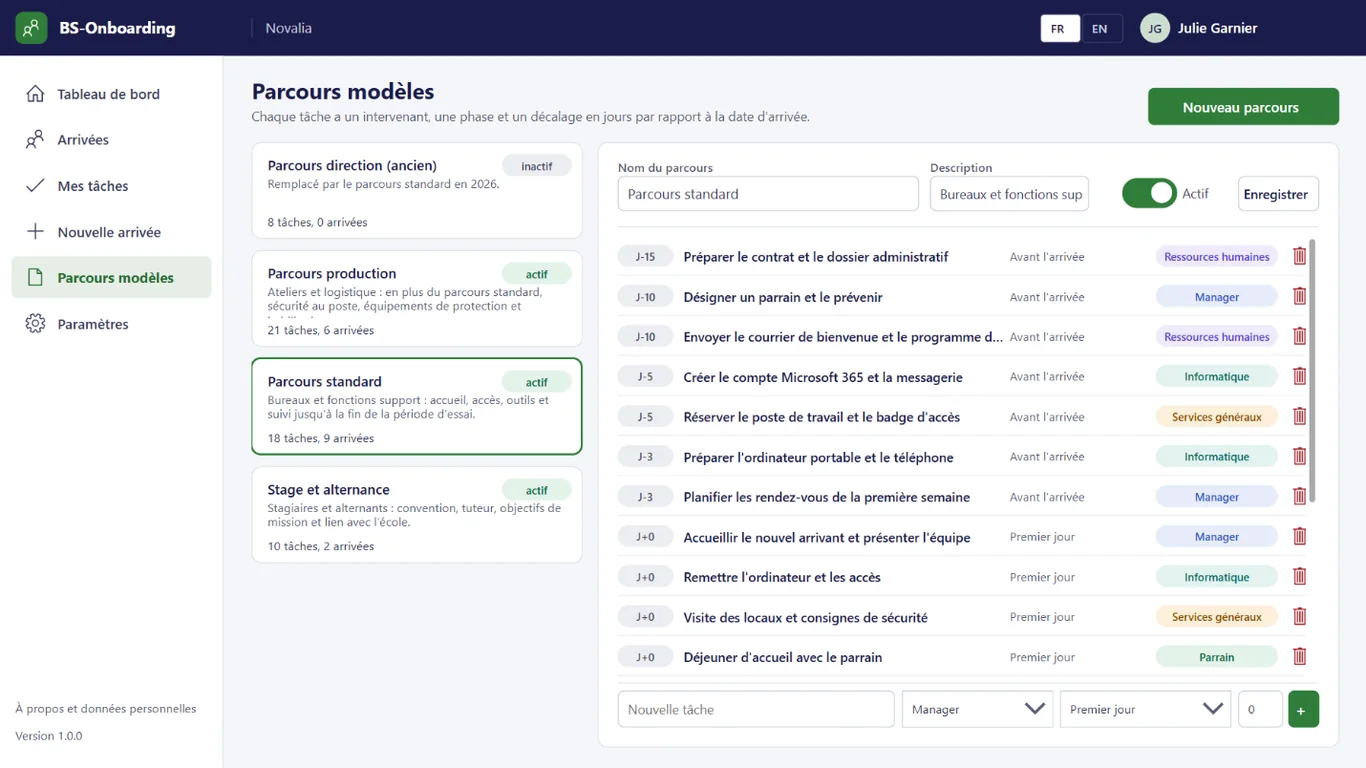
HR keeps the template paths: each task has a contributor, a phase and an offset in days from the start date. A path can be deactivated without being deleted.
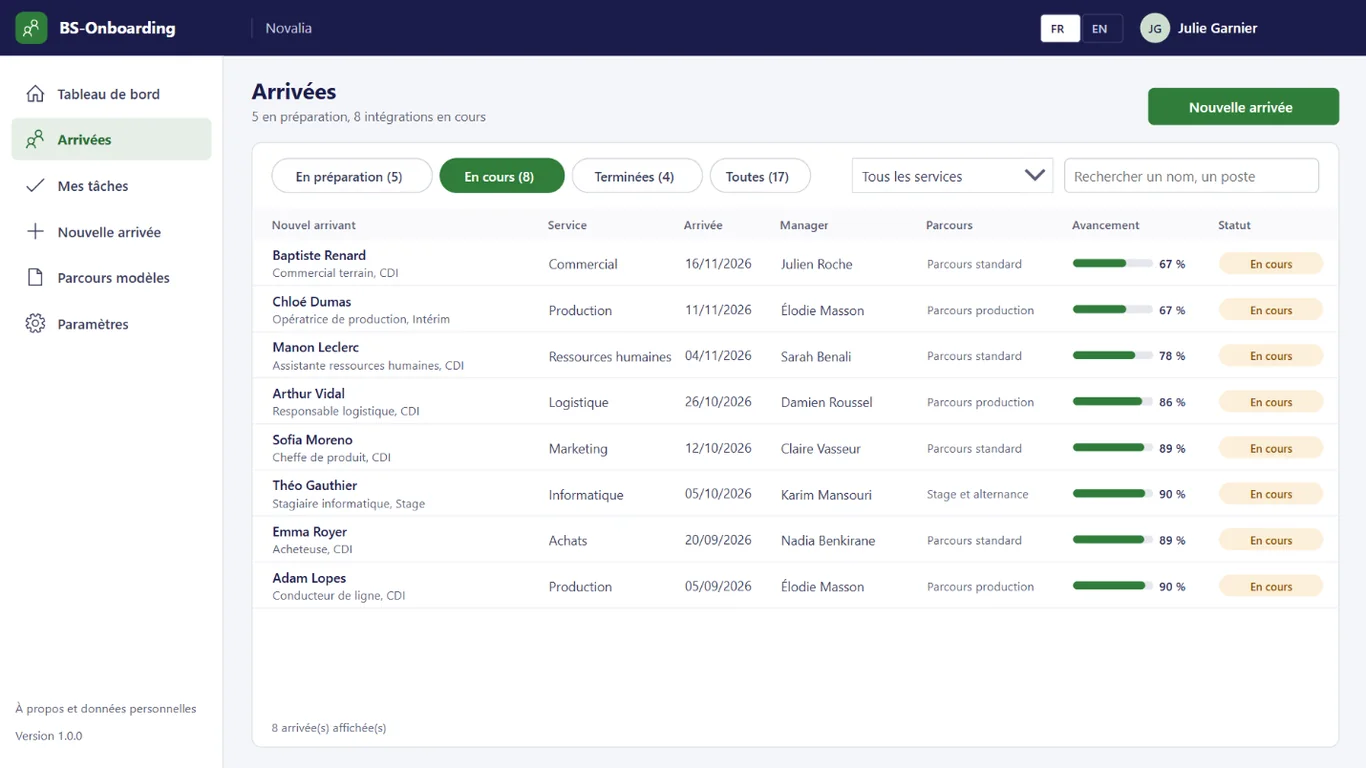
Arrivals in preparation, in progress or completed, with their department, date, manager, path and progress.
# who it's for
For HR, managers and support teams in organisations that regularly welcome new employees.
# use cases
A line operator starts in three weeks. HR records the arrival with the production path. IT, facilities and the manager receive their tasks, with due dates before the arrival. The workstation, safety equipment and welcome are ready on day one.
About ten work-study students arrive in the same week. Each arrival gets the internship and work-study path. The dashboard shows overdue tasks by contributor. HR can see where to follow up without keeping a separate list.
End-of-probation reviews are often late. The path includes a task for the manager at the end of probation, with a reminder a few days before. The review is scheduled on time and recorded in the app.
# alternatives
| Alternative | Limitation | What BS-Onboarding brings |
|---|---|---|
| Checklist in a spreadsheet | No split by department, no calculated due date, no reminder, no overall view | Tasks split by contributor, calculated due dates, reminders, progress by phase |
| Onboarding module of an HR SaaS | New hires' data outside the tenant, per-employee subscription, often limited to HR tasks | Every department in the same path, data in your Microsoft 365 |
| Custom development | Cost and lead time of a project, maintenance to plan | Ready-to-use app, delivered with its installation kit |
# data and security
Power Apps, Power Automate and SharePoint, with standard connectors only.
# installation
In the Bret Software demo environment, with fictitious data, on every screen.
A Power Platform environment with Dataverse, a SharePoint site, a service account with a Microsoft 365 licence and a mailbox, Microsoft Entra groups for the profiles (HR, contributors), and the IT and facilities team addresses.
By Bret Software, in your tenant, with the app's kit: lists, settings, audited permissions and Power Platform solution.
Setting the template paths, team addresses and sites, acceptance in test mode, which sends every e-mail to a single address, then go-live for users.
# frequently asked questions
No. BS-Onboarding only uses standard connectors: SharePoint and Office 365 Outlook. Users need a Microsoft 365 licence that includes Power Apps and Power Automate for Microsoft 365, with no Premium option. A service account, with a Microsoft 365 licence and a mailbox, runs the flows. Your administrator checks the plans available in your tenant.
In a SharePoint site of your Microsoft 365 tenant, dedicated to the app. No data is sent to Bret Software or to any third-party service: there is no external server. Any e-mails are sent through your organisation's Outlook connector. Permissions are set list by list for each group, and an append-only log records the actions.
Bret Software installs the app in your tenant in one day, with its kit: lists, settings, permissions and Power Platform solution. You provide a Power Platform environment with Dataverse, a service account with a Microsoft 365 licence and Microsoft Entra groups for the profiles. On request, we import your existing data and adapt the logo and colours.
Yes. The interface is available in French and English. The app opens in the browser language the first time, then remembers each user's choice. E-mails are sent in the recipient's language, or in French then English when it is not known or when the message goes to several people. Labels can be edited in a SharePoint list.
Yes. We give you access to the Bret Software demo environment: the app runs there with fictitious data, on every screen. You explore it with your teams before deciding. The price is set on quotation, according to your context and the adaptations you want, such as importing your existing data.
HR records the arrival and chooses a template path. The app then creates all the tasks of the path, each assigned to a contributor: HR, manager, IT, facilities, buddy or the new employee. The due date of each task is calculated from the start date, for example fifteen days before or one week after.
Yes. HR creates as many template paths as needed, for example a standard path, a production path and a path for interns and work-study students. A path can be deactivated without being deleted. Tasks are split into five phases: before arrival, day one, first week, first month and end of probation.
No. Each contributor receives an e-mail reminder a few days before a task is due, two by default, then when it is overdue. They open the app to see their tasks in "My tasks" and tick them once done. A task that does not apply to the arrival can be marked as not applicable.
A completed or cancelled onboarding remains available, then it is deleted with its tasks by a scheduled purge, beyond a period set by the organisation, 24 months by default. The "About and personal data" screen states the purpose, the data processed, the retention periods and the organisation's data protection contact.
Demo with fictitious data: recording an arrival, tasks by contributor, reminders and progress by phase.


