A report in two minutes
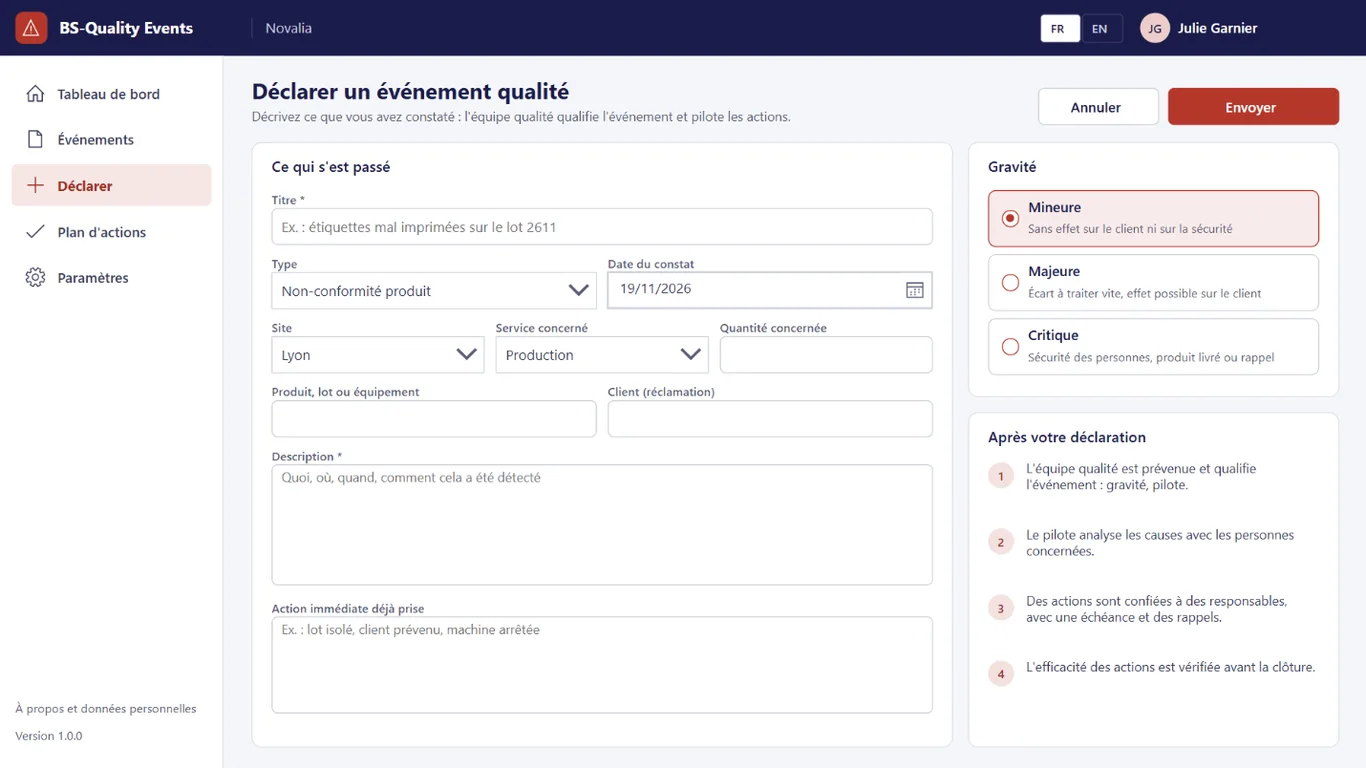
A short form, severity explained on screen and next steps shown to the reporter.


Report, analyse and handle quality events.
BS-Quality Events brings non-conformances, customer complaints, incidents and audit findings together in one register. Every employee reports what they see. The quality team qualifies the event, analyses root causes with the 5M method and assigns actions, with e-mail reminders until they are done and checked for effectiveness.
# why
# benefits
A short form, severity explained on screen and next steps shown to the reporter.
The owner records the 5M family and the five whys on the event record.
Each action has an owner and a due date, with reminders before and after it is due.
An event is only closed once the effectiveness of its actions has been checked.
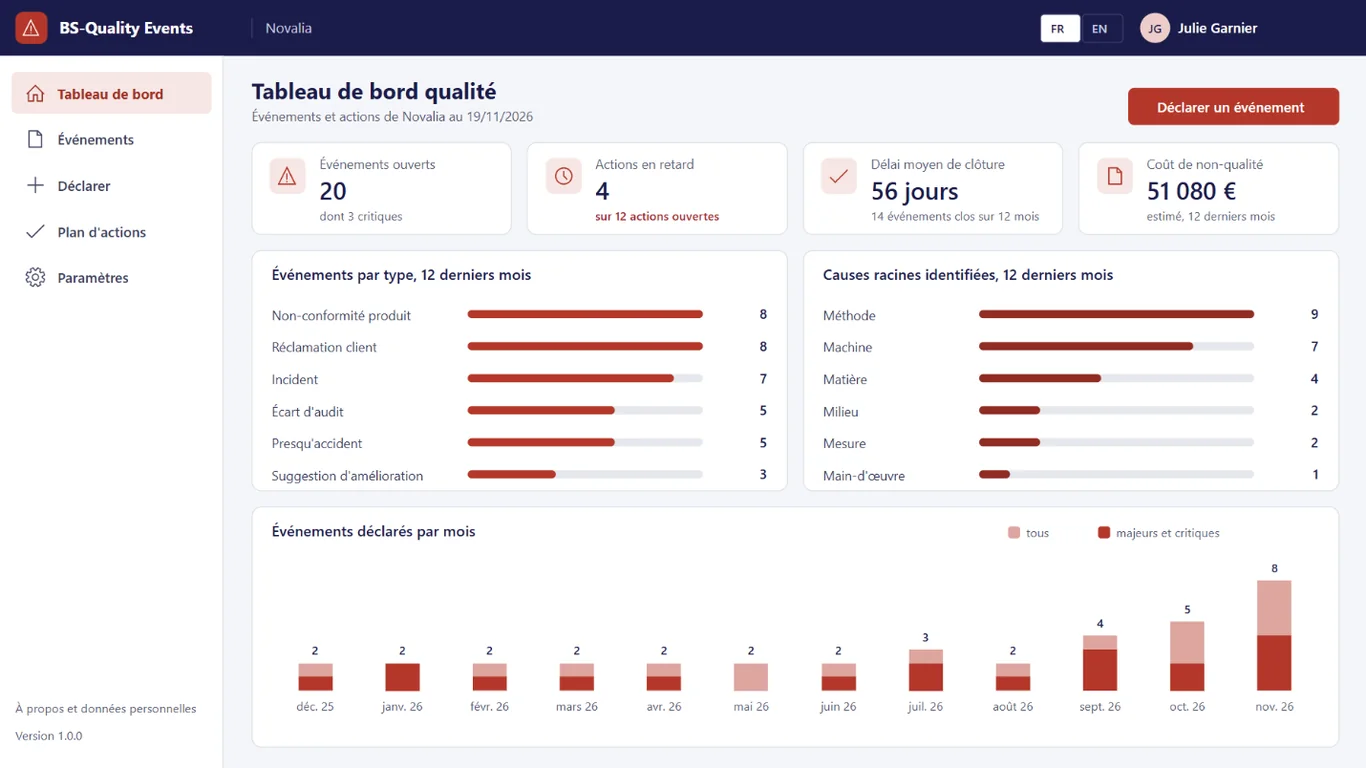
The dashboard adds up estimated costs and shows the most frequent causes.
# features
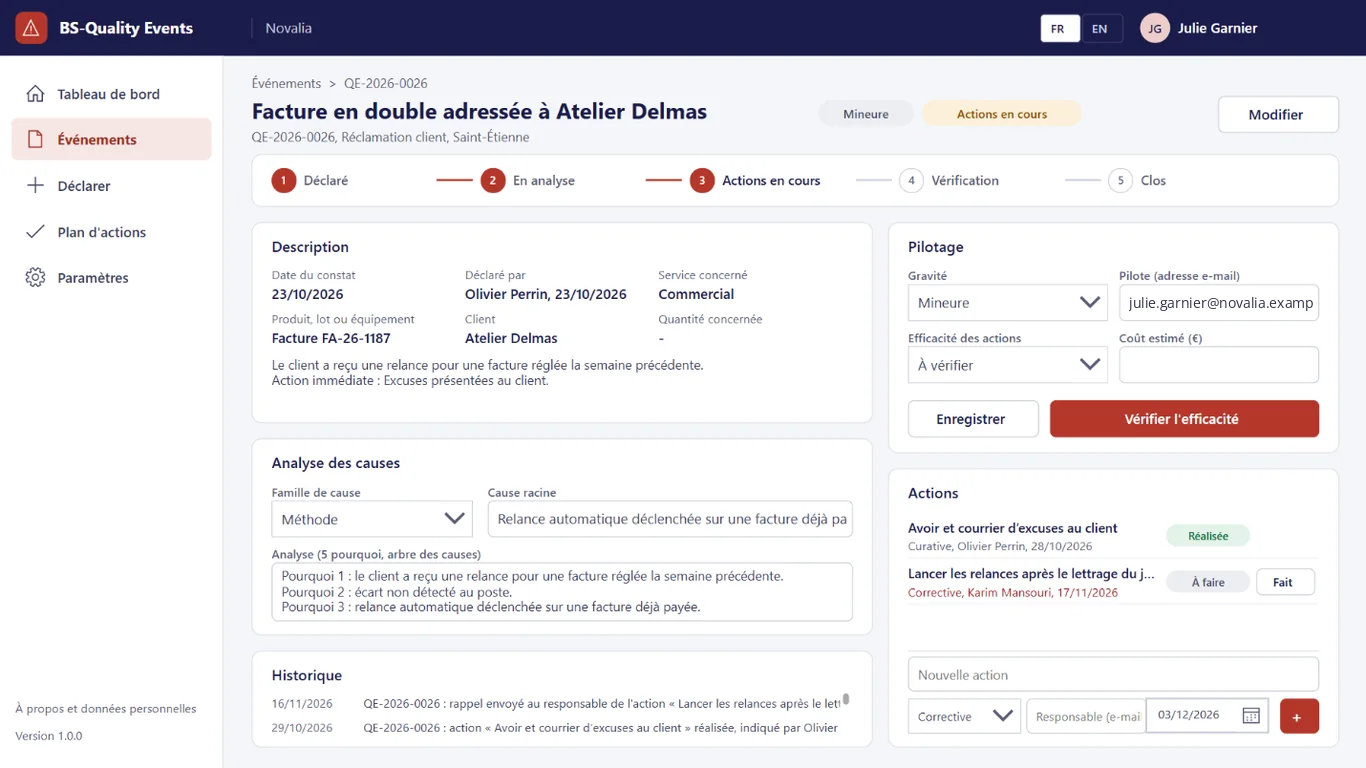
Report, root cause analysis, actions, reminders and effectiveness check: the whole path of an event fits on its record, with the history of each step.
The timeline shows progress from report to closure. The owner records the severity, estimated cost, root cause analysis and actions, then checks their effectiveness before closing.
A short form: type, date observed, site, department, product or customer concerned, description and immediate action already taken. Severity is chosen from three levels explained on screen, and the reporter sees the next steps.
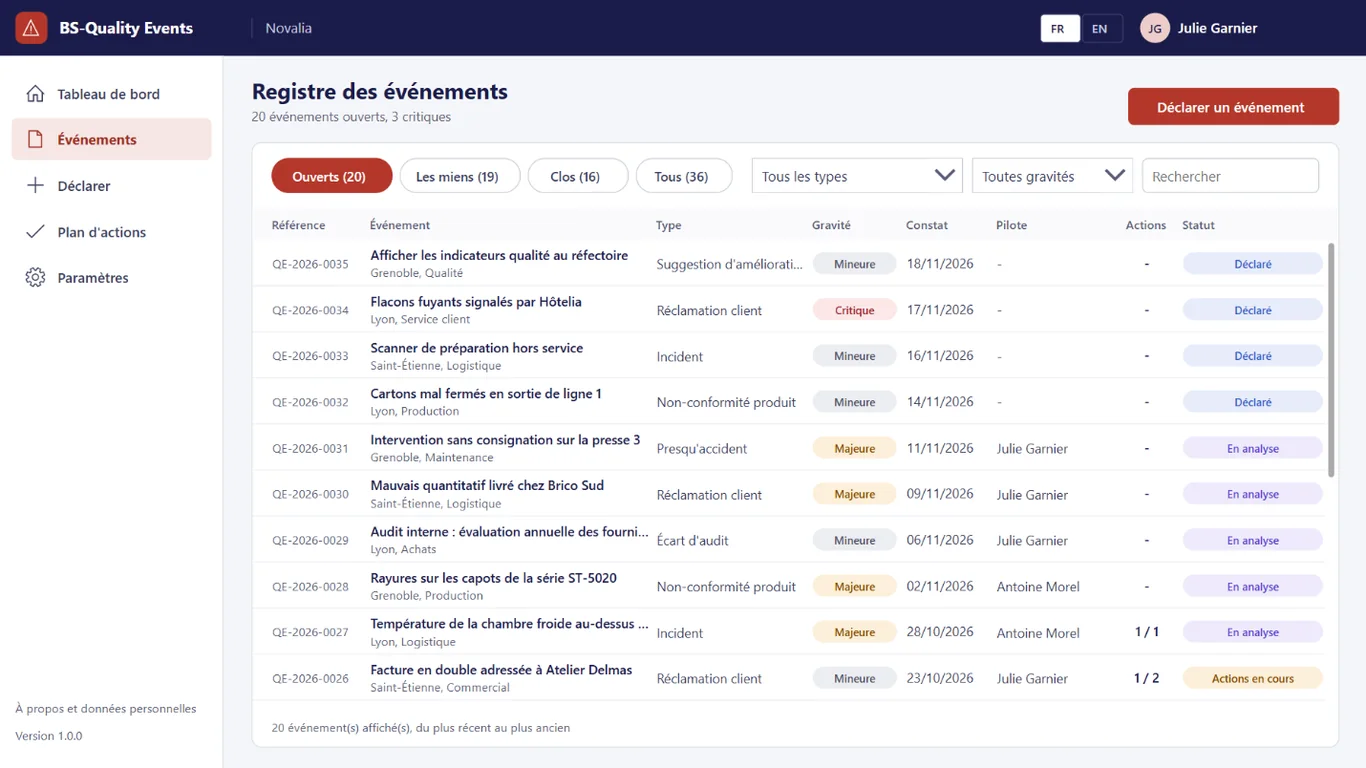
All events with their type, severity, date observed, owner, number of actions and status. Filters by status, type and severity, and search.
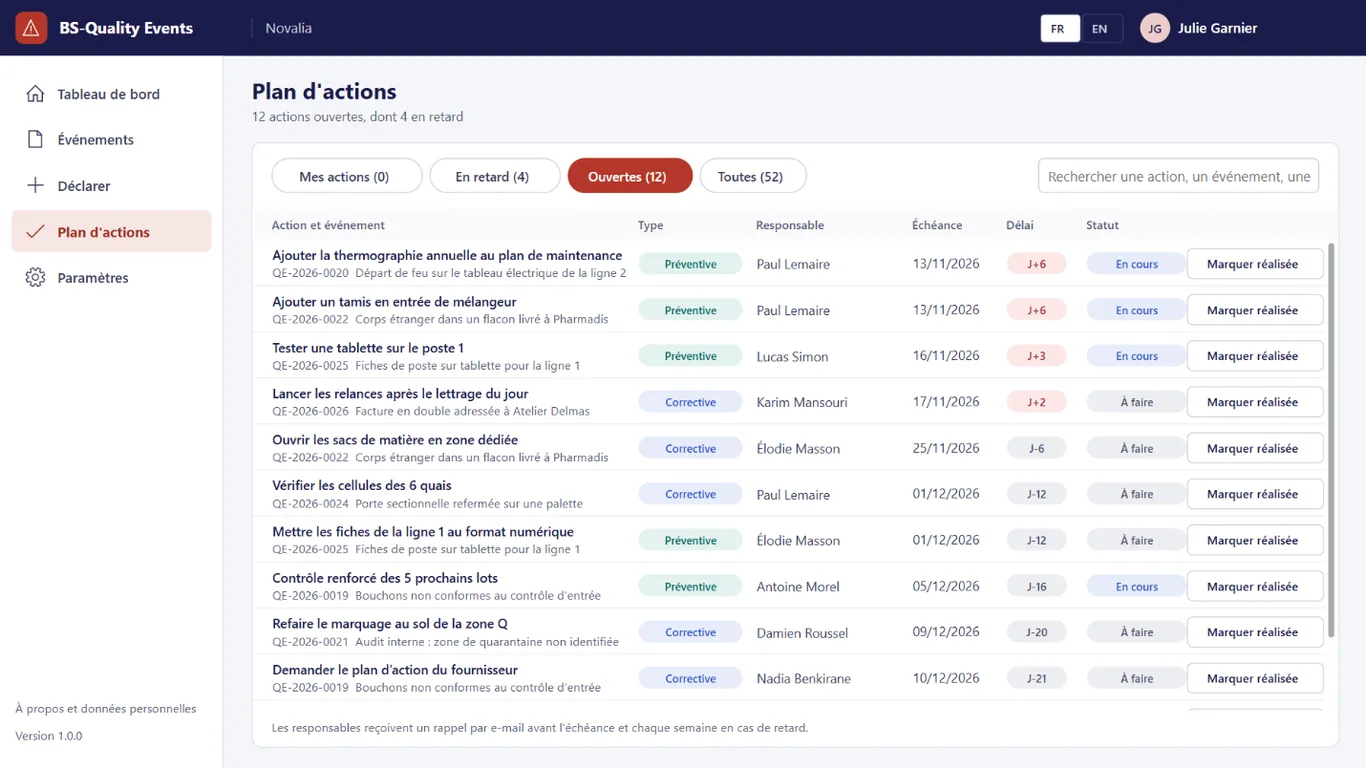
Each action has an owner and a due date. The action plan shows my actions, overdue actions and all open actions; the owner marks it done as soon as it is.
# who it's for
For quality or QHSE managers, operations and site management, in SMEs, mid-sized companies and sites certified or preparing for ISO 9001.
# use cases
A customer reports an invoice sent twice. Customer service reports it as a complaint. The quality team names an owner, who finds the root cause with the five whys and creates a containment action and a corrective action. The customer receives an apology the same day, the faulty automatic reminder is fixed and effectiveness is checked before closing.
An ISO 9001 audit is coming up. The quality manager filters the register on the year, opens each major event and shows the analysis, the actions and their check. Proof of handling is gathered without rebuilding the history from e-mails.
Several corrective actions have passed their due date. Owners receive a reminder every morning; the quality manager follows the "Overdue" tab of the action plan. Delays are visible and handled in meetings, with names and dates.
# alternatives
| Alternative | Limitation | What BS-Quality Events brings |
|---|---|---|
| Shared spreadsheet and e-mails | No report form, no reminder, incomplete history, no consolidated view | Guided report, automatic reminders, history and dashboard |
| Quality management SaaS | Data outside the tenant, per-user subscription, many modules to configure for a need often limited to the register and actions | Focused on the register and actions, data in your Microsoft 365 |
| Custom development | Cost and lead time of a project, maintenance to plan | Ready-to-use app, delivered with its installation kit |
# data and security
Power Apps, Power Automate and SharePoint, with standard connectors only.
# installation
In the Bret Software demo environment, with fictitious data, on every screen.
A Power Platform environment with Dataverse, a SharePoint site, a service account with a Microsoft 365 licence and a mailbox, Microsoft Entra groups for the profiles (quality team, employees), and the quality team address.
By Bret Software, in your tenant, with the app's kit: lists, settings, audited permissions and Power Platform solution.
Setting the quality team address, sites and qualification delay, acceptance in test mode, which sends every e-mail to a single address, then go-live for users.
# frequently asked questions
No. BS-Quality Events only uses standard connectors: SharePoint and Office 365 Outlook. Users need a Microsoft 365 licence that includes Power Apps and Power Automate for Microsoft 365, with no Premium option. A service account, with a Microsoft 365 licence and a mailbox, runs the flows. Your administrator checks the plans available in your tenant.
In a SharePoint site of your Microsoft 365 tenant, dedicated to the app. No data is sent to Bret Software or to any third-party service: there is no external server. Any e-mails are sent through your organisation's Outlook connector. Permissions are set list by list for each group, and an append-only log records the actions.
Bret Software installs the app in your tenant in one day, with its kit: lists, settings, permissions and Power Platform solution. You provide a Power Platform environment with Dataverse, a service account with a Microsoft 365 licence and Microsoft Entra groups for the profiles. On request, we import your existing data and adapt the logo and colours.
Yes. The interface is available in French and English. The app opens in the browser language the first time, then remembers each user's choice. E-mails are sent in the recipient's language, or in French then English when it is not known or when the message goes to several people. Labels can be edited in a SharePoint list.
Yes. We give you access to the Bret Software demo environment: the app runs there with fictitious data, on every screen. You explore it with your teams before deciding. The price is set on quotation, according to your context and the adaptations you want, such as importing your existing data.
The list supplied covers product non-conformance, customer complaint, incident, audit finding, near miss and improvement suggestion. Each report states the site, department, date observed, product or customer concerned and the immediate action already taken. Severity is chosen between minor, major and critical, with an explanation of each level on screen.
The owner named by the quality team classifies the cause in a family of the 5M method: method, material, machine, manpower, environment or measurement. They record the root cause and the five whys reasoning on the event record. The dashboard then counts causes by family, to spot those that keep coming back.
The owner of each action receives a reminder a few days before the due date, three by default, then when it is overdue. The quality team receives every morning the events reported the day before and those still awaiting qualification. During acceptance, test mode sends all these e-mails to a single address.
Yes. The owner enters an estimated cost on each event: scrap, rework, credit note, time spent. The dashboard adds up these costs over the last twelve months and shows them with the number of events by type and by cause. These amounts are estimates entered by the quality team, with no link to accounting.
Demo with fictitious data: report, root cause analysis, action plan, reminders and dashboard.


