An alert before each expiry
Holders and their managers get an e-mail 90 days, then 30 days before expiry, then on the day.


Never let a certification expire again.
BS-Certifications keeps the register of staff licences and certifications: forklift licences, electrical clearances, work at height, first aid, technical certifications. Each role has its requirements; the matrix shows who is up to date, what is missing and what expires, and holders and managers are warned 90 days ahead.
# why
# benefits
Holders and their managers get an e-mail 90 days, then 30 days before expiry, then on the day.
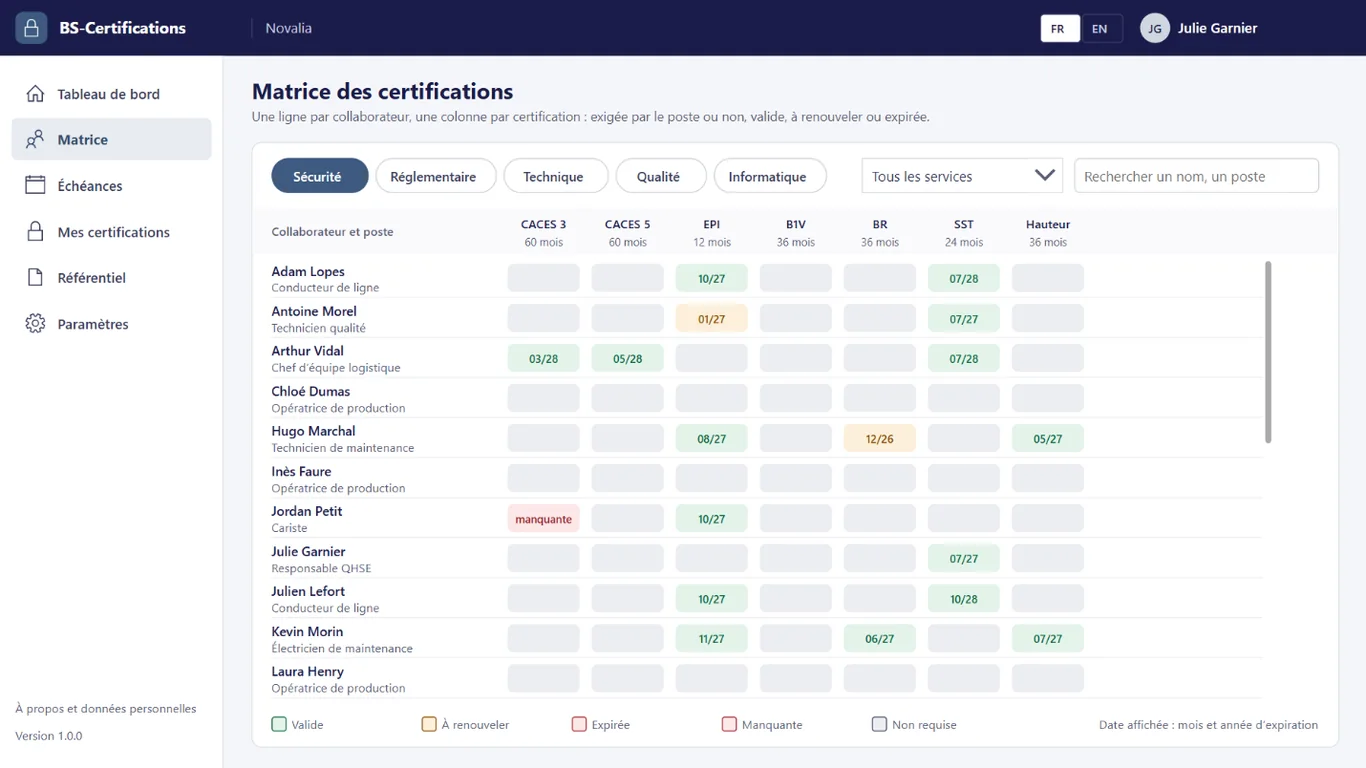
The matrix compares certifications held with the requirements of each person's role.
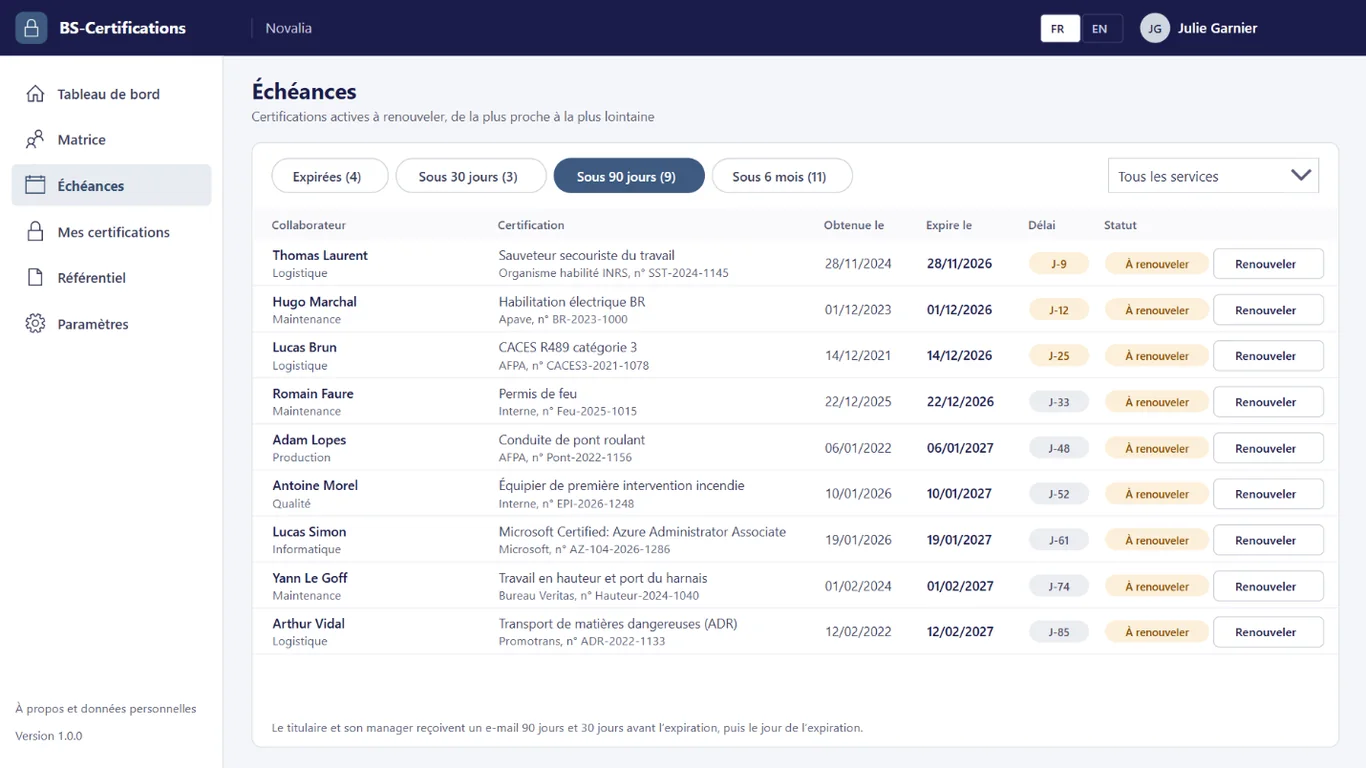
The due dates screen lists what expires within 30 days, 90 days or 6 months.
The PDF of each certification is attached to its record, ready for an inspection.
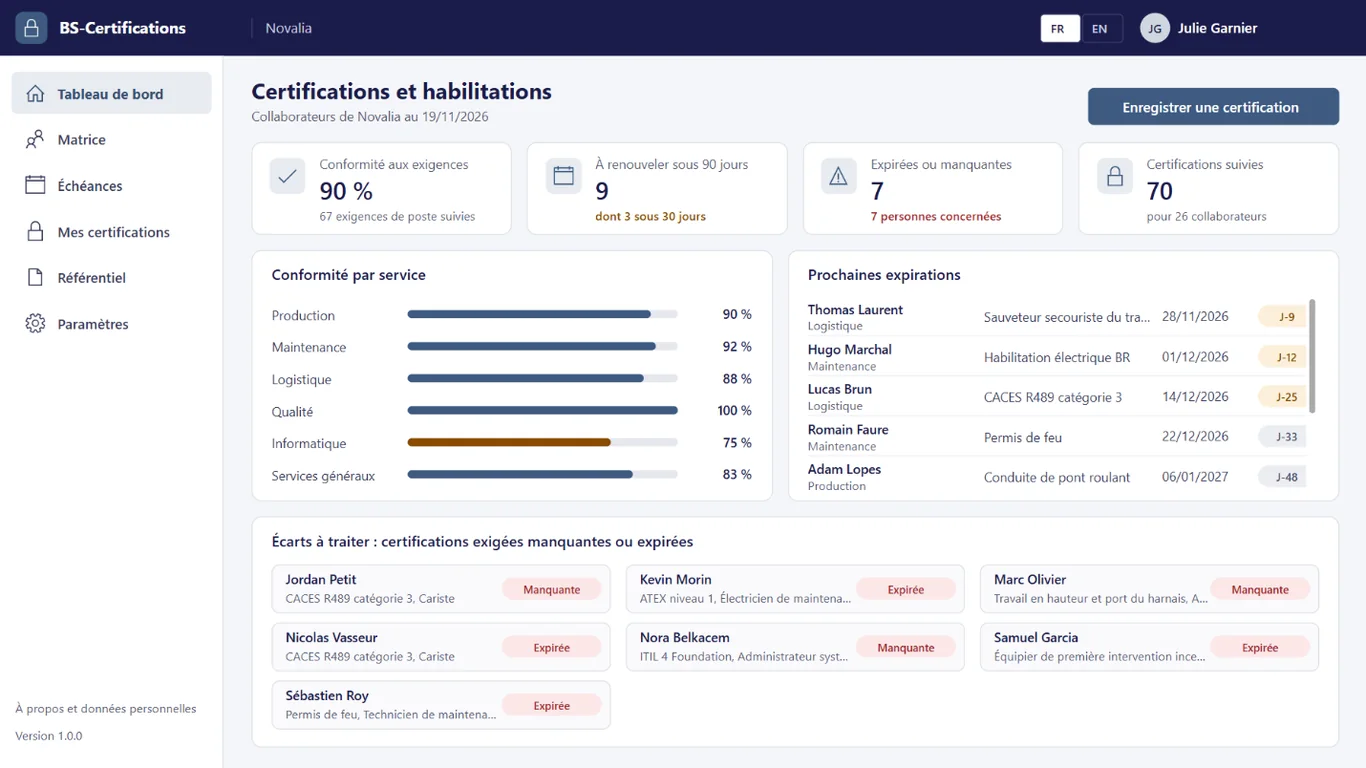
The dashboard gives the rate of compliance with requirements and the gaps to handle.
# features
The matrix compares what each person holds with what their role requires, and alerts go out on their own before each expiry.
Rate of compliance with requirements, certifications to renew within 90 days, expired or missing, compliance by department and upcoming expiries: enough to know where to act.
Certifications that have expired or must be renewed within 30 days, 90 days or 6 months, from the nearest to the furthest, with a renewal button and a filter by department.
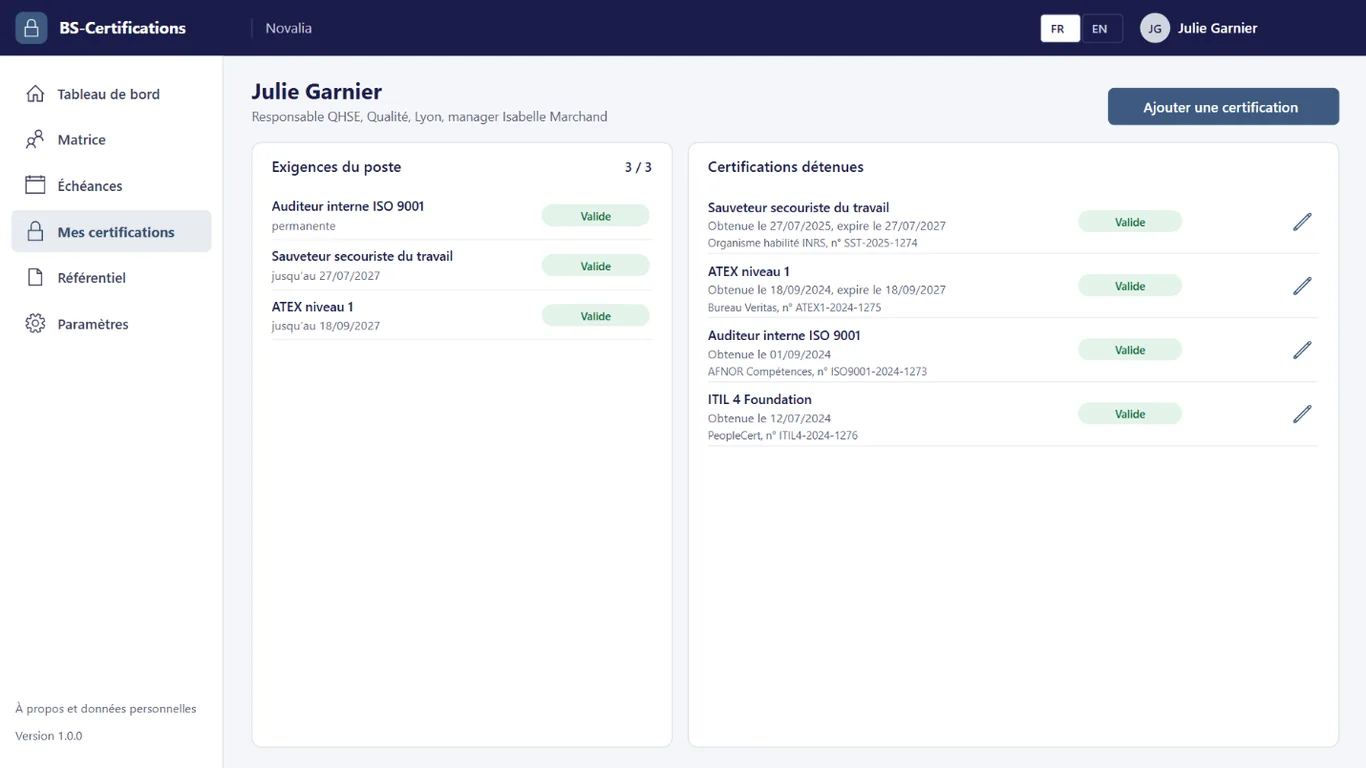
Employees see their role's requirements and the certifications they hold, with their date obtained, expiry and issuing body. They cannot see other people's.
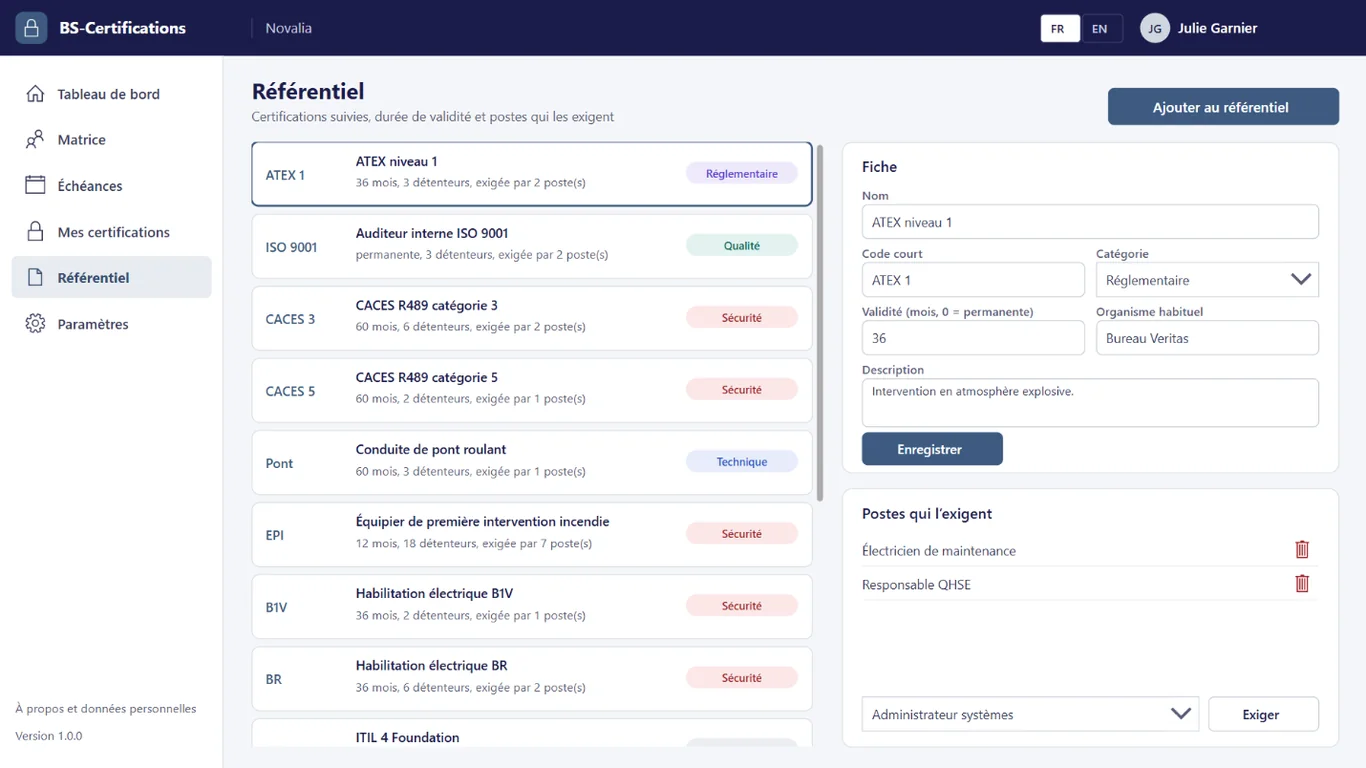
Each certification has a code, a category, a validity period in months, or none if it is permanent, a usual issuing body and the roles that require it. The expiry date is calculated on entry.
# who it's for
For QHSE, training or HR managers, in organisations that must prove their staff's certifications: forklift licences, electrical clearances, work at height, first aid.
# use cases
An inspection covers machine operators. The QHSE manager filters the matrix on the safety category and opens the PDF certificates of the forklift licences. The proof is presented in a few minutes, with expiry dates.
Several electrical clearances expire in the spring. The training manager checks the "Within 6 months" tab of the due dates and groups the refresher sessions. Renewals are planned ahead, with no emergency session.
A maintenance technician changes role. The manager updates their role; the matrix immediately shows the certifications missing for the new role. The required training is identified before the move.
# alternatives
| Alternative | Limitation | What BS-Certifications brings |
|---|---|---|
| Certification spreadsheet | No alert, no link with role requirements, certificates kept elsewhere | Automatic alerts, matrix by role, linked certificates |
| Training module of an HR SaaS | Employee data outside the tenant, per-employee subscription, expiry tracking often secondary | Focused on expiries and role compliance, data in your Microsoft 365 |
| Custom development | Cost and lead time of a project, maintenance to plan | Ready-to-use app, delivered with its installation kit |
# data and security
Power Apps, Power Automate and SharePoint, with standard connectors only.
# installation
In the Bret Software demo environment, with fictitious data, on every screen.
A Power Platform environment with Dataverse, a SharePoint site, a service account with a Microsoft 365 licence and a mailbox, Microsoft Entra groups for the profiles (managers, employees), and the list of people tracked with their role and manager.
By Bret Software, in your tenant, with the app's kit: lists, settings, audited permissions and Power Platform solution.
Setting the catalogue, people tracked, requirements by role and sites, acceptance in test mode, which sends every e-mail to a single address, then go-live for users.
# frequently asked questions
No. BS-Certifications only uses standard connectors: SharePoint and Office 365 Outlook. Users need a Microsoft 365 licence that includes Power Apps and Power Automate for Microsoft 365, with no Premium option. A service account, with a Microsoft 365 licence and a mailbox, runs the flows. Your administrator checks the plans available in your tenant.
In a SharePoint site of your Microsoft 365 tenant, dedicated to the app. No data is sent to Bret Software or to any third-party service: there is no external server. Any e-mails are sent through your organisation's Outlook connector. Permissions are set list by list for each group, and an append-only log records the actions.
Bret Software installs the app in your tenant in one day, with its kit: lists, settings, permissions and Power Platform solution. You provide a Power Platform environment with Dataverse, a service account with a Microsoft 365 licence and Microsoft Entra groups for the profiles. On request, we import your existing data and adapt the logo and colours.
Yes. The interface is available in French and English. The app opens in the browser language the first time, then remembers each user's choice. E-mails are sent in the recipient's language, or in French then English when it is not known or when the message goes to several people. Labels can be edited in a SharePoint list.
Yes. We give you access to the Bret Software demo environment: the app runs there with fictitious data, on every screen. You explore it with your teams before deciding. The price is set on quotation, according to your context and the adaptations you want, such as importing your existing data.
Any that the organisation adds to its catalogue: forklift licences, electrical clearances, work at height, ATEX, workplace first aid, but also quality or IT certifications. Each certification has a validity period in months, or none if it is permanent, a category and a usual issuing body. The expiry date is calculated on entry.
The certification holder and their manager. A daily flow sends them an e-mail 90 days before expiry, then 30 days before, then on the day of expiry. The first alert delay is set in the settings. During acceptance, test mode sends all these e-mails to a single address.
Managers state, in the catalogue, the roles that require each certification. The matrix then compares, for each person, the certifications held with their role's requirements. Each cell shows whether the certification is valid, to renew, expired, missing or not required, with its expiry date.
No. Employees see their own certifications and their role's requirements in "My certifications". The matrix, due dates, catalogue and everyone's certificates are reserved for managers. Permissions are set list by list in SharePoint, and certificates are kept in a library with restricted access.
Demo with fictitious data: matrix by role, due dates, alerts and certificates.


