A guaranteed desk on arrival
Employees book on the plan before coming, for a full or half day.


Book your desk at the office and find your team.
BS-Desk Booking organises hybrid work. Each employee books a desk, a focus room or a parking space on the floor plan, for a full or half day. They see who from their team is coming, confirm their presence on arrival, and unconfirmed desks are released for others.
# why
# benefits
Employees book on the plan before coming, for a full or half day.
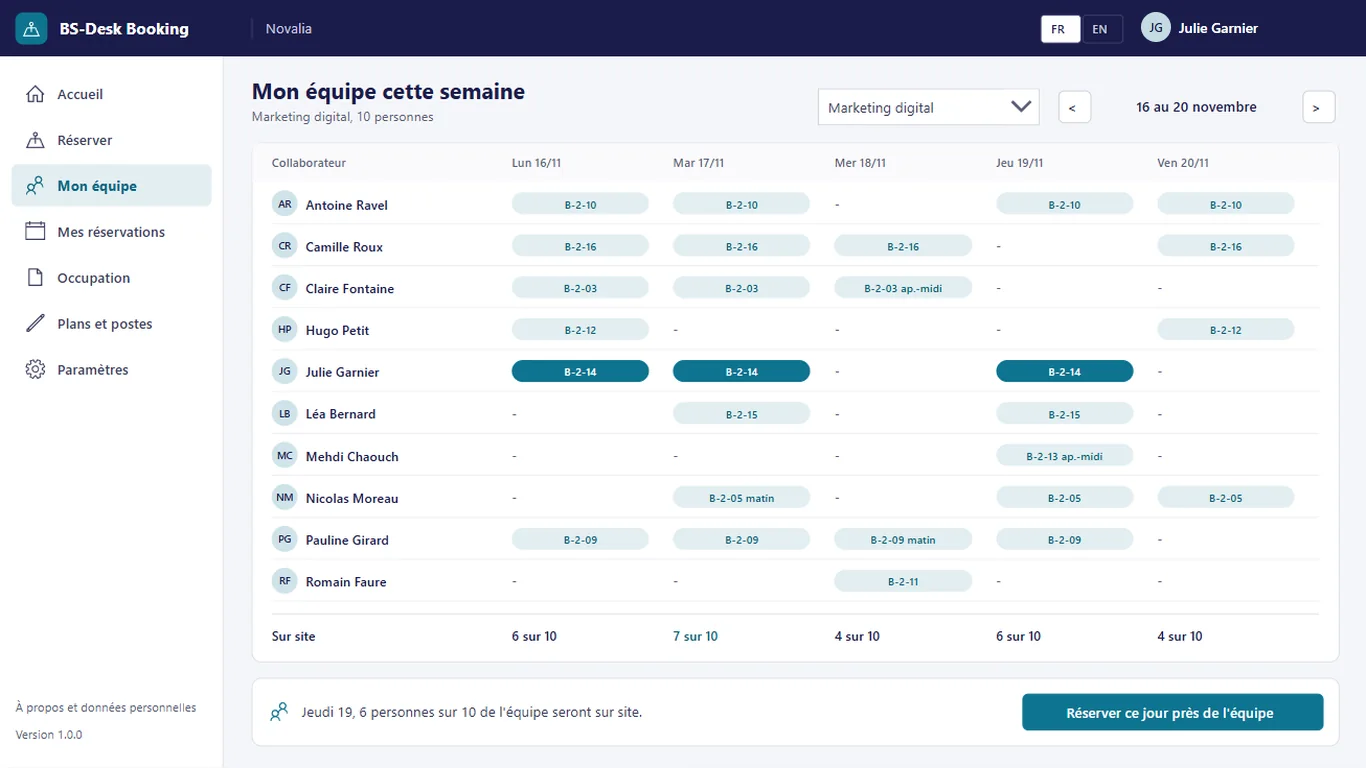
Everyone sees, day by day, who from their team is coming and where they sit.
Bookings not confirmed by the cut-off time are released for others.
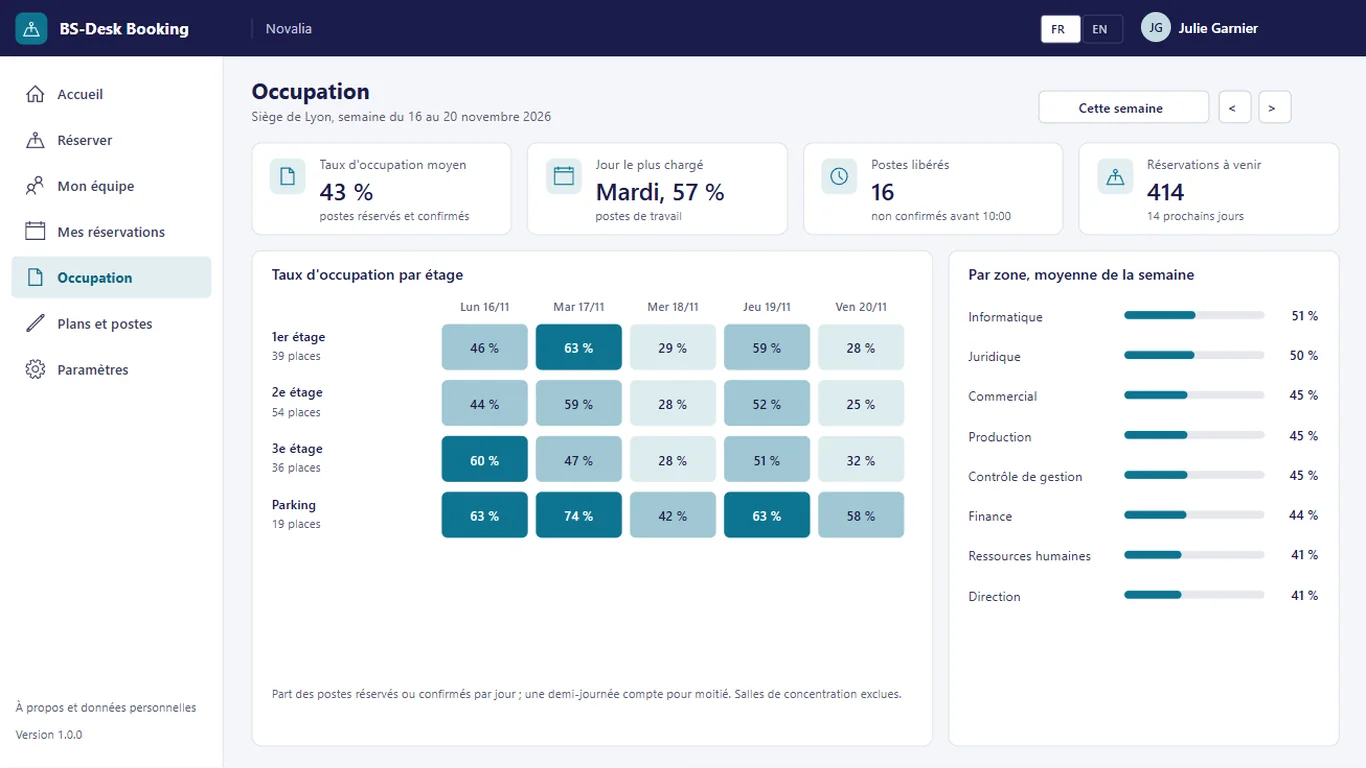
Occupancy rate by floor and by day to size your spaces.
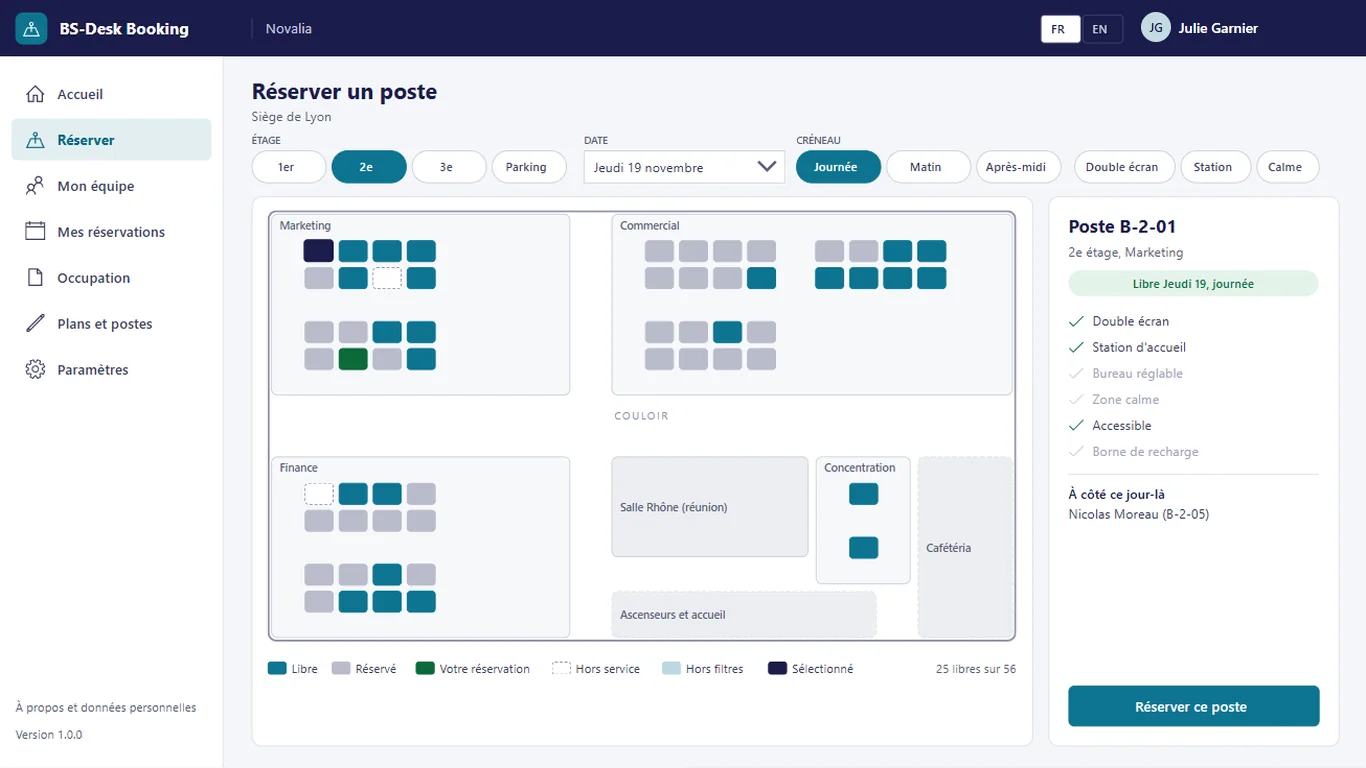
Desks are placed on a grid over a simple background plan.
# features
You choose your day and your desk while seeing where your colleagues will be, and unconfirmed desks go back to others.
Day by day, the "My team" screen shows who comes to the office and at which desk. You choose your days to meet your colleagues, and a button books right next to the team.
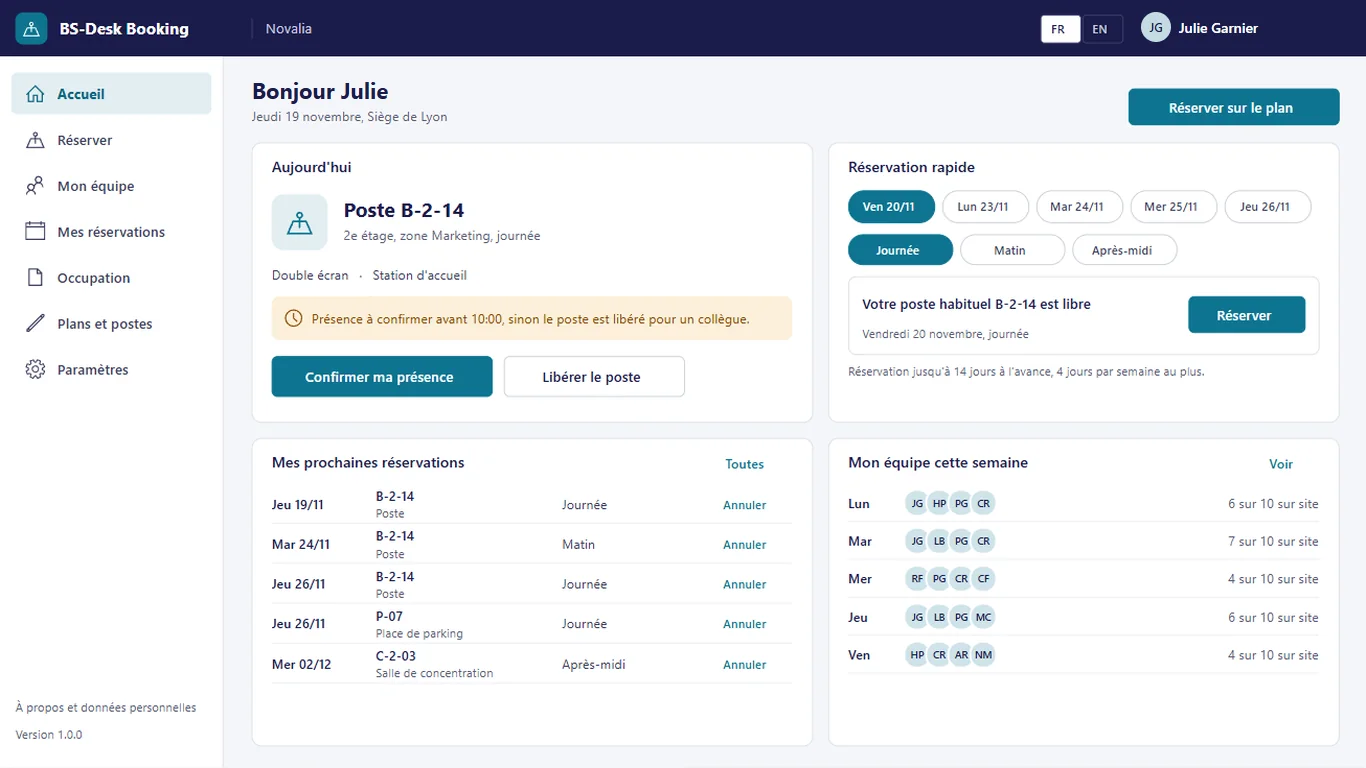
The home screen shows today's booking, presence confirmation and colleagues on site. Quick booking offers the usual desk for the next days.
Occupancy rate by floor and by day, busiest day, released desks and upcoming bookings: enough to size your spaces on real data.
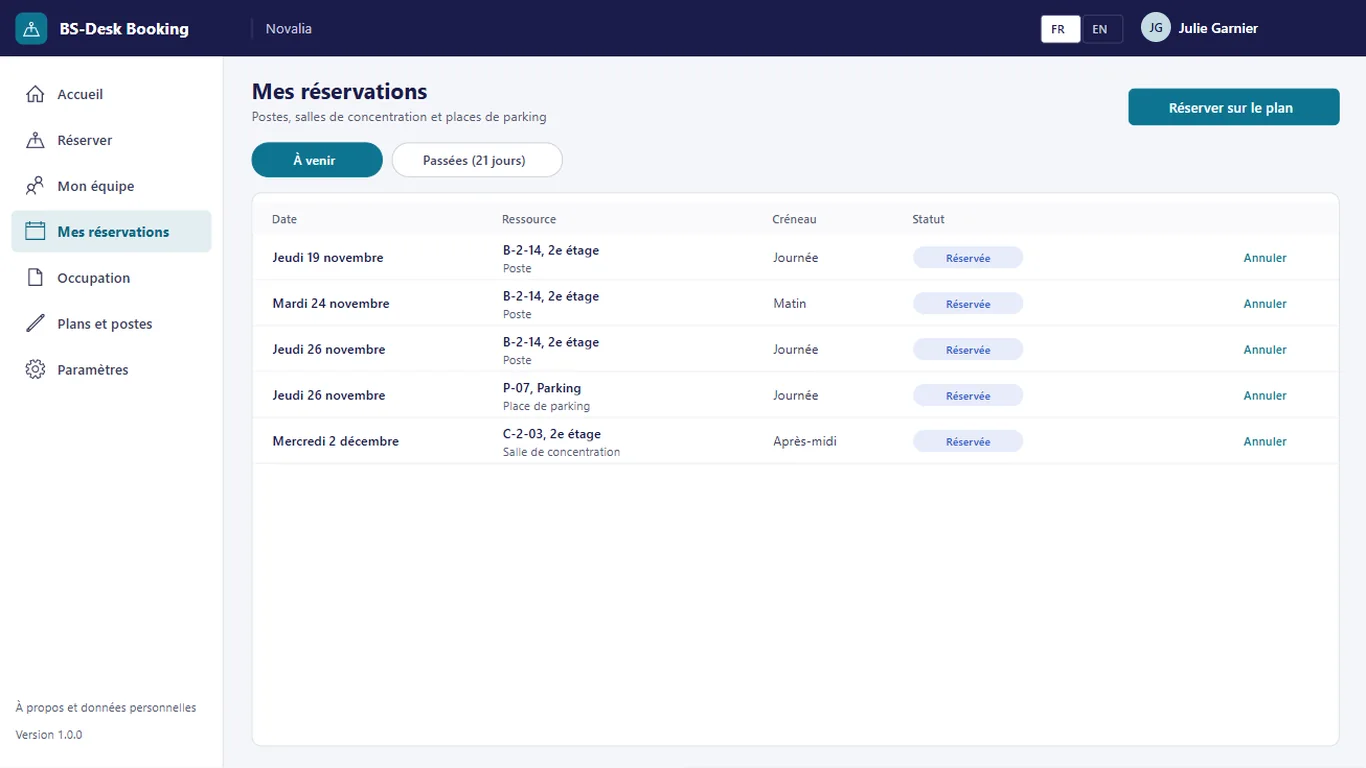
Employees find their upcoming bookings of desks, focus rooms and parking spaces, and cancel them if their plans change.
# who it's for
For sites with a few dozen to a few hundred shared desks, in hybrid work or flex office. Facilities keep the plans in the app, without drawing software.
# use cases
A team of fifteen people in hybrid work wants to meet once a week. The manager suggests Thursday; everyone opens "My team", sees who has already booked and chooses a nearby desk on the plan. The team sits in the same area on Thursdays, without an exchange of e-mails.
Facilities notice desks that are booked but where nobody shows up. They turn on automatic release with a confirmation cut-off time in mid-morning. Unconfirmed desks become free again during the day and benefit other employees.
Real estate management is questioning how a floor is used. It looks at occupancy by floor and by day over several weeks. Redesign decisions rest on booking and presence data.
# alternatives
| Alternative | Limitation | What BS-Desk Booking brings |
|---|---|---|
| Shared spreadsheet or calendar | No plan, no presence confirmation, no occupancy measurement | Floor plan, confirmation and automatic release, occupancy rate |
| Desk booking SaaS | Presence data outside the tenant, subscription per desk or per user, sometimes hardware (sensors, kiosks) | Presence data in your Microsoft 365, no hardware to install |
| Custom development | Cost and lead time of a project, maintenance to plan | Ready-to-use app, delivered with its installation kit |
# data and security
Power Apps, Power Automate and SharePoint, with standard connectors only.
# installation
In the Bret Software demo environment, with fictitious data, on every screen.
A Power Platform environment with Dataverse, a SharePoint site, a service account with a Microsoft 365 licence and a mailbox, Microsoft Entra groups for the profiles (managers, employees).
By Bret Software, in your tenant, with the app's kit: lists, settings, audited permissions and Power Platform solution.
Setting the site, floors and their plans, desks and teams, acceptance in test mode, which sends every e-mail to a single address, then go-live for users.
# frequently asked questions
No. BS-Desk Booking only uses standard connectors: SharePoint and Office 365 Outlook. Users need a Microsoft 365 licence that includes Power Apps and Power Automate for Microsoft 365, with no Premium option. A service account, with a Microsoft 365 licence and a mailbox, runs the flows. Your administrator checks the plans available in your tenant.
In a SharePoint site of your Microsoft 365 tenant, dedicated to the app. No data is sent to Bret Software or to any third-party service: there is no external server. Any e-mails are sent through your organisation's Outlook connector. Permissions are set list by list for each group, and an append-only log records the actions.
Bret Software installs the app in your tenant in one day, with its kit: lists, settings, permissions and Power Platform solution. You provide a Power Platform environment with Dataverse, a service account with a Microsoft 365 licence and Microsoft Entra groups for the profiles. On request, we import your existing data and adapt the logo and colours.
Yes. The interface is available in French and English. The app opens in the browser language the first time, then remembers each user's choice. E-mails are sent in the recipient's language, or in French then English when it is not known or when the message goes to several people. Labels can be edited in a SharePoint list.
Yes. We give you access to the Bret Software demo environment: the app runs there with fictitious data, on every screen. You explore it with your teams before deciding. The price is set on quotation, according to your context and the adaptations you want, such as importing your existing data.
No. Each floor has a simple background plan, as an image, and managers place the desks on a grid in the app. For each desk they enter its type, area and equipment: screens, docking station, adjustable desk, quiet area, accessible access, charging. A desk can be marked out of service without being deleted.
The employee confirms their presence in the app before a cut-off time set by the organisation. If automatic release is turned on, a scheduled flow releases unconfirmed bookings at the end of the morning and at the start of the afternoon, on business days. The desk becomes free again on the plan and another employee can book it.
Yes. A car park is managed like a floor, with its plan and bookable spaces. The parking space is a resource type, just like the desk and the focus room. The booking rules are the same: days in advance, days per week, time slot, presence confirmation and automatic release.
Yes. Managers set in the settings the number of days bookable in advance, 14 by default, and the number of days bookable per week and per person, 4 by default. They also set the presence confirmation cut-off time and decide whether to turn on automatic release of unconfirmed desks.
Demo with fictitious data: interactive plan, team presence, confirmation and occupancy rate.


