Campaigns launched in one click
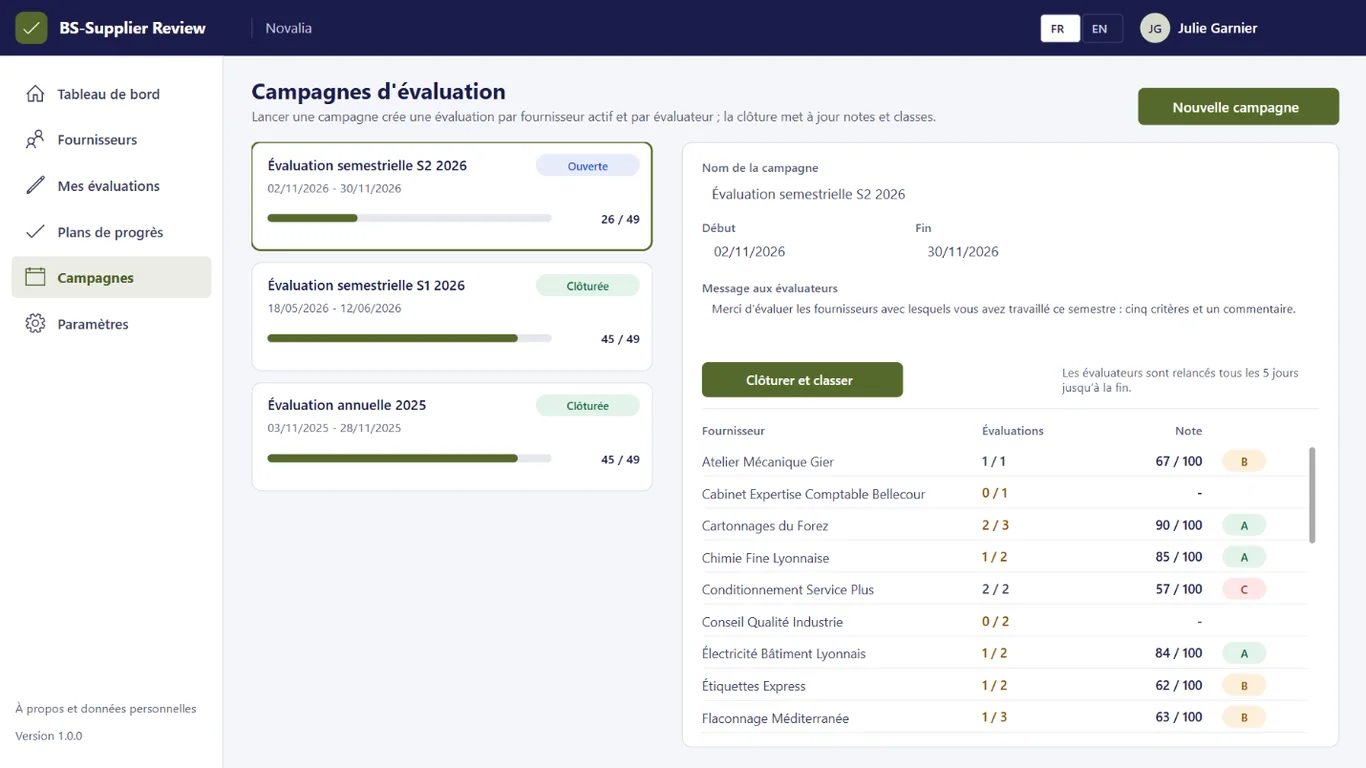
An evaluation is created for each supplier and each of its raters, with e-mail reminders.

Rate your suppliers and track their progress.
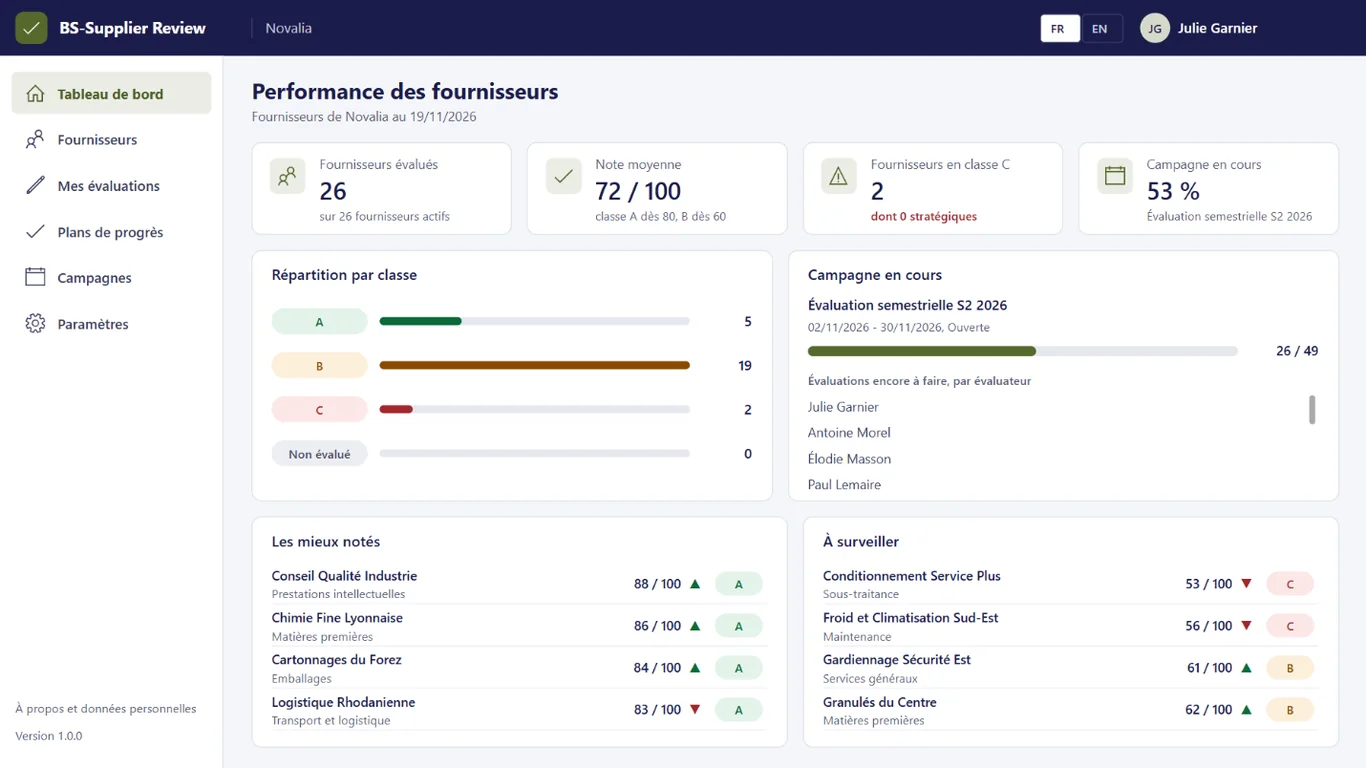
BS-Supplier Review organises regular supplier evaluations. Buyers launch a campaign; employees who work with each supplier rate it on quality, delivery, price, service and CSR. The weighted score ranks the supplier as A, B or C, and improvement plans are followed until they are closed.
# why
# benefits
An evaluation is created for each supplier and each of its raters, with e-mail reminders.
Five weighted criteria, a score out of 100 and its trend since the last campaign.
Only the named rater can score, and only during the campaign.
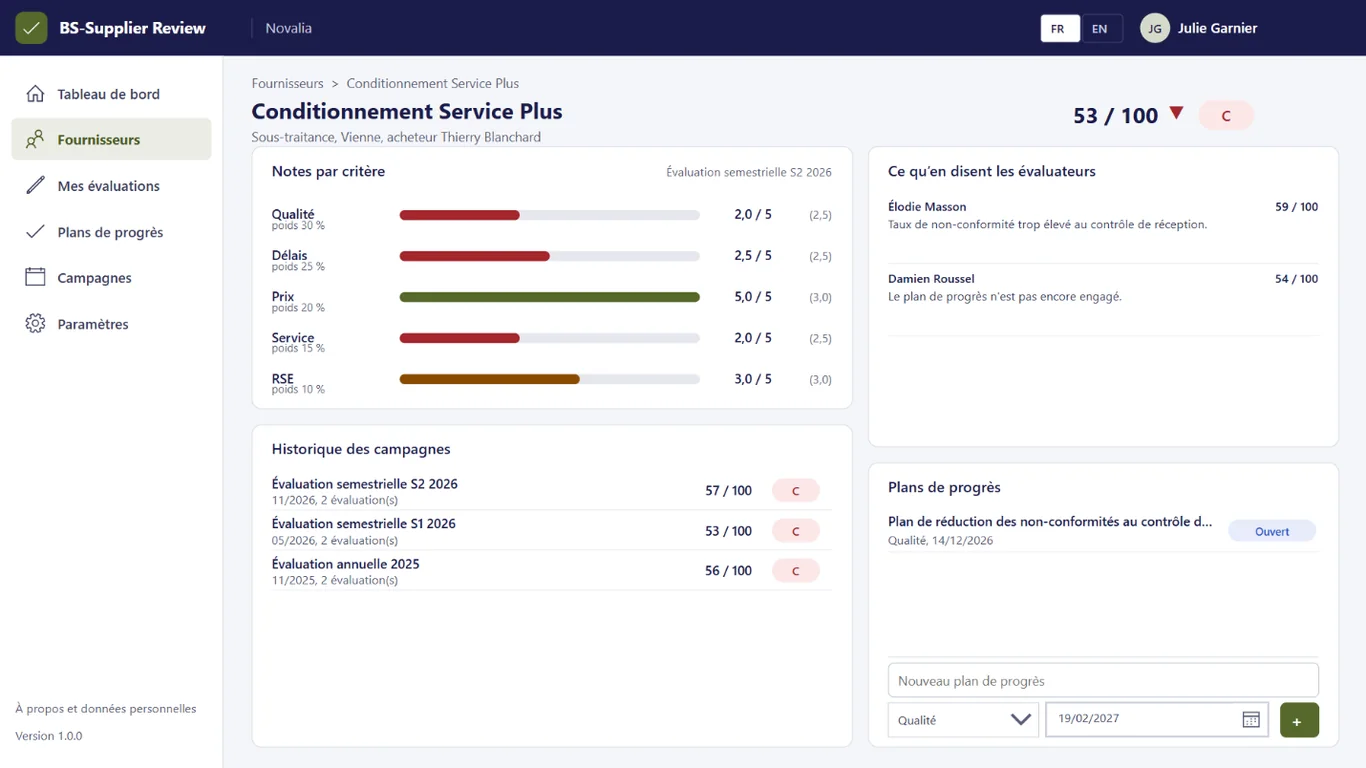
Each plan has a criterion, an owner and a due date, with reminders until it is closed.
CSR is one of the five criteria, with an adjustable weight.
# features
Scores come from the employees who work with the supplier, submission is checked by a flow, and the evaluation leads to improvement plans that are followed up.
Score by criterion, class, trend since the last campaign, raters' comments, campaign history and improvement plans.
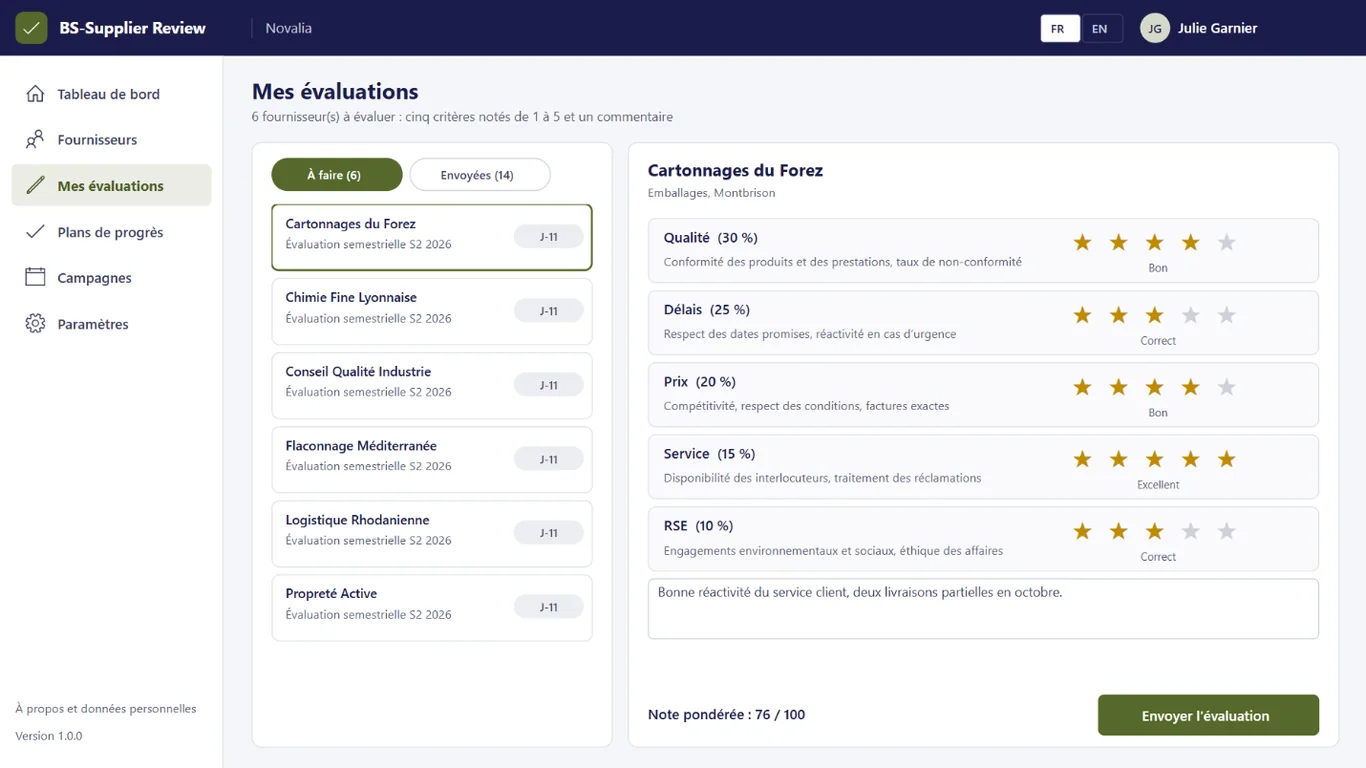
Raters score each supplier assigned to them from 1 to 5 on quality, delivery, price, service and CSR, with a comment. The weighted score is shown before sending.
The list of suppliers with their category, score out of 100 and class, filtered by class or category. Strategic suppliers are highlighted.
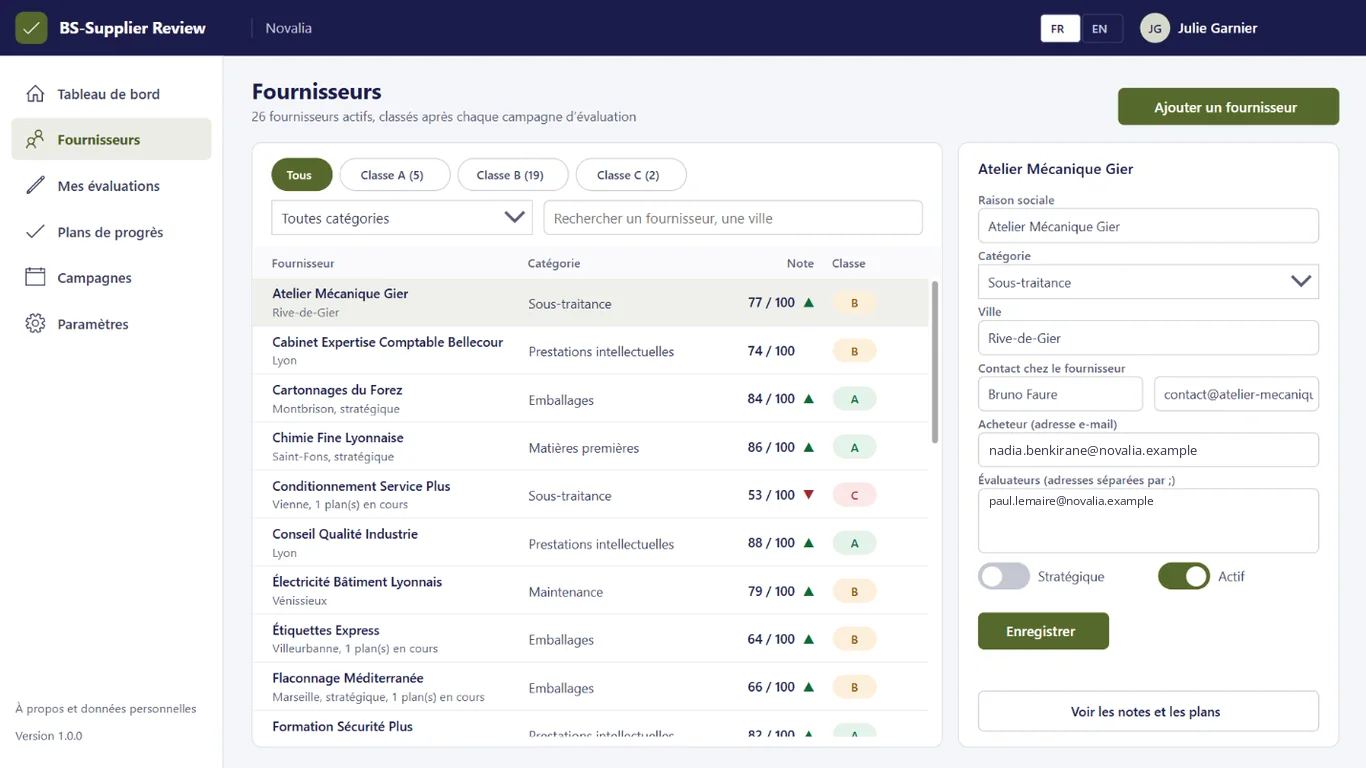
Creating a campaign generates one evaluation per active supplier and per rater. Progress is followed supplier by supplier, late raters are reminded, and closing updates scores and classes.
# who it's for
For purchasing departments, supplier quality managers and buyers who want regular, shared evaluation that leads to action.
# use cases
Buyers evaluate their regular suppliers every year. They launch the campaign; each rater receives their evaluations to do and a reminder if they are late. Scores are consolidated without a spreadsheet and each supplier receives its class at closing.
A carrier's delivery times are getting worse. Its score on the delivery criterion drops; the buyer opens an improvement plan with a due date. The plan is followed until it is closed and its effect shows in the next campaign.
A major contract is up for renewal. The buyer opens the supplier record: score by criterion, trend and raters' comments. The negotiation rests on facts shared internally.
# alternatives
| Alternative | Limitation | What BS-Supplier Review brings |
|---|---|---|
| E-mailed questionnaires and spreadsheet | Manual reminders, tedious consolidation, no control over raters, improvement plans not followed up | Campaigns, automatic reminders, checked scores, followed improvement plans |
| Purchasing suite SaaS | Supplier data outside the tenant, high subscription, evaluation often lost in a wider scope | Focused on evaluation and improvement, data in your Microsoft 365 |
| Custom development | Cost and lead time of a project, maintenance to plan | Ready-to-use app, delivered with its installation kit |
# data and security
Power Apps, Power Automate and SharePoint, with standard connectors only.
# installation
In the Bret Software demo environment, with fictitious data, on every screen.
A Power Platform environment with Dataverse, a SharePoint site, a service account with a Microsoft 365 licence and a mailbox, Microsoft Entra groups for the profiles (buyers, raters), and the list of suppliers to evaluate with their raters.
By Bret Software, in your tenant, with the app's kit: lists, settings, audited permissions and Power Platform solution.
Setting suppliers, raters, criteria weights and class thresholds, acceptance in test mode, which sends every e-mail to a single address, then go-live for users.
# frequently asked questions
No. BS-Supplier Review only uses standard connectors: SharePoint and Office 365 Outlook. Users need a Microsoft 365 licence that includes Power Apps and Power Automate for Microsoft 365, with no Premium option. A service account, with a Microsoft 365 licence and a mailbox, runs the flows. Your administrator checks the plans available in your tenant.
In a SharePoint site of your Microsoft 365 tenant, dedicated to the app. No data is sent to Bret Software or to any third-party service: there is no external server. Any e-mails are sent through your organisation's Outlook connector. Permissions are set list by list for each group, and an append-only log records the actions.
Bret Software installs the app in your tenant in one day, with its kit: lists, settings, permissions and Power Platform solution. You provide a Power Platform environment with Dataverse, a service account with a Microsoft 365 licence and Microsoft Entra groups for the profiles. On request, we import your existing data and adapt the logo and colours.
Yes. The interface is available in French and English. The app opens in the browser language the first time, then remembers each user's choice. E-mails are sent in the recipient's language, or in French then English when it is not known or when the message goes to several people. Labels can be edited in a SharePoint list.
Yes. We give you access to the Bret Software demo environment: the app runs there with fictitious data, on every screen. You explore it with your teams before deciding. The price is set on quotation, according to your context and the adaptations you want, such as importing your existing data.
Each rater scores the supplier from 1 to 5 on five criteria: quality, delivery, price, service and CSR. Scores are weighted, 30, 25, 20, 15 and 10 by default, and brought back to 100. The supplier's score is the average of its evaluations in the campaign. Weights are set in the settings, as are the class thresholds.
When the campaign closes, each supplier receives a class according to its score out of 100: A from 80, B from 60, C below, with adjustable thresholds. The supplier record also shows its previous score, to follow its trend from one campaign to the next. A supplier ranked C usually calls for an improvement plan.
The raters named on the supplier record, usually the employees who work with it. Scores are sent through a flow under a service account, which checks that the caller is the named rater and that the campaign is open. Raters can therefore neither change other people's scores nor score outside a campaign.
No. BS-Supplier Review is an internal tool: only your organisation's buyers and raters access it with their Microsoft 365 account. Scores and comments stay internal. To share a result or an improvement plan with a supplier, the buyer sends it through their usual channels.
Demo with fictitious data: campaign, evaluation, weighted score, classes and improvement plans.


